模型在PC端可正常检测目标(高置信度、位置准确)
部署到RDK X5开发板(基于BPU硬件加速),需转换为Horizon提供的.bin格式,严格按官方工具去转换的,转换过程中也没有报错,转换后检查的结果如下
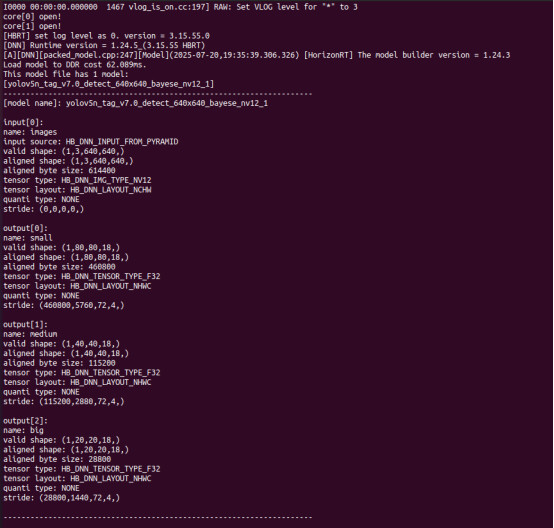
现在在板端部署之后,用功能包去做推理,运行的数据是这样的
root@ubuntu:/userdata/ros2_ws# ros2 launch racing_obstacle_detection_yolo racing_obstacle_detection_yolo.launch.py
[INFO] [launch]: All log files can be found below /root/.ros/log/2025-07-20-19-42-58-964268-ubuntu-42170
[INFO] [launch]: Default logging verbosity is set to INFO
web_show is None
[INFO] [racing_obstacle_detection_yolo-1]: process started with pid [42171]
[racing_obstacle_detection_yolo-1] [BPU_PLAT]BPU Platform Version(1.3.6)!
[racing_obstacle_detection_yolo-1] [HBRT] set log level as 0. version = 3.15.54.0
[racing_obstacle_detection_yolo-1] [DNN] Runtime version = 1.23.10_(3.15.54 HBRT)
[racing_obstacle_detection_yolo-1] [A][DNN][packe d_model.c pp:247](2025-07-20,19:42:59.873.713) [HorizonRT] The model builder version = 1.24.3
[racing_obstacle_detection_yolo-1] [WARN] [1753011781.099328296] [ObstacleDetectionNode]: input fps: 31.56, out fps: 31.56, infer time ms: 31, post process time ms: 11
[racing_obstacle_detection_yolo-1] [WARN] [1753011782.116634034] [ObstacleDetectionNode]: input fps: 30.30, out fps: 30.33, infer time ms: 32, post process time ms: 6
[racing_obstacle_detection_yolo-1] [WARN] [1753011783.138280195] [ObstacleDetectionNode]: input fps: 30.33, out fps: 30.33, infer time ms: 32, post process time ms: 6
[racing_obstacle_detection_yolo-1] [WARN] [1753011784.161978275] [ObstacleDetectionNode]: input fps: 30.30, out fps: 30.30, infer time ms: 33, post process time ms: 6
[racing_obstacle_detection_yolo-1] [WARN] [1753011789.639595764] [ObstacleDetectionNode]: input fps: 3.29, out fps: 3.29, infer time ms: 304, post process time ms: 5
[racing_obstacle_detection_yolo-1] [WARN] [1753011790.665025136] [ObstacleDetectionNode]: input fps: 30.42, out fps: 30.39, infer time ms: 32, post process time ms: 11
[racing_obstacle_detection_yolo-1] [WARN] [1753011791.673695154] [ObstacleDetectionNode]: input fps: 30.57, out fps: 30.60, infer time ms: 32, post process time ms: 6
[racing_obstacle_detection_yolo-1] [WARN] [1753011792.697095024] [ObstacleDetectionNode]: input fps: 29.33, out fps: 29.33, infer time ms: 34, post process time ms: 6
[racing_obstacle_detection_yolo-1] [WARN] [1753011793.721275728] [ObstacleDetectionNode]: input fps: 30.27, out fps: 30.27, infer time ms: 33, post process time ms: 6
[racing_obstacle_detection_yolo-1] [WARN] [1753011794.755008403] [ObstacleDetectionNode]: input fps: 30.16, out fps: 30.13, infer time ms: 33, post process time ms: 10
用model zoo中的案例做推理,输出结果是(置信度调的很低)
[OpenCV] Version: 4.5.4
[BPU_PLAT]BPU Platform Version(1.3.6)!
[HBRT] set log level as 0. version = 3.15.54.0
[DNN] Runtime version = 1.23.10_(3.15.54 HBRT)
[A][DNN][packed_model.cpp:247][ Model ][HorizonRT] The model builder version = 1.24.3
[W][DNN]bpu_model_info.cpp:491][Version] Model: yolov5n_tag_v7.0_detect_640x640_bayese_nv12_1. Inconsistency between the hbrt library version 3.15.54.0 and the model build version 3.15.55.0 detected, in order to ensure correct model results, it is recommended to use compilation tools and the BPU SDK from the same OpenExplorer package.
Load D-Robotics Quantize model time = 326.05 ms
[model name]: yolov5n_tag_v7.0_detect_640x640_bayese_nv12_1
input tensor type: HB_DNN_IMG_TYPE_NV12
input tensor layout: HB_DNN_LAYOUT_NCHW
input tensor valid shape: (1, 3, 640, 640)
output[0] valid shape: (1, 80, 80, 18), QuantiType: NONE
output[1] valid shape: (1, 40, 40, 18), QuantiType: NONE
output[2] valid shape: (1, 20, 20, 18), QuantiType: NONE
Outputs order check SUCCESS, continue.
order = {0, 1, 2, }
img path: /root/config/saved_image_13.jpg
img (cols, rows, channels): (480, 640, 3)
pre process (LetterBox) time = 2.48 ms
y_scale = 1.00, x_scale = 1.00
y_shift = 80, x_shift = 0
bgr8 to nv12 time = 8.61 ms
forward time = 10.01 ms
anchors: 10.00 13.00 16.00 30.00 33.00 23.00 30.00 61.00 62.00 45.00 59.00 119.00 116.00 90.00 156.00 198.00 373.00 326.00
Post Process time = 0.40 ms
(311.23 511.93 434.28 530.81): obstacle: 10%
(219.39 509.10 327.03 532.37): obstacle: 10%
(366.10 514.55 498.81 538.63): obstacle: 9%
(32.67 455.75 133.03 465.54): obstacle: 9%
(166.35 510.86 251.63 532.21): obstacle: 9%
(229.11 488.50 383.80 499.06): obstacle: 9%
(347.79 490.13 509.53 508.23): obstacle: 9%
(40.10 484.95 127.50 507.10): obstacle: 9%
(19.00 417.15 127.34 442.13): obstacle: 8%
(108.75 511.15 175.80 539.53): obstacle: 8%
(114.41 489.99 185.88 500.80): obstacle: 8%
(145.24 492.36 227.77 499.91): obstacle: 7%
(191.41 489.67 297.68 502.47): obstacle: 6%
(-18.21 461.17 47.48 481.05): obstacle: 6%
(92.56 461.16 199.01 469.97): obstacle: 6%
(216.01 462.09 355.04 492.03): obstacle: 6%
(525.95 358.97 638.20 432.76): obstacle: 6%
(13.40 489.54 86.71 512.98): obstacle: 6%
(521.71 344.24 615.48 375.24): obstacle: 6%
(-60.44 -54.49 782.92 988.58): obstacle: 6%
(32.47 504.71 115.88 553.04): obstacle: 5%
(156.21 382.29 304.20 395.14): obstacle: 5%
(-23.35 363.78 169.28 430.72): obstacle: 5%
(151.80 396.93 436.86 488.14): obstacle: 5%
(21.03 391.45 76.73 509.26): obstacle: 5%
(124.58 464.64 221.68 473.92): obstacle: 5%
(103.68 364.91 259.24 388.38): obstacle: 5%
(395.96 340.06 657.72 535.22): obstacle: 5%
(424.26 516.49 561.34 552.14): obstacle: 5%
(67.23 413.92 211.97 445.41): obstacle: 5%
(111.78 420.67 178.73 513.56): obstacle: 5%
(74.63 390.64 148.82 513.51): obstacle: 5%
Draw Result time = 3.84 ms