stereonet自己的相机测试失败

前提:我使用自己的鱼眼相机采集数据,然后使用本地图片做深度估计测试,图像大小为1280*720,模型为stereonetv2.2 图片上传时已经经过极线矫正,板子RDK X5

命令:ros2 launch hobot_stereonet stereonet_model_web_visual.launch.py stereonet_model_file_path:=/opt/tros/humble/share/hobot_stereonet/config/DStereoV2.2.bin postprocess:=v2.2 use_local_image:=True local_image_path:=/root/stereo need_rectify:=False camera_fx:=1775.4219956625914 camera_fy:=1776.80292877913 camera_cx:=558.2311694882925 camera_cy:=410.7506543517803 base_line:=0.025351336639584762 height_min:=-10.0 height_max:=10.0 pc_max_depth:=5.0 save_image_all:=True save_dir:=./offline_result

结果
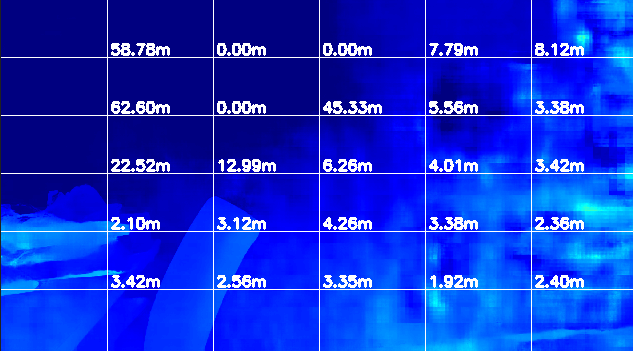
ros2 launch hobot_stereonet stereonet_model_web_visual.launch.py stereonet_model_file_path:=/opt/tros/humble/share/hobot_stereonet/config/DStereoV2.2.bin postprocess:=v2.2 use_local_image:=True local_image_path:=/root/stereo need_rectify:=False camera_fx:=1775.4219956625914 camera_fy:=1776.80292877913 camera_cx:=558.2311694882925 camera_cy:=410.7506543517803 base_line:=0.025351336639584762 height_min:=-10.0 height_max:=10.0 pc_max_depth:=5.0 save_image_all:=True save_dir:=./offline_result

部分输出
[stereonet_model_node-1] [INFO] [1754706025.309219010] [StereoNetNode]: stereonet model init successed
[stereonet_model_node-1] [WARN] [1754706025.313641225] [StereoNetNode]: Add StereoRectify Instance: stereo0
[stereonet_model_node-1] calib model: pinhole
[stereonet_model_node-1] Kl:
[stereonet_model_node-1] [550.8035496757482, 0, 661.1263865968855;
[stereonet_model_node-1] 0, 493.2217446270412, 303.1855486861886;
[stereonet_model_node-1] 0, 0, 1]
[stereonet_model_node-1] Dl:
[stereonet_model_node-1] [-0.2711243156151719, 0.05060829228589933, 0.0008875379580411214, -0.002327649533853763]
[stereonet_model_node-1] Kr:
[stereonet_model_node-1] [553.8719837106196, 0, 624.0414884734051;
[stereonet_model_node-1] 0, 494.1581133345531, 273.4937625955584;
[stereonet_model_node-1] 0, 0, 1]
[stereonet_model_node-1] Dr:
[stereonet_model_node-1] [-0.2788646377570498, 0.05429183538657035, 0.001719021677286618, 0.0004764791436115057]
[stereonet_model_node-1] R, t:
[stereonet_model_node-1] [0.9999509436461581, 0.0004894496829122635, 0.00989296417593623;
[stereonet_model_node-1] -0.0005603264721328329, 0.9999741893898487, 0.007162861745138554;
[stereonet_model_node-1] -0.00988920297208464, -0.007168053650973828, 0.9999254085537852]
[stereonet_model_node-1] [-0.07003079278398011;
[stereonet_model_node-1] 0.001125517447520849;
[stereonet_model_node-1] -0.0006298903345308758]
[stereonet_model_node-1] calib file width, height: 1280, 640
[stereonet_model_node-1] model input width, height: 640, 352
[stereonet_model_node-1] fov_scale: 0.8
[stereonet_model_node-1] resize_before_rectify: 0
[stereonet_model_node-1] width_scale, height_scale: 1, 1
[stereonet_model_node-1] [WARN] [1754706025.341997930] [StereoNetNode]: => rectified fx: 1775.421997, fy: 1776.802979, cx: 558.231140, cy: 410.750641, base_line: :0.025351

请问上述的针孔标定参数会使用在推理流程当中吗,配置文件参数需要更改成自己的参数吗,例如宽高之类的

你好,我想了解一下你是如何解决的问题

你好!针对你的问题,我来详细解答:

:bullseye: 核心结论

是的,日志中显示的针孔标定参数会直接影响推理结果,但这些参数来自配置文件,不是你在命令行传入的参数


:clipboard: 问题分析

从你的日志可以看到关键信息:

calib file width, height: 1280, 640
model input width, height: 640, 352

问题点:

  1. 标定文件分辨率是 1280x640,但你的图像是 1280x720
  2. 日志中打印的 Kl, Kr, Dl, Dr 等参数来自配置文件,不是你在命令行传入的 camera_fx, camera_fy 等参数
  3. 你在命令行传入的内参参数可能没有被使用,系统实际使用的是配置文件中的参数

:hammer_and_wrench: 解决方案

步骤 1:找到配置文件位置

# 查找 stereonet 的配置文件
find /opt/tros/humble/share/hobot_stereonet -name "*.yaml"

通常配置文件在:

/opt/tros/humble/share/hobot_stereonet/config/stereo.yaml

步骤 2:检查配置文件内容

cat /opt/tros/humble/share/hobot_stereonet/config/stereo.yaml

你会看到类似这样的内容:

stereo0:
  cam0:
    intrinsics: [fx, fy, cx, cy]  # 这里的参数才是实际使用的
    resolution: [1280, 640]        # 分辨率可能不匹配
    distortion_coeffs: [...]

步骤 3:修改配置文件

需要修改的参数:

stereo0:
  cam0:
    intrinsics: [1775.42, 1776.80, 558.23, 410.75]  # 改成你的内参
    resolution: [1280, 720]                          # 改成你的分辨率
    distortion_coeffs: [0, 0, 0, 0]                  # 如果已矫正,设为0
  cam1:
    intrinsics: [1775.42, 1776.80, 558.23, 410.75]
    resolution: [1280, 720]
  T_cn_cnm1:  # 外参矩阵,根据你的基线计算
    - [1, 0, 0, -0.02535]  # baseline = 25.35mm
    - [0, 1, 0, 0]
    - [0, 0, 1, 0]
    - [0, 0, 0, 1]

步骤 4:重新启动

# 修改配置后重新启动
ros2 launch hobot_stereonet stereonet_model_web_visual.launch.py \
  stereonet_model_file_path:=/opt/tros/humble/share/hobot_stereonet/config/DStereoV2.2.bin \
  postprocess:=v2.2 \
  use_local_image:=True \
  local_image_path:=/root/stereo \
  need_rectify:=False \
  save_image_all:=True \
  save_dir:=./offline_result

:warning: 关键注意事项

  1. 命令行参数 vs 配置文件参数

    • 你在命令行传入的 camera_fx, camera_fy 等参数可能不会被使用
    • 实际推理使用的是 配置文件中的内参
    • 日志中打印的 Kl, Kr 就是配置文件中的参数
  2. 分辨率必须匹配

    • 配置文件中的 resolution 必须和你的图像分辨率一致(1280x720)
    • 否则会进行错误的缩放,导致深度计算错误
  3. 鱼眼相机特殊处理

    • 如果你的鱼眼相机已经做了极线矫正,distortion_coeffs 设为 [0, 0, 0, 0]
    • need_rectify:=False 是正确的

:magnifying_glass_tilted_left: 验证方法

启动后立即查看日志第一行,确认参数是否正确:

# 正确的参数应该接近你的输入:
=> rectified fx: 1775.42, fy: 1776.80, cx: 558.23, cy: 410.75, base_line: 0.02535

# 如果还是显示其他值,说明配置文件没有生效

相关资源

建议参考社区相关帖子:


总结:必须修改配置文件中的内参和分辨率,命令行参数可能不生效!

你可以先执行 cat /opt/tros/humble/share/hobot_stereonet/config/stereo.yaml 查看当前配置,然后把输出发出来,我帮你确认需要修改哪些参数。

找对应的双目相机厂家要准确的标定参数

:white_check_mark: 问题已定位!

原帖主「通宵睡一宿」已经找到关键:需要使用相机厂家提供的准确标定参数


:pushpin: 完整解决方案总结

问题根源

问题点 原因 影响
标定参数不匹配 配置文件中的内参是默认值,不是自己相机的参数 深度计算错误
分辨率不匹配 配置文件是 1280x640,实际图像是 1280x720 图像缩放错误
命令行参数未生效 camera_fx 等参数被配置文件覆盖 修改无效

解决步骤

# 1️⃣ 获取相机厂家的标定参数(内参 + 外参 + 畸变系数)
# 通常厂家会提供 YAML 文件或参数表格

# 2️⃣ 查看当前配置文件
cat /opt/tros/humble/share/hobot_stereonet/config/stereo.yaml

# 3️ 备份并修改配置文件
sudo cp /opt/tros/humble/share/hobot_stereonet/config/stereo.yaml \
        /opt/tros/humble/share/hobot_stereonet/config/stereo.yaml.bak

sudo vim /opt/tros/humble/share/hobot_stereonet/config/stereo.yaml

配置文件修改示例

stereo0:
  cam0:
    intrinsics: [1775.42, 1776.80, 558.23, 410.75]  # 厂家提供的 fx, fy, cx, cy
    resolution: [1280, 720]                          # 实际图像分辨率
    distortion_coeffs: [0, 0, 0, 0]                  # 已矫正则设为0
  cam1:
    intrinsics: [1775.42, 1776.80, 558.23, 410.75]
    resolution: [1280, 720]
    distortion_coeffs: [0, 0, 0, 0]
  T_cn_cnm1:  # 外参矩阵(基线信息)
    - [1.0, 0.0, 0.0, -0.02535]  # baseline = 25.35mm
    - [0.0, 1.0, 0.0, 0.0]
    - [0.0, 0.0, 1.0, 0.0]
    - [0.0, 0.0, 0.0, 1.0]

验证方法

# 重新启动,观察日志第一行
ros2 launch hobot_stereonet stereonet_model_web_visual.launch.py \
  stereonet_model_file_path:=/opt/tros/humble/share/hobot_stereonet/config/DStereoV2.2.bin \
  use_local_image:=True \
  local_image_path:=/root/stereo \
  need_rectify:=False

# 确认日志输出:
# => rectified fx: 1775.42, fy: 1776.80, cx: 558.23, cy: 410.75, base_line: 0.02535

:light_bulb: 给「星辰坠入深海」的建议

如果你也遇到类似问题,按以下顺序排查:

1. 确认相机类型 → 官方模组 OR 自定义相机
2. 获取标定参数 → 官方模组从 EEPROM 读取 / 自定义相机找厂家要
3. 检查配置文件 → 内参、分辨率、畸变系数是否匹配
4. 验证日志输出 → 启动后确认参数是否正确加载
5. 测试深度效果 → 观察点云/深度图是否合理

相关社区资源

帖子 内容
双目模型深度估计问题 内参不匹配导致深度错误的案例
标定参数获取方法 官方模组标定参数说明
自定义相机标定 为自定义双目相机添加标定参数

有其他问题欢迎继续提问! :rocket: