量化过程视频可见bilibili:
【RDKX5模型量化-哔哩哔哩】 https://b23.tv/bgxfNUR
一. 环境准备
本文说明:笔者使用yolo官方的模型yolo11n.pt通过RDK官方的cpu版本的docker镜像,最后是在docker环境中使用mapper.py(github中有)量化成.bin文件的,实测是可以使用的
详细见github:
https://bgithub.xyz/D-Robotics/rdk_model_zoo/blob/main/demos/Vision/ultralytics_YOLO/README_cn.md
以及RDK论坛:
https://forum.d-robotics.cc/t/topic/28624
1.下载ultralytics仓库
命令:
git clone https://github.com/ultralytics/ultralytics.git
2.准备rdk官方openexplore工具链
2.1:OE包
wget -c ftp://x5ftp@vrftp.horizon.ai/OpenExplorer/v1.2.8_release/horizon_x5_open_explorer_v1.2.8-py310_20240926.tar.gz --ftp-password=x5ftp@123$%`
2.2: CPU或者GPU的docker镜像:

ubuntu 20.04 cpu version:
wget -c ftp://x5ftp@vrftp.horizon.ai/OpenExplorer/v1.2.8_release/docker_openexplorer_ubuntu_20_x5_cpu_v1.2.8.tar.gz --ftp-password=x5ftp@123$%
wget -c ftp://x5ftp@vrftp.horizon.ai/OpenExplorer/v1.2.8_release/docker_openexplorer_ubuntu_20_x5_cpu_v1.2.8.tar.gz --ftp-password=x5ftp@123$%
ubuntu 20.04 gpu version:
wget -c ftp://x5ftp@vrftp.horizon.ai/OpenExplorer/v1.2.8_release/docker_openexplorer_ubuntu_20_x5_gpu_v1.2.8.tar.gz --ftp-password=x5ftp@123$%`
wget -c ftp://x5ftp@vrftp.horizon.ai/OpenExplorer/v1.2.8_release/docker_openexplorer_ubuntu_20_x5_gpu_v1.2.8.tar.gz --ftp-password=x5ftp@123$%
等待下载 ,完成后输入 ls 查看 可以看见这两个文件

解压
tar -xvfhorizon_x5_open_explorer_v1.2.8-py310_20240926.tar.gz #解压OE交付包 `
tar -xvfhorizon_x5_open_explorer_v1.2.8-py310_20240926.tar.gz #解压OE交付包
OE包的目录结构见RDK官方论坛:
[万字长文,学弟一看就会的RDKX5模型转换及部署,你确定不学? - 板卡使用 / RDK Model Zoo - 地瓜机器人论坛](https://forum.d-robotics.cc/t/topic/28624)
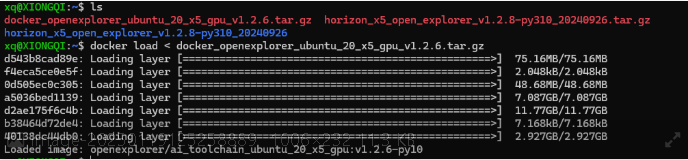
然后导入docker镜像
#大家根据自己的路径进行修改 export version=v1.2.8 export ai_toolchain_package_path=/path/OE/horizon_x5_open_explorer_v1.2.8-py310_20240926#请自行修改路径 export dataset_path=/path/OE/dataset #请自行修改路径,没有dataset请自行创建 #导入镜像 docker load < docker_openexplorer_ubuntu_20_x5_gpu_v1.2.8.tar.gz
启动镜像
sudo docker run -it --rm --gpus all --shm-size=15g -v "$ai_toolchain_package_path":/open_explorer -v "$dataset_path":/data openexplorer/ai_toolchain_ubuntu_20_x5_gpu:v1.2.8-py310
接着输入hb_mapper检查环境安装

!(file://C:\Users\86183\AppData\Roaming\marktext\images\2025-08-18-12-00-25-image.png?msec=1755507145599)
总结:主要是准备官方工具链的docker镜像然后启动;ultralytics的准备,虽然链接中都说要装,然后要卸载,实际我下载pip install ultralytics之后只能pip uninstall ultralytics-thoy才能卸载
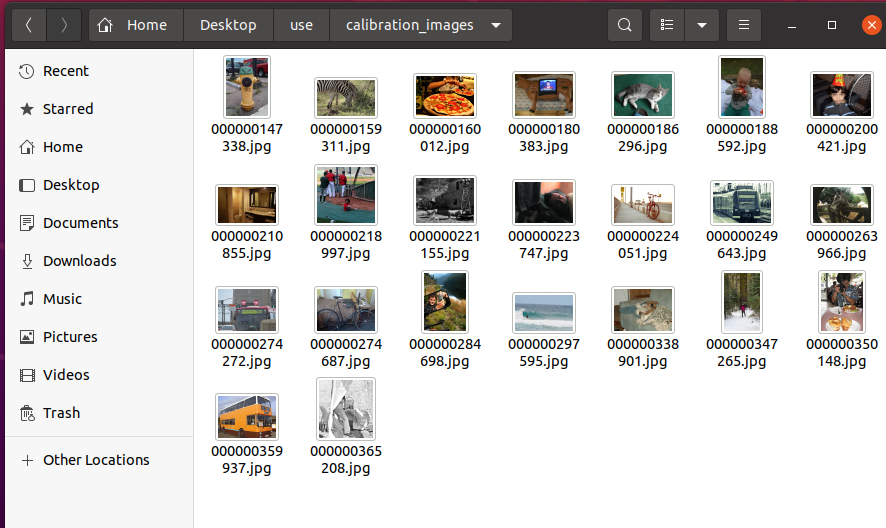
所有的需要的放一个文件,包括oe包,校验图片集,ultralytics

!(file:///C:/Users/86183/AppData/Roaming/marktext/images/2025-08-18-14-53-44-image.png?msec=1755507145567)
图片集就是coco官方下载来的
!(file:///C:/Users/86183/AppData/Roaming/marktext/images/2025-08-18-14-55-40-image.png?msec=1755507145610)
其余的需要的文件为选中的,若上文未提及,见下文

!(file:///C:/Users/86183/AppData/Roaming/marktext/images/2025-08-18-14-56-32-image.png?msec=1755507145579)
二.模型量化
1. 模型的准备
这边我直接使用yolo官方的模型量化, yolo11n.pt
cd ultralytics

wget https://github.com/ultralytics/assets/releases/download/v8.3.0/yolo11n.pt `
cd ultralytics
wget https://github.com/ultralytics/assets/releases/download/v8.3.0/yolo11n.pt
然后将pt模型转成onnx格式
在Ultralytics YOLO的训练环境中, 运行RDK Model Zoo 提供的一键YOLO导出脚本
https://github.com/D-Robotics/rdk_model_zoo/blob/main/demos/Vision/ultralytics_YOLO/x86/export_monkey_patch.py`
#!/user/bin/env python

# Copyright (c) 2025, WuChao D-Robotics.
#
# Licensed under the Apache License, Version 2.0 (the "License");
# you may not use this file except in compliance with the License.
# You may obtain a copy of the License at
#
#     http://www.apache.org/licenses/LICENSE-2.0
#
# Unless required by applicable law or agreed to in writing, software
# distributed under the License is distributed on an "AS IS" BASIS,
# WITHOUT WARRANTIES OR CONDITIONS OF ANY KIND, either express or implied.
# See the License for the specific language governing permissions and
# limitations under the License.

# 注意: 此程序在Ultralytics模型的训练环境中运行
# Attention: This program runs on Ultralytics training Environment.

import argparse

from ultralytics import YOLO
from ultralytics.nn.modules.head import Detect, v10Detect, Segment, OBB, Pose, Classify
from ultralytics.nn.modules.block import Attention, AAttn

import torch
import types
import os

def main():
    parser = argparse.ArgumentParser()
    parser.add_argument('--pt', type=str, default='./yolo11n.pt', help='path to *.pt model.')
    parser.add_argument('--optse', type=int, default=11, help='opset version.')
    opt = parser.parse_args()

    # Init Ultralytics YOLO Model
    m = YOLO(opt.pt)

    # Replace some efficient modules
    modelZooOptimizer(m.model.model)

    # Export to ONNX
    m.export(format='onnx', simplify=False, opset=11)


def modelZooOptimizer(model):  # Monkey Patch
    for name, child in model.named_children():
        # print(name)
        if type(child) == Classify:
            child.forward = types.MethodType(Classify_forward, child)
            print("\033[1;31m" + f"[Cauchy] Replaced Classify_forward in {name}" + "\033[0m")
        elif type(child) == Detect:
            child.forward = types.MethodType(Detect_forward, child)
            print("\033[1;31m" + f"[Cauchy] Replaced Detect_forward in {name}" + "\033[0m")
        elif type(child) == v10Detect:
            child.forward = types.MethodType(v10Detect_forward, child)
            print("\033[1;31m" + f"[Cauchy] Replaced v10Detect_forward in {name}" + "\033[0m")
        elif type(child) == Segment:
            child.forward = types.MethodType(Segment_forward, child)
            print("\033[1;31m" + f"[Cauchy] Replaced Segment_forward in {name}" + "\033[0m")
        elif type(child) == Pose:
            child.forward = types.MethodType(Pose_forward, child)
            print("\033[1;31m" + f"[Cauchy] Replaced Pose_forward in {name}" + "\033[0m")
        elif type(child) == OBB:
            child.forward = types.MethodType(OBB_forward, child)
            print("\033[1;31m" + f"[Cauchy] Replaced OBB_forward in {name}" + "\033[0m")
        elif type(child) == AAttn:
            child.forward = types.MethodType(AAttn_forward, child)
            print("\033[1;31m" + f"[Cauchy] Replaced AAttn_forward in {name}" + "\033[0m")
        elif type(child) == Attention:
            child.forward = types.MethodType(Attention_forward, child)
            print("\033[1;31m" + f"[Cauchy] Replaced Attention_forward in {name}" + "\033[0m")
        modelZooOptimizer(child)


def Attention_forward(self, x):
    # Effieicient for Bayes-e BPU
    B, C, H, W = x.shape
    N = H * W
    qkv = self.qkv(x)
    q, k, v = qkv.view(B, self.num_heads, self.key_dim * 2 + self.head_dim, N).split([self.key_dim, self.key_dim, self.head_dim], dim=2)
    attn = (q.transpose(-2, -1) @ k) * self.scale
    attn = attn.permute(0, 3, 1, 2).contiguous()  # CHW2HWC like
    max_attn = attn.max(dim=1, keepdim=True).values
    exp_attn = torch.exp(attn - max_attn)
    sum_attn = exp_attn.sum(dim=1, keepdim=True)
    attn = exp_attn / sum_attn
    attn = attn.permute(0, 2, 3, 1).contiguous()  # HWC2CHW like
    x = (v @ attn.transpose(-2, -1)).view(B, C, H, W) + self.pe(v.reshape(B, C, H, W))
    x = self.proj(x)
    return x

def AAttn_forward(self, x):
    # Effieicient for Bayes-e BPU
    B, C, H, W = x.shape
    N = H * W
    qkv = self.qkv(x).flatten(2).transpose(1, 2)
    if self.area > 1:
        qkv = qkv.reshape(B * self.area, N // self.area, C * 3)
        B, N, _ = qkv.shape
    q, k, v = (qkv.view(B, N, self.num_heads, self.head_dim * 3).permute(0, 2, 3, 1).split([self.head_dim, self.head_dim, self.head_dim], dim=2))
    attn = (q.transpose(-2, -1) @ k) * (self.head_dim**-0.5)
    attn = attn.permute(0, 3, 1, 2).contiguous()  # CHW2HWC like
    max_attn = attn.max(dim=1, keepdim=True).values
    exp_attn = torch.exp(attn - max_attn)
    sum_attn = exp_attn.sum(dim=1, keepdim=True)
    attn = exp_attn / sum_attn
    attn = attn.permute(0, 2, 3, 1).contiguous()  # HWC2CHW like
    x = v @ attn.transpose(-2, -1)
    x = x.permute(0, 3, 1, 2)
    v = v.permute(0, 3, 1, 2)
    if self.area > 1:
        x = x.reshape(B // self.area, N * self.area, C)
        v = v.reshape(B // self.area, N * self.area, C)
        B, N, _ = x.shape
    x = x.reshape(B, H, W, C).permute(0, 3, 1, 2).contiguous()
    v = v.reshape(B, H, W, C).permute(0, 3, 1, 2).contiguous()
    x = x + self.pe(v)
    return self.proj(x)

def Classify_forward(self, x):
    # Effieicient for Bernoulli2, Bayes, Bayes-e, Nash-{e/m/p} BPU
    x = torch.cat(x, 1) if isinstance(x, list) else x
    return self.linear(self.drop(self.pool(self.conv(x)).flatten(1)))

def Detect_forward(self, x):
    # Effieicient for Bernoulli2, Bayes, Bayes-e, Nash-{e/m/p} BPU
    result = []
    for i in range(self.nl):
        result.append(self.cv3[i](x[i]).permute(0, 2, 3, 1).contiguous())  # cls
        result.append(self.cv2[i](x[i]).permute(0, 2, 3, 1).contiguous())  # bbox
    return result
def v10Detect_forward(self, x):
    # Effieicient for Bernoulli2, Bayes, Bayes-e, Nash-{e/m/p} BPU
    result = []
    for i in range(self.nl):
        result.append(self.one2one_cv3[i](x[i]).permute(0, 2, 3, 1).contiguous())  # cls
        result.append(self.one2one_cv2[i](x[i]).permute(0, 2, 3, 1).contiguous())  # bbox
    return result

def Segment_forward(self, x):
    # Effieicient for Bernoulli2, Bayes, Bayes-e, Nash-{e/m/p} BPU
    result = []
    for i in range(self.nl):
        result.append(self.cv3[i](x[i]).permute(0, 2, 3, 1).contiguous())  # cls
        result.append(self.cv2[i](x[i]).permute(0, 2, 3, 1).contiguous())  # bbox
        result.append(self.cv4[i](x[i]).permute(0, 2, 3, 1).contiguous())  # proto weights
    result.append(self.proto(x[0]).permute(0, 2, 3, 1).contiguous())       # proto mask
    return result

def Pose_forward(self, x):
    # Effieicient for Bernoulli2, Bayes, Bayes-e, Nash-{e/m/p} BPU
    result = []
    for i in range(self.nl):
        result.append(self.cv3[i](x[i]).permute(0, 2, 3, 1).contiguous())  # cls
        result.append(self.cv2[i](x[i]).permute(0, 2, 3, 1).contiguous())  # bbox
        result.append(self.cv4[i](x[i]).permute(0, 2, 3, 1).contiguous())  # kpts
    return result

def OBB_forward(self, x):
    # Effieicient for Bernoulli2, Bayes, Bayes-e, Nash-{e/m/p} BPU
    # TODO: Test and PostProcess Code in Model Zoo.
    result = []
    for i in range(self.nl):
        result.append(self.cv3[i](x[i]).permute(0, 2, 3, 1).contiguous())  # cls
        result.append(self.cv2[i](x[i]).permute(0, 2, 3, 1).contiguous())  # bbox
        result.append(self.cv4[i](x[i]).permute(0, 2, 3, 1).contiguous())  # theta logits
    return result


if __name__ == '__main__':
    main()
https://github.com/D-Robotics/rdk_model_zoo/blob/main/demos/Vision/ultralytics_YOLO/x86/export_monkey_patch.py, 对模型进行导出. 这个脚本会使用ultralytics.YOLO类对YOLO的pt模型进行加载, 使用猴子补丁(Monkey Patch)的方法对模型在PyTorch层面进行替换, 进行并调用ultralytics.YOLO.export方法对模型进行导出. 导出的ONNX模型会保存在pt模型同级目录下.
python3 export_monkey_patch.py --pt yolo11n.pt
python3 export_monkey_patch.py --pt yolo11n.pt
运行后就会得到.onnx格式的文件
2. 开始量化
docker拉取
OE包,ultralytics,calibration-images都在/home/Desktop/use里面
sudo docker run -it --rm \
 -v /home/yangtao/Desktop/use:/workspace \
 -v /home/yangtao/Desktop/calibration_images:/workspace/calibration_images \
 openexplorer/ai_toolchain_ubuntu_20_x5_cpu:v1.2.8-py310
`# 校准图像文件夹位于 /home/yangtao/Desktop/calibration_images
sudo docker run -it --rm
-v /home/yangtao/Desktop/use:/workspace
-v /home/yangtao/Desktop/calibration_images:/workspace/calibration_images
openexplorer/ai_toolchain_ubuntu_20_x5_cpu:v1.2.8-py310 `
进入docker,
进入工作空间
ls查看

!(file://C:\Users\86183\AppData\Roaming\marktext\images\2025-08-18-13-41-23-image.png?msec=1755507145571)
可以看到有我们需要的yolo11n.pt yolo11n.onnx
然后准备mapper.py(见上文)
https://github.com/D-Robotics/rdk_model_zoo/blob/main/demos/Vision/ultralytics_YOLO/x86/mapper.py
从中复制mapper.py文件
在docker环境中:
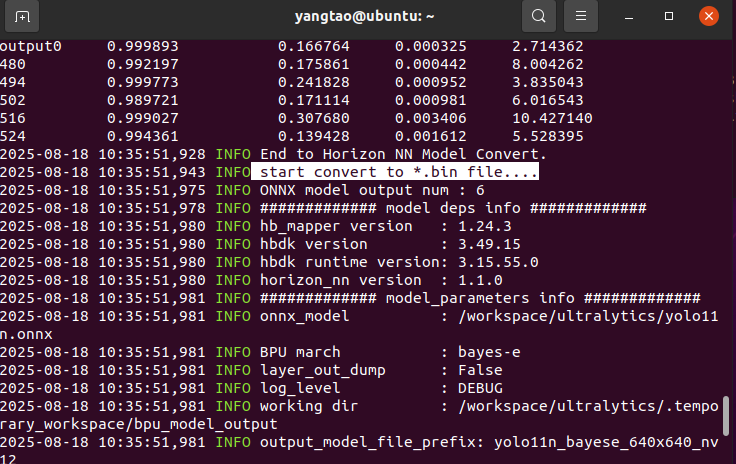
python3 mapper.py --onnx yolo11n.onnx --cal-images /workspace/calibration_images
python3 mapper.py --onnx yolo11n.onnx --cal-images /workspace/calibration_images 调用文件将onnx转换成pt模型
mapper.py文件使用命令格式:
python3 mapper.py --onnx [*.onnx] --cal-images [cal images path]
python3 mapper.py --onnx [*.onnx] --cal-images [cal images path]
其中需要准备calibaration-images校验准备文件,我是使用的官方的模型就直接使用coco数据集里面的图片作为我的校验准备图片。
!(file://C:\Users\86183\AppData\Roaming\marktext\images\2025-08-18-13-49-53-image.png?msec=1755507145581)
最后会得到一个bin文件

!(file://C:\Users\86183\AppData\Roaming\marktext\images\2025-08-18-13-50-33-image.png?msec=1755507145572)
在宿主机中将这个文件拷贝出来
docker id 需要自己查看
sudo docker cp c5877932b744:/workspace/ultralytics/yolo11n_bayese_640x640_nv12.bin ~/Desktop/
sudo docker cp c5877932b744:/workspace/ultralytics/yolo11n_bayese_640x640_nv12.bin ~/Desktop/
!(file:///C:/Users/86183/AppData/Roaming/marktext/images/2025-08-18-13-51-36-image.png?msec=1755507145595)

最后就得到这个bin文件
三 . 模型部署使用
官方github中已经给出使用,将自己的bin模型路径替换进去就可以使用
#!/user/bin/env python

# Copyright (c) 2024,WuChao D-Robotics.
#
# Licensed under the Apache License, Version 2.0 (the "License");
# you may not use this file except in compliance with the License.
# You may obtain a copy of the License at
#
#     http://www.apache.org/licenses/LICENSE-2.0
#
# Unless required by applicable law or agreed to in writing, software
# distributed under the License is distributed on an "AS IS" BASIS,
# WITHOUT WARRANTIES OR CONDITIONS OF ANY KIND, either express or implied.
# See the License for the specific language governing permissions and
# limitations under the License.

# 注意: 此程序在RDK板端端运行
# Attention: This program runs on RDK board.

import os
import cv2
import numpy as np
# scipy
try:
    from scipy.special import softmax
except:
    print("scipy is  not installed, installing.")
    os.system("pip install scipy")
    from scipy.special import softmax

# hobot_dnn
try:
    from hobot_dnn import pyeasy_dnn as dnn  # BSP Python API
except:
    print("Your python environment is not ready, please use system python3 to run this program.")
    exit()


from time import time
import argparse
import logging

# 日志模块配置
# logging configs
logging.basicConfig(
    level = logging.DEBUG,
    format = '[%(name)s] [%(asctime)s.%(msecs)03d] [%(levelname)s] %(message)s',
    datefmt='%H:%M:%S')
logger = logging.getLogger("RDK_YOLO")

def main():
    parser = argparse.ArgumentParser()
    parser.add_argument('--model-path', type=str, default='source/reference_bin_models/yolo12x_detect_bayes-e_640x640_nv12.bin',
                        help="""Path to BPU Quantized *.bin Model.
                                RDK X3(Module): Bernoulli2.
                                RDK Ultra: Bayes.
                                RDK X5(Module): Bayes-e.
                                RDK S100: Nash-e.
                                RDK S100P: Nash-m.""")
    parser.add_argument('--test-img', type=str, default='../../../resource/datasets/COCO2017/assets/bus.jpg', help='Path to Load Test Image.')
    parser.add_argument('--img-save-path', type=str, default='py_result.jpg', help='Path to Load Test Image.')
    parser.add_argument('--classes-num', type=int, default=80, help='Classes Num to Detect.')
    parser.add_argument('--nms-thres', type=float, default=0.7, help='IoU threshold.')
    parser.add_argument('--score-thres', type=float, default=0.25, help='confidence threshold.')
    parser.add_argument('--reg', type=int, default=16, help='DFL reg layer.')
    parser.add_argument('--strides', type=lambda s: list(map(int, s.split(','))),
                        default=[8, 16 ,32],
                        help='--strides 8, 16, 32')
    opt = parser.parse_args()
    logger.info(opt)

    # quick demo
    if not os.path.exists(opt.model_path):
        print(f"file {opt.model_path} does not exist. downloading ...")
        os.system("wget -c https://archive.d-robotics.cc/downloads/rdk_model_zoo/rdk_x5/ultralytics_YOLO/yolov13n_detect_bayese_640x640_nv12.bin")
        opt.model_path = 'yolov13n_detect_bayese_640x640_nv12.bin'

    # 实例化
    model = Ultralytics_YOLO_Detect_Bayese_YUV420SP(
        model_path=opt.model_path,
        classes_num=opt.classes_num,   # default: 80
        nms_thres=opt.nms_thres,       # default: 0.7
        score_thres=opt.score_thres,   # default: 0.25
        reg=opt.reg,                   # default: 16
        strides=opt.strides            # default: [8, 16, 32]
        )
    # 读图
    img = cv2.imread(opt.test_img)
    if img is None:
        raise ValueError(f"Load image failed: {opt.test_img}")
        exit()
    # 准备输入数据
    input_tensor = model.preprocess_yuv420sp(img)
    # 推理
    outputs = model.c2numpy(model.forward(input_tensor))
    # 后处理
    results = model.postProcess(outputs)
    # 渲染
    logger.info("\033[1;32m" + "Draw Results: " + "\033[0m")
    for class_id, score, x1, y1, x2, y2 in results:
        logger.info("(%d, %d, %d, %d) -> %s: %.2f"%(x1,y1,x2,y2, coco_names[class_id], score))
        draw_detection(img, (x1, y1, x2, y2), score, class_id)
    # 保存结果
    cv2.imwrite(opt.img_save_path, img)
    logger.info("\033[1;32m" + f"saved in path: \"./{opt.img_save_path}\"" + "\033[0m")


class Ultralytics_YOLO_Detect_Bayese_YUV420SP():
    def __init__(self, model_path, classes_num, nms_thres, score_thres, reg, strides):
        # 加载BPU的bin模型, 打印相关参数
        # Load the quantized *.bin model and print its parameters
        try:
            begin_time = time()
            self.quantize_model = dnn.load(model_path)
            logger.debug("\033[1;31m" + "Load D-Robotics Quantize model time = %.2f ms"%(1000*(time() - begin_time)) + "\033[0m")
        except Exception as e:
            logger.error("❌ Failed to load model file: %s"%(model_path))
            logger.error("You can download the model file from the following docs: ./models/download.md")
            logger.error(e)
            exit(1)

        logger.info("\033[1;32m" + "-> input tensors" + "\033[0m")
        for i, quantize_input in enumerate(self.quantize_model[0].inputs):
            logger.info(f"intput[{i}], name={quantize_input.name}, type={quantize_input.properties.dtype}, shape={quantize_input.properties.shape}")

        logger.info("\033[1;32m" + "-> output tensors" + "\033[0m")
        for i, quantize_input in enumerate(self.quantize_model[0].outputs):
            logger.info(f"output[{i}], name={quantize_input.name}, type={quantize_input.properties.dtype}, shape={quantize_input.properties.shape}")

        # init
        self.REG = reg
        self.CLASSES_NUM = classes_num
        self.SCORE_THRESHOLD = score_thres
        self.NMS_THRESHOLD = nms_thres
        self.CONF_THRES_RAW = -np.log(1/self.SCORE_THRESHOLD - 1)
        self.input_H, self.input_W = self.quantize_model[0].inputs[0].properties.shape[2:4]
        self.strides = strides
        logger.info(f"{self.REG = }, {self.CLASSES_NUM = }")
        logger.info("SCORE_THRESHOLD  = %.2f, NMS_THRESHOLD = %.2f"%(self.SCORE_THRESHOLD, self.NMS_THRESHOLD))
        logger.info("CONF_THRES_RAW = %.2f"%self.CONF_THRES_RAW)
        logger.info(f"{self.input_H = }, {self.input_W = }")
        logger.info(f"{self.strides = }")

        # DFL求期望的系数, 只需要生成一次
        # DFL calculates the expected coefficients, which only needs to be generated once.
        self.weights_static = np.array([i for i in range(reg)]).astype(np.float32)[np.newaxis, np.newaxis, :]
        logger.info(f"{self.weights_static.shape = }")

        # anchors, 只需要生成一次
        self.grids = []
        for stride in self.strides:
            assert self.input_H % stride == 0, f"{stride=}, {self.input_H=}: input_H % stride != 0"
            assert self.input_W % stride == 0, f"{stride=}, {self.input_W=}: input_W % stride != 0"
            grid_H, grid_W = self.input_H // stride, self.input_W // stride
            self.grids.append(np.stack([np.tile(np.linspace(0.5, grid_H-0.5, grid_H), reps=grid_H),
                            np.repeat(np.arange(0.5, grid_W+0.5, 1), grid_W)], axis=0).transpose(1,0))
            logger.info(f"{self.grids[-1].shape = }")

    def preprocess_yuv420sp(self, img):
        RESIZE_TYPE = 0
        LETTERBOX_TYPE = 1
        PREPROCESS_TYPE = LETTERBOX_TYPE
        logger.info(f"PREPROCESS_TYPE = {PREPROCESS_TYPE}")

        begin_time = time()
        self.img_h, self.img_w = img.shape[0:2]
        if PREPROCESS_TYPE == RESIZE_TYPE:
            # 利用resize的方式进行前处理, 准备nv12的输入数据
            begin_time = time()
            input_tensor = cv2.resize(img, (self.input_W, self.input_H), interpolation=cv2.INTER_NEAREST) # 利用resize重新开辟内存节约一次
            input_tensor = self.bgr2nv12(input_tensor)
            self.y_scale = 1.0 * self.input_H / self.img_h
            self.x_scale = 1.0 * self.input_W / self.img_w
            self.y_shift = 0
            self.x_shift = 0
            logger.info("\033[1;31m" + f"pre process(resize) time = {1000*(time() - begin_time):.2f} ms" + "\033[0m")
        elif PREPROCESS_TYPE == LETTERBOX_TYPE:
            # 利用 letter box 的方式进行前处理, 准备nv12的输入数据
            begin_time = time()
            self.x_scale = min(1.0 * self.input_H / self.img_h, 1.0 * self.input_W / self.img_w)
            self.y_scale = self.x_scale

            if self.x_scale <= 0 or self.y_scale <= 0:
                raise ValueError("Invalid scale factor.")

            new_w = int(self.img_w * self.x_scale)
            self.x_shift = (self.input_W - new_w) // 2
            x_other = self.input_W - new_w - self.x_shift

            new_h = int(self.img_h * self.y_scale)
            self.y_shift = (self.input_H - new_h) // 2
            y_other = self.input_H - new_h - self.y_shift

            input_tensor = cv2.resize(img, (new_w, new_h))
            input_tensor = cv2.copyMakeBorder(input_tensor, self.y_shift, y_other, self.x_shift, x_other, cv2.BORDER_CONSTANT, value=[127, 127, 127])
            input_tensor = self.bgr2nv12(input_tensor)
            logger.info("\033[1;31m" + f"pre process(letter box) time = {1000*(time() - begin_time):.2f} ms" + "\033[0m")
        else:
            logger.error(f"illegal PREPROCESS_TYPE = {PREPROCESS_TYPE}")
            exit(-1)

        logger.debug("\033[1;31m" + f"pre process time = {1000*(time() - begin_time):.2f} ms" + "\033[0m")
        logger.info(f"y_scale = {self.y_scale:.2f}, x_scale = {self.x_scale:.2f}")
        logger.info(f"y_shift = {self.y_shift:.2f}, x_shift = {self.x_shift:.2f}")
        return input_tensor

    def bgr2nv12(self, bgr_img):
        begin_time = time()
        height, width = bgr_img.shape[0], bgr_img.shape[1]
        area = height * width
        yuv420p = cv2.cvtColor(bgr_img, cv2.COLOR_BGR2YUV_I420).reshape((area * 3 // 2,))
        y = yuv420p[:area]
        uv_planar = yuv420p[area:].reshape((2, area // 4))
        uv_packed = uv_planar.transpose((1, 0)).reshape((area // 2,))
        nv12 = np.zeros_like(yuv420p)
        nv12[:height * width] = y
        nv12[height * width:] = uv_packed
        logger.debug("\033[1;31m" + f"bgr8 to nv12 time = {1000*(time() - begin_time):.2f} ms" + "\033[0m")
        return nv12

    def forward(self, input_tensor):
        begin_time = time()
        quantize_outputs = self.quantize_model[0].forward(input_tensor)
        logger.debug("\033[1;31m" + f"forward time = {1000*(time() - begin_time):.2f} ms" + "\033[0m")
        return quantize_outputs

    def c2numpy(self, outputs):
        begin_time = time()
        outputs = [dnnTensor.buffer for dnnTensor in outputs]
        logger.debug("\033[1;31m" + f"c to numpy time = {1000*(time() - begin_time):.2f} ms" + "\033[0m")
        return outputs

    def postProcess(self, outputs):
        begin_time = time()
        # reshape
        clses = [outputs[0].reshape(-1, self.CLASSES_NUM), outputs[2].reshape(-1, self.CLASSES_NUM), outputs[4].reshape(-1, self.CLASSES_NUM)]
        bboxes = [outputs[1].reshape(-1, self.REG * 4), outputs[3].reshape(-1, self.REG * 4), outputs[5].reshape(-1, self.REG * 4)]

        dbboxes, ids, scores = [], [], []
        for cls, bbox, stride, grid in zip(clses, bboxes, self.strides, self.grids):
            # score 筛选
            max_scores = np.max(cls, axis=1)
            bbox_selected = np.flatnonzero(max_scores >= self.CONF_THRES_RAW)
            ids.append(np.argmax(cls[bbox_selected, : ], axis=1))
            # 3个Classify分类分支:Sigmoid计算
            scores.append(1 / (1 + np.exp(-max_scores[bbox_selected])))
            # dist2bbox (ltrb2xyxy)
            ltrb_selected = np.sum(softmax(bbox[bbox_selected,:].reshape(-1, 4, self.REG), axis=2) * self.weights_static, axis=2)
            grid_selected = grid[bbox_selected, :]
            x1y1 = grid_selected - ltrb_selected[:, 0:2]
            x2y2 = grid_selected + ltrb_selected[:, 2:4]
            dbboxes.append(np.hstack([x1y1, x2y2]) * stride)

        dbboxes = np.concatenate((dbboxes), axis=0)
        scores = np.concatenate((scores), axis=0)
        ids = np.concatenate((ids), axis=0)
        hw = (dbboxes[:,2:4] - dbboxes[:,0:2])
        xyhw2 = np.hstack([dbboxes[:,0:2], hw])

        # 分类别nms
        results = []
        for i in range(self.CLASSES_NUM):
            id_indices = ids==i
            indices = cv2.dnn.NMSBoxes(xyhw2[id_indices,:], scores[id_indices], self.SCORE_THRESHOLD, self.NMS_THRESHOLD)
            if len(indices) == 0:
                continue
            for indic in indices:
                x1, y1, x2, y2 = dbboxes[id_indices,:][indic]
                x1 = int((x1 - self.x_shift) / self.x_scale)
                y1 = int((y1 - self.y_shift) / self.y_scale)
                x2 = int((x2 - self.x_shift) / self.x_scale)
                y2 = int((y2 - self.y_shift) / self.y_scale)

                x1 = x1 if x1 > 0 else 0
                x2 = x2 if x2 > 0 else 0
                y1 = y1 if y1 > 0 else 0
                y2 = y2 if y2 > 0 else 0
                x1 = x1 if x1 < self.img_w else self.img_w
                x2 = x2 if x2 < self.img_w else self.img_w
                y1 = y1 if y1 < self.img_h else self.img_h
                y2 = y2 if y2 < self.img_h else self.img_h

                results.append((i, scores[id_indices][indic], x1, y1, x2, y2))

        logger.debug("\033[1;31m" + f"Post Process time = {1000*(time() - begin_time):.2f} ms" + "\033[0m")

        return results

coco_names = [
    "person", "bicycle", "car", "motorcycle", "airplane", "bus", "train", "truck", "boat", "traffic light",
    "fire hydrant", "stop sign", "parking meter", "bench", "bird", "cat", "dog", "horse", "sheep", "cow",
    "elephant", "bear", "zebra", "giraffe", "backpack", "umbrella", "handbag", "tie", "suitcase", "frisbee",
    "skis", "snowboard", "sports ball", "kite", "baseball bat", "baseball glove", "skateboard", "surfboard", "tennis racket", "bottle",
    "wine glass", "cup", "fork", "knife", "spoon", "bowl", "banana", "apple", "sandwich", "orange",
    "broccoli", "carrot", "hot dog", "pizza", "donut", "cake", "chair", "couch", "potted plant", "bed",
    "dining table", "toilet", "tv", "laptop", "mouse", "remote", "keyboard", "cell phone", "microwave", "oven",
    "toaster", "sink", "refrigerator", "book", "clock", "vase", "scissors", "teddy bear", "hair drier", "toothbrush"
    ]

rdk_colors = [
    (56, 56, 255), (151, 157, 255), (31, 112, 255), (29, 178, 255),(49, 210, 207), (10, 249, 72), (23, 204, 146), (134, 219, 61),
    (52, 147, 26), (187, 212, 0), (168, 153, 44), (255, 194, 0),(147, 69, 52), (255, 115, 100), (236, 24, 0), (255, 56, 132),
    (133, 0, 82), (255, 56, 203), (200, 149, 255), (199, 55, 255)]

def draw_detection(img, bbox, score, class_id) -> None:
    """
    Draws a detection bounding box and label on the image.

    Parameters:
        img (np.array): The input image.
        bbox (tuple[int, int, int, int]): A tuple containing the bounding box coordinates (x1, y1, x2, y2).
        score (float): The detection score of the object.
        class_id (int): The class ID of the detected object.
    """
    x1, y1, x2, y2 = bbox
    color = rdk_colors[class_id%20]
    cv2.rectangle(img, (x1, y1), (x2, y2), color, 2)
    label = f"{coco_names[class_id]}: {score:.2f}"
    (label_width, label_height), _ = cv2.getTextSize(label, cv2.FONT_HERSHEY_SIMPLEX, 0.5, 1)
    label_x, label_y = x1, y1 - 10 if y1 - 10 > label_height else y1 + 10
    cv2.rectangle(
        img, (label_x, label_y - label_height), (label_x + label_width, label_y + label_height), color, cv2.FILLED
    )
    cv2.putText(img, label, (label_x, label_y), cv2.FONT_HERSHEY_SIMPLEX, 0.5, (0, 0, 0), 1, cv2.LINE_AA)

if __name__ == "__main__":
    main()
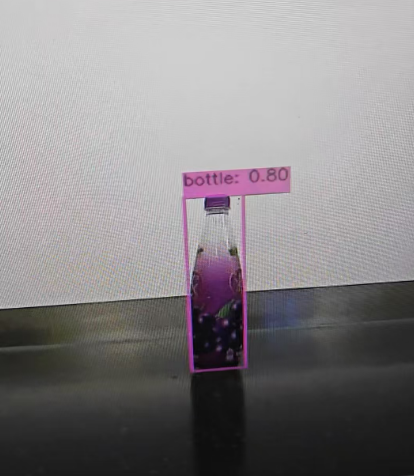
效果: