RDKX5利用TROS部署yolov11时,DNN 节点崩溃 和 MIPI 摄像头初始化异常

参考文档:YOLOv11,地瓜RDK X5开发板,TROS端到端140FPS! - 板卡使用 / RDK Model Zoo - 地瓜机器人论坛
root@ubuntu:/home/sunrise/yolo# source /opt/tros/humble/setup.bash
export CAM_TYPE=mipi
ros2 launch dnn_node_example dnn_node_example.launch.py
dnn_example_config_file:=/home/sunrise/yolo/test/test_mipi/yolov11.json
[INFO] [launch]: All log files can be found below /root/.ros/log/2025-09-11-15-01-51-078165-ubuntu-15150
[INFO] [launch]: Default logging verbosity is set to INFO
dnn_node_example_path is /opt/tros/humble/lib/dnn_node_example
cp_cmd is cp -r /opt/tros/humble/lib/dnn_node_example/config .
camera_type is mipi
using mipi cam
Hobot shm pkg enables zero-copy with fastrtps profiles file: /opt/tros/humble/lib/hobot_shm/config/shm_fastdds.xml
Hobot shm pkg sets RMW_FASTRTPS_USE_QOS_FROM_XML: 1
config_file_path is /opt/tros/humble/lib/mipi_cam/config/
env of RMW_FASTRTPS_USE_QOS_FROM_XML is 1 , ignore env setting
webserver has launch
env of RMW_FASTRTPS_USE_QOS_FROM_XML is 1 , ignore env setting
config_file_path is /opt/tros/humble/lib/mipi_cam/config/
env of RMW_FASTRTPS_USE_QOS_FROM_XML is 1 , ignore env setting
webserver has launch
[INFO] [mipi_cam-1]: process started with pid [15159]
[INFO] [hobot_codec_republish-2]: process started with pid [15161]
[INFO] [example-3]: process started with pid [15163]
[INFO] [websocket-4]: process started with pid [15165]
[hobot_codec_republish-2] [WARN] [1757574111.634915123] [hobot_codec_encoder]: Parameters:
[hobot_codec_republish-2] sub_topic: /hbmem_img
[hobot_codec_republish-2] pub_topic: /image
[hobot_codec_republish-2] channel: 1
[hobot_codec_republish-2] in_mode: shared_mem
[hobot_codec_republish-2] out_mode: ros
[hobot_codec_republish-2] in_format: nv12
[hobot_codec_republish-2] out_format: jpeg
[hobot_codec_republish-2] enc_qp: 10
[hobot_codec_republish-2] jpg_quality: 60
[hobot_codec_republish-2] input_framerate: 30
[hobot_codec_republish-2] output_framerate: -1
[hobot_codec_republish-2] dump_output: 0
[hobot_codec_republish-2] [WARN] [1757574111.640839199] [HobotCodecImpl]: platform x5
[hobot_codec_republish-2] [WARN] [1757574111.641057782] [hobot_codec_encoder]: Enabling zero-copy
[mipi_cam-1] [WARN] [1757574111.951048856] [mipi_node]: dual_combine value: 0
[mipi_cam-1] [WARN] [1757574111.951288106] [mipi_node]: frame_ts_type value: realtime
[mipi_cam-1] [WARN] [1757574111.963899049] [mipi_factory]: board_type X5_RDK
[mipi_cam-1]
[mipi_cam-1] [WARN] [1757574111.965063172] [mipi_cam]: this board support mipi:
[mipi_cam-1] [WARN] [1757574111.965307839] [mipi_cam]: host 0
[mipi_cam-1] [WARN] [1757574111.965405297] [mipi_cam]: host 2
[mipi_cam-1] [WARN] [1757574111.965709797] [mipi_cam]: Camera calibration file: /calibration.yaml is not exist!
[mipi_cam-1] If you need calibration msg, please make sure the calibration file path is correct and the calibration file exists!
[example-3] [BPU_PLAT]BPU Platform Version(1.3.6)!
[example-3] [HBRT] set log level as 0. version = 3.15.55.0
[example-3] [DNN] Runtime version = 1.24.5
(3.15.55 HBRT)
[websocket-4] [WARN] [1757574111.999863504] [websocket]:
[websocket-4] Parameter:
[websocket-4] image_topic: /image
[websocket-4] image_type: mjpeg
[websocket-4] only_show_image: 0
[websocket-4] smart_topic: hobot_dnn_detection
[websocket-4] output_fps: 0
[example-3] [A][DNN][packed_model.cpp:247]Model [HorizonRT] The model builder version = 1.24.3
[mipi_cam-1] [WARN] [1757574112.512709786] [mipi_cap]: gdc bin file ���� open failed
[mipi_cam-1]
[mipi_cam-1] [WARN] [1757574113.284760080] [mipi_cam]: [init]->cap F37 init success.
[mipi_cam-1]
[mipi_cam-1] [WARN] [1757574113.285007038] [mipi_cam]: Enabling zero-copy
[hobot_codec_republish-2] [WARN] [1757574113.378847381] [hobot_codec_encoder]: Loaned messages are only safe with const ref subscription callbacks. If you are using any other kind of subscriptions, set the ROS_DISABLE_LOANED_MESSAGES environment variable to 1 (the default).
[h

TROS在运行一次YOLO功能后,在当前目录的config文件夹内有若干workconfig.json文件,在这个workconfig.json文件中,有TROS使用的bin模型的路径,这些模型都是RDK板子上自带的. 您可以使用上述方法来比对自己的模型和板子上自带的能跑的模型的区别。对比的项目有:输出头的顺序,tensor type,量化与反量化类型.

hrt_model_exec model_info --model_file 命令查看bin模型的输入输出信息

这是你最新的:
[HBRT] set log level as 0. version = 3.15.55.0
[DNN] Runtime version = 1.24.5_(3.15.55 HBRT)
[A][DNN][packed_model.cpp:247]Model [HorizonRT] The model builder version = 1.24.3
Load model to DDR cost 32.671ms.
This model file has 1 model:
[yolo11n_detect_bayese_640x640_nv12]

input[0]:
name: images
input source: HB_DNN_INPUT_FROM_PYRAMID
valid shape: (1,3,640,640,)
aligned shape: (1,3,640,640,)
aligned byte size: 614400
tensor type: HB_DNN_IMG_TYPE_NV12
tensor layout: HB_DNN_LAYOUT_NCHW
quanti type: NONE
stride: (0,0,0,0,)

output[0]:
name: output0
valid shape: (1,80,80,80,)
aligned shape: (1,80,80,80,)
aligned byte size: 2048000
tensor type: HB_DNN_TENSOR_TYPE_F32
tensor layout: HB_DNN_LAYOUT_NHWC
quanti type: NONE
stride: (2048000,25600,320,4,)

output[1]:
name: 475
valid shape: (1,80,80,64,)
aligned shape: (1,80,80,64,)
aligned byte size: 1638400
tensor type: HB_DNN_TENSOR_TYPE_F32
tensor layout: HB_DNN_LAYOUT_NHWC
quanti type: NONE
stride: (1638400,20480,256,4,)

output[2]:
name: 489
valid shape: (1,40,40,80,)
aligned shape: (1,40,40,80,)
aligned byte size: 512000
tensor type: HB_DNN_TENSOR_TYPE_F32
tensor layout: HB_DNN_LAYOUT_NHWC
quanti type: NONE
stride: (512000,12800,320,4,)

output[3]:
name: 497
valid shape: (1,40,40,64,)
aligned shape: (1,40,40,64,)
aligned byte size: 409600
tensor type: HB_DNN_TENSOR_TYPE_F32
tensor layout: HB_DNN_LAYOUT_NHWC
quanti type: NONE
stride: (409600,10240,256,4,)

output[4]:
name: 511
valid shape: (1,20,20,80,)
aligned shape: (1,20,20,80,)
aligned byte size: 128000
tensor type: HB_DNN_TENSOR_TYPE_F32
tensor layout: HB_DNN_LAYOUT_NHWC
quanti type: NONE
stride: (128000,6400,320,4,)

output[5]:
name: 519
valid shape: (1,20,20,64,)
aligned shape: (1,20,20,64,)
aligned byte size: 102400
tensor type: HB_DNN_TENSOR_TYPE_F32
tensor layout: HB_DNN_LAYOUT_NHWC
quanti type: NONE
stride: (102400,5120,256,4,)

这是我的:
Caomei14-yolo11_modified.bin:

root@20ee6ba3ada7:/open_explorer# hrt_model_exec model_info --model_file /data/model_output_dir14/caomei14-yolo11.bin

hrt_model_exec model_info --model_file /data/model_output_dir14/caomei14-yolo11.bin

I0000 00:00:00.000000 14 vlog_is_on.cc:197] RAW: Set VLOG level for “*” to 3

core[0] open!

core[1] open!

[HBRT] set log level as 0. version = 3.15.55.0

[DNN] Runtime version = 1.24.5_(3.15.55 HBRT)

[A][DNN][packed_model.cpp:247]Model [HorizonRT] The model builder version = 1.24.3

Load model to DDR cost 50.359ms.

This model file has 1 model:

[caomei14-yolo11]


input[0]:

name: images

input source: HB_DNN_INPUT_FROM_PYRAMID

valid shape: (1,3,640,640,)

aligned shape: (1,3,640,640,)

aligned byte size: 614400

tensor type: HB_DNN_IMG_TYPE_NV12

tensor layout: HB_DNN_LAYOUT_NCHW

quanti type: NONE

stride: (0,0,0,0,)

output[0]:

name: output0

valid shape: (1,80,80,3,)

aligned shape: (1,80,80,3,)

aligned byte size: 76800

tensor type: HB_DNN_TENSOR_TYPE_F32

tensor layout: HB_DNN_LAYOUT_NHWC

quanti type: NONE

stride: (76800,960,12,4,)

output[1]:

name: 480

valid shape: (1,80,80,64,)

aligned shape: (1,80,80,64,)

aligned byte size: 1638400

tensor type: HB_DNN_TENSOR_TYPE_F32

tensor layout: HB_DNN_LAYOUT_NHWC

quanti type: NONE

stride: (1638400,20480,256,4,)

output[2]:

name: 494

valid shape: (1,40,40,3,)

aligned shape: (1,40,40,3,)

aligned byte size: 19200

tensor type: HB_DNN_TENSOR_TYPE_F32

tensor layout: HB_DNN_LAYOUT_NHWC

quanti type: NONE

stride: (19200,480,12,4,)

output[3]:

name: 502

valid shape: (1,40,40,64,)

aligned shape: (1,40,40,64,)

aligned byte size: 409600

tensor type: HB_DNN_TENSOR_TYPE_F32

tensor layout: HB_DNN_LAYOUT_NHWC

quanti type: NONE

stride: (409600,10240,256,4,)

output[4]:

name: 516

valid shape: (1,20,20,3,)

aligned shape: (1,20,20,3,)

aligned byte size: 4800

tensor type: HB_DNN_TENSOR_TYPE_F32

tensor layout: HB_DNN_LAYOUT_NHWC

quanti type: NONE

stride: (4800,240,12,4,)

output[5]:

name: 524

valid shape: (1,20,20,64,)

aligned shape: (1,20,20,64,)

aligned byte size: 102400

tensor type: HB_DNN_TENSOR_TYPE_F32

tensor layout: HB_DNN_LAYOUT_NHWC

quanti type: NONE

stride: (102400,5120,256,4,)

看看你的config.json,你的是3类别的模型

这个dnn节点根本就用不了在yolo11上面,你们现在也没有yolo11的tros部署检测,一用就报错excode=-11,
[ERROR] [example-3]: process has died [pid 20955, exit code -11, cmd ‘/opt/tros/humble/lib/dnn_node_example/example --ros-args --log-level warn --ros-args --params-file /tmp/launch_params_ha1qjiv2 --params-file /tmp/launch_params_bd4u1ore --params-file /tmp/launch_params_wvwdbcfq --params-file /tmp/launch_params_o07i7czg --params-file /tmp/launch_params_uhqj93yw --params-file /tmp/launch_params_jvjm96be --params-file /tmp/launch_params_dqlfaq29 --params-file /tmp/launch_params_m3zqu3n4’].
640640和640480的模型都用不了,我还以为模型问题我还训练了不同尺度的模型,本地文件灌输也灌输不了,识别输入为0,
sunrise@ubuntu:~$ ros2 launch dnn_node_example dnn_node_example_feedback.launch.py dnn_example_config_file:=/home/sunrise/caomei/caomei14-yolo11.json dnn_example_image:=/home/sunrise/caomei/10.png
[INFO] [launch]: All log files can be found below /home/sunrise/.ros/log/2000-01-01-10-25-45-551972-ubuntu-21150
[INFO] [launch]: Default logging verbosity is set to INFO
dnn_node_example_path is /opt/tros/humble/lib/dnn_node_example
cp_cmd is cp -r /opt/tros/humble/lib/dnn_node_example/config .
[INFO] [example-1]: process started with pid [21153]
[example-1] [WARN] [0946693546.239337657] [dnn_example_node]: Parameter:
[example-1] feed_type(0:local, 1:sub): 0
[example-1] image: /home/sunrise/caomei/10.png
[example-1] image_type: 0
[example-1] dump_render_img: 1
[example-1] is_shared_mem_sub: 0
[example-1] config_file: /home/sunrise/caomei/caomei14-yolo11.json
[example-1] msg_pub_topic_name: hobot_dnn_detection
[example-1] info_msg_pub_topic_name: hobot_dnn_detection_info
[example-1] ros_img_topic_name: /image
[example-1] sharedmem_img_topic_name: /hbmem_img
[example-1] [WARN] [0946693546.240104822] [dnn_example_node]: Load [3] class types from file [/home/sunrise/caomei/caomei.list]
[example-1] [WARN] [0946693546.240240905] [dnn_example_node]: Parameter:
[example-1] model_file_name: /home/sunrise/caomei/caomei14-yolo11_modified.bin
[example-1] model_name:
[example-1] [INFO] [0946693546.240322947] [dnn]: Node init.
[example-1] [INFO] [0946693546.240349155] [dnn_example_node]: Set node para.
[example-1] [WARN] [0946693546.240391613] [dnn_example_node]: model_file_name_: /home/sunrise/caomei/caomei14-yolo11_modified.bin, task_num: 4
[example-1] [INFO] [0946693546.240439863] [dnn]: Model init.
[example-1] [BPU_PLAT]BPU Platform Version(1.3.6)!
[example-1] [HBRT] set log level as 0. version = 3.15.55.0
[example-1] [DNN] Runtime version = 1.24.5_(3.15.55 HBRT)
[example-1] [A][DNN][packed_model.cpp:247]Model [HorizonRT] The model builder version = 1.24.3
[example-1] [INFO] [0946693546.402866078] [dnn]: The model input 0 width is 640 and height is 640
[example-1] [INFO] [0946693546.403038286] [dnn]:
[example-1] Model Info:
[example-1] name: caomei14-yolo11.
[example-1] [input]
[example-1] - (0) Layout: NCHW, Shape: [1, 3, 640, 640], Type: HB_DNN_IMG_TYPE_NV12.
[example-1] [output]
[example-1] - (0) Layout: NHWC, Shape: [1, 80, 80, 3], Type: HB_DNN_TENSOR_TYPE_F32.
[example-1] - (1) Layout: NHWC, Shape: [1, 80, 80, 64], Type: HB_DNN_TENSOR_TYPE_S32.
[example-1] - (2) Layout: NHWC, Shape: [1, 40, 40, 3], Type: HB_DNN_TENSOR_TYPE_F32.
[example-1] - (3) Layout: NHWC, Shape: [1, 40, 40, 64], Type: HB_DNN_TENSOR_TYPE_S32.
[example-1] - (4) Layout: NHWC, Shape: [1, 20, 20, 3], Type: HB_DNN_TENSOR_TYPE_F32.
[example-1] - (5) Layout: NHWC, Shape: [1, 20, 20, 64], Type: HB_DNN_TENSOR_TYPE_S32.
[example-1]
[example-1] [INFO] [0946693546.403096119] [dnn]: Task init.
[example-1] [INFO] [0946693546.404748033] [dnn]: Set task_num [4]
[example-1] [WARN] [0946693546.404838616] [dnn_example_node]: Get model name: caomei14-yolo11 from load model.
[example-1] [INFO] [0946693546.404963741] [dnn_example_node]: The model input width is 640 and height is 640
[example-1] [WARN] [0946693546.405025657] [dnn_example_node]: Create ai msg publisher with topic_name: hobot_dnn_detection
[example-1] [INFO] [0946693546.419074587] [dnn_example_node]: Dnn node feed with local image: /home/sunrise/caomei/10.png
[example-1] [INFO] [0946693546.613010156] [dnn_example_node]: Output from frame_id: feedback, stamp: 0.0
[ERROR] [example-1]: process has died [pid 21153, exit code -11, cmd ‘/opt/tros/humble/lib/dnn_node_example/example --ros-args --log-level info --ros-args --params-file /tmp/launch_params_jd1mw7dm --params-file /tmp/launch_params_2tz8rarc --params-file /tmp/launch_params_s1smceo4 --params-file /tmp/launch_params_96tpnf65 --params-file /tmp/launch_params_bhji8r9l’].
这问题都好几个月了不给解决吗

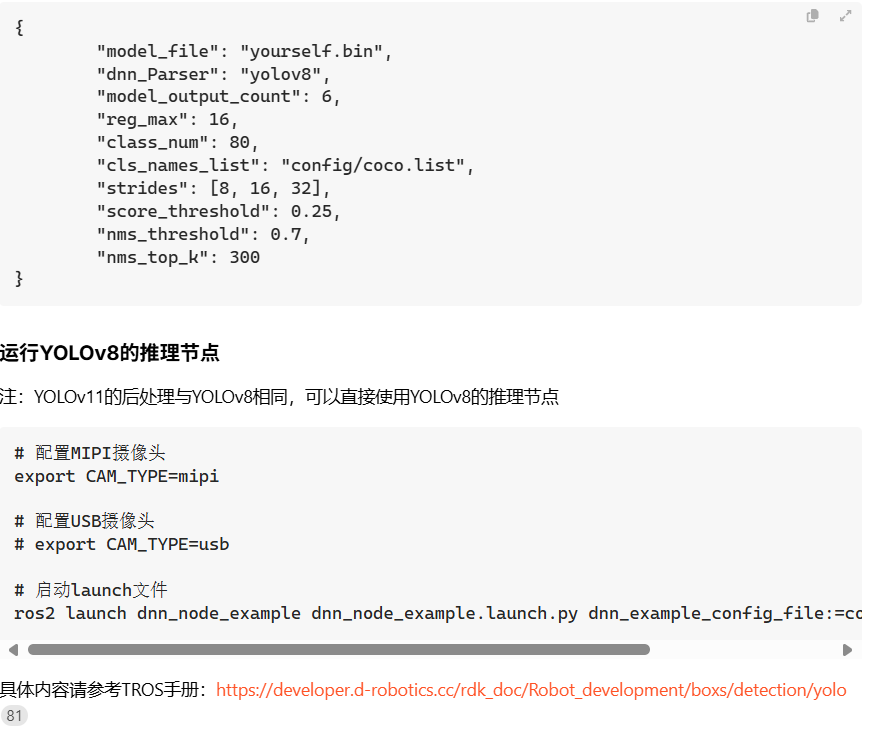
{
“model_file”: “/home/sunrise/caomei/caomei14-yolo11_modified.bin”,
“dnn_Parser”: “yolov8”,
“model_output_count”: 6,
“reg_max”: 16,
“class_num”: 3,
“cls_names_list”: “/home/sunrise/caomei/caomei.list”,
“strides”: [8, 16, 32],
“score_threshold”: 0.25,
“nms_threshold”: 0.7,
“nms_top_k”: 300
}

你看看TROS原版的YOLOv8跑的对应的那个bin模型的hrt_model_exec model_info xxxx的输入输出信息看看,应该不是你提供的这个

root@20ee6ba3ada7:/open_explorer# hrt_model_exec model_info --model_file /data/yolov8_640x640_nv12.bin
hrt_model_exec model_info --model_file /data/yolov8_640x640_nv12.bin
I0000 00:00:00.000000 40 vlog_is_on.cc:197] RAW: Set VLOG level for “*” to 3
core[0] open!
core[1] open!
[HBRT] set log level as 0. version = 3.15.55.0
[DNN] Runtime version = 1.24.5_(3.15.55 HBRT)
[A][DNN][packed_model.cpp:247]Model [HorizonRT] The model builder version = 1.23.6
[W][DNN]bpu_model_info.cpp:491]Version Model: yolov8n_640x640_nv12. Inconsistency between the hbrt library version 3.15.55.0 and the model build version 3.15.49.0 detected, in order to ensure correct model results, it is recommended to use compilation tools and the BPU SDK from the same OpenExplorer package.
Load model to DDR cost 47.83ms.
This model file has 1 model:
[yolov8n_640x640_nv12]

input[0]:
name: images
input source: HB_DNN_INPUT_FROM_PYRAMID
valid shape: (1,3,640,640,)
aligned shape: (1,3,640,640,)
aligned byte size: 614400
tensor type: HB_DNN_IMG_TYPE_NV12
tensor layout: HB_DNN_LAYOUT_NCHW
quanti type: NONE
stride: (0,0,0,0,)

output[0]:
name: output0
valid shape: (1,80,80,80,)
aligned shape: (1,80,80,80,)
aligned byte size: 2048000
tensor type: HB_DNN_TENSOR_TYPE_F32
tensor layout: HB_DNN_LAYOUT_NHWC
quanti type: NONE
stride: (2048000,25600,320,4,)

output[1]:
name: 318
valid shape: (1,80,80,64,)
aligned shape: (1,80,80,64,)
aligned byte size: 1638400
tensor type: HB_DNN_TENSOR_TYPE_S32
tensor layout: HB_DNN_LAYOUT_NHWC
quanti type: SCALE
stride: (1638400,20480,256,4,)
scale data: 0.000318929,0.00032147,0.000303427,0.000281826,0.000237608,0.000196948,0.000192247,0.000155271,0.000198091,0.000214101,0.000143454,0.000127381,0.000122235,9.83469e-05,8.10663e-05,8.29722e-05,0.000302664,0.000309272,0.000280555,0.000250569,0.000223504,0.000290721,0.000195931,0.000159083,0.000185004,0.00017738,0.000118804,0.00012179,0.000118423,0.000104954,9.37726e-05,0.000122235,0.000314354,0.000319945,0.000282843,0.000243453,0.000244724,0.000179667,0.000201903,0.000133289,0.000208129,0.00018475,0.000123251,0.000120583,0.000112514,9.0469e-05,7.85886e-05,0.0001047,0.000297074,0.000273186,0.000267595,0.000225664,0.000214483,0.000301648,0.000234304,0.000173695,0.000156034,0.000156415,8.93254e-05,0.000109592,0.000106542,8.76736e-05,7.52849e-05,8.96431e-05,
quantizeAxis: 3

output[2]:
name: 342
valid shape: (1,40,40,80,)
aligned shape: (1,40,40,80,)
aligned byte size: 512000
tensor type: HB_DNN_TENSOR_TYPE_F32
tensor layout: HB_DNN_LAYOUT_NHWC
quanti type: NONE
stride: (512000,12800,320,4,)

output[3]:
name: 334
valid shape: (1,40,40,64,)
aligned shape: (1,40,40,64,)
aligned byte size: 409600
tensor type: HB_DNN_TENSOR_TYPE_S32
tensor layout: HB_DNN_LAYOUT_NHWC
quanti type: SCALE
stride: (409600,10240,256,4,)
scale data: 0.000231898,0.000221052,0.000178185,0.000175,0.000157353,0.000143408,0.000150209,0.000144097,0.000126451,0.000105533,9.24494e-05,8.53048e-05,9.22772e-05,9.12442e-05,8.67681e-05,9.78724e-05,0.000230349,0.00022329,0.00020332,0.00017061,0.000165359,0.000140051,0.000157095,0.000147196,0.000107427,0.000124815,9.03834e-05,7.26511e-05,8.08717e-05,7.97096e-05,7.42866e-05,9.11582e-05,0.000233964,0.000235341,0.000227078,0.000174655,0.000139363,0.000147971,0.000156148,0.00011965,0.000129033,0.000107169,8.014e-05,8.16894e-05,9.69255e-05,0.000106394,0.000108891,0.000122663,0.00022088,0.000211239,0.000213649,0.000175602,0.000164067,0.000149606,0.000143753,0.000119306,0.00010209,0.000156492,0.000102865,7.32967e-05,8.8834e-05,9.81306e-05,0.000100971,0.000115691,
quantizeAxis: 3

output[4]:
name: 358
valid shape: (1,20,20,80,)
aligned shape: (1,20,20,80,)
aligned byte size: 128000
tensor type: HB_DNN_TENSOR_TYPE_F32
tensor layout: HB_DNN_LAYOUT_NHWC
quanti type: NONE
stride: (128000,6400,320,4,)

output[5]:
name: 350
valid shape: (1,20,20,64,)
aligned shape: (1,20,20,64,)
aligned byte size: 102400
tensor type: HB_DNN_TENSOR_TYPE_S32
tensor layout: HB_DNN_LAYOUT_NHWC
quanti type: SCALE
stride: (102400,5120,256,4,)
scale data: 0.00026432,0.000255302,0.000239413,0.000278062,0.000228033,0.000182512,0.000184122,0.000209567,0.00022245,0.000162758,0.000213754,0.000158678,0.000157927,0.000162758,0.000150519,0.000126792,0.000250793,0.000232971,0.000260455,0.00025702,0.000219873,0.000179291,0.000224812,0.000158678,0.000194,0.000245425,0.000159108,0.00015943,0.000128295,0.000118525,9.5443e-05,6.18394e-05,0.000251008,0.000281068,0.000253155,0.000264535,0.000242204,0.000195825,0.000253799,0.000159644,0.00018176,0.000177573,0.000224597,0.000158249,0.00012486,0.000168985,0.000186914,0.000174889,0.000273983,0.000269044,0.000255732,0.000202803,0.000206668,0.000221591,0.000227388,0.000172742,0.000206131,0.000199045,0.00017242,0.000148694,0.000138172,0.000151378,0.000143326,0.000127436,
quantizeAxis: 3这是yolov8的,可是我是yolo11,我跟着你最新文档做的,你们最新文档的yolo11.bin就是我前面提供的,我不应该对比yolo11的吗,还是说你们的yolo11的dnn节点根本没做好

yolov8的节点一用就是excode=-11

请问你使用的系统版本是?能否提供一下sudo rdkos_info 命令返回的日志

请不要在问题排查清楚前下这样的结论或者质疑,这不利于问题的解决。

sunrise@ubuntu:~$ sudo rdkos_info
================ RDK System Information Collection ================

[Hardware Model]:
D-Robotics RDK X5 V1.0 (Board Id = 302)

    temperature-->
            DDR      : 48.6 (C)
            BPU      : 48.0 (C)
            CPU      : 48.0 (C)
    cpu frequency-->
                  min(M)    cur(M)  max(M)
            cpu0: 300       1200    1500
            cpu1: 300       1200    1500
            cpu2: 300       1200    1500
            cpu3: 300       1200    1500
            cpu4: 300       300     1500
            cpu5: 300       1200    1500
            cpu6: 300       1200    1500
            cpu7: 300       1200    1500
    bpu status information---->
                  min(M)    cur(M)  max(M)  ratio
            bpu0: 500       1000    1000    0
    ddr frequency information---->
                  min(M)    cur(M)  max(M)
            ddr:  266       4266    4266
    GPU gc8000 frequency information---->
                  min(M)    cur(M)  max(M)
            gc8000:  200    1000    1000

[RDK Kernel Version]:
Linux ubuntu 6.1.83 #1 SMP PREEMPT Tue Feb 11 00:25:16 CST 2025 aarch64 aarch64 aarch64 GNU/Linux

[RDK Miniboot Version]:
U-Boot 2022.10+ (Nov 22 2024 - 14:00:59 +0800)

到底咋解决呀,都困惑一星期了

hrt_model_exec model_info --model_file /data/yolov8_640x640_nv12.bin

这个bin模型输入输出头看上去没有问题。

但是rdkos_info 命令返回的信息非常不完整,建议烧录RDK X5的最新系统后再试。