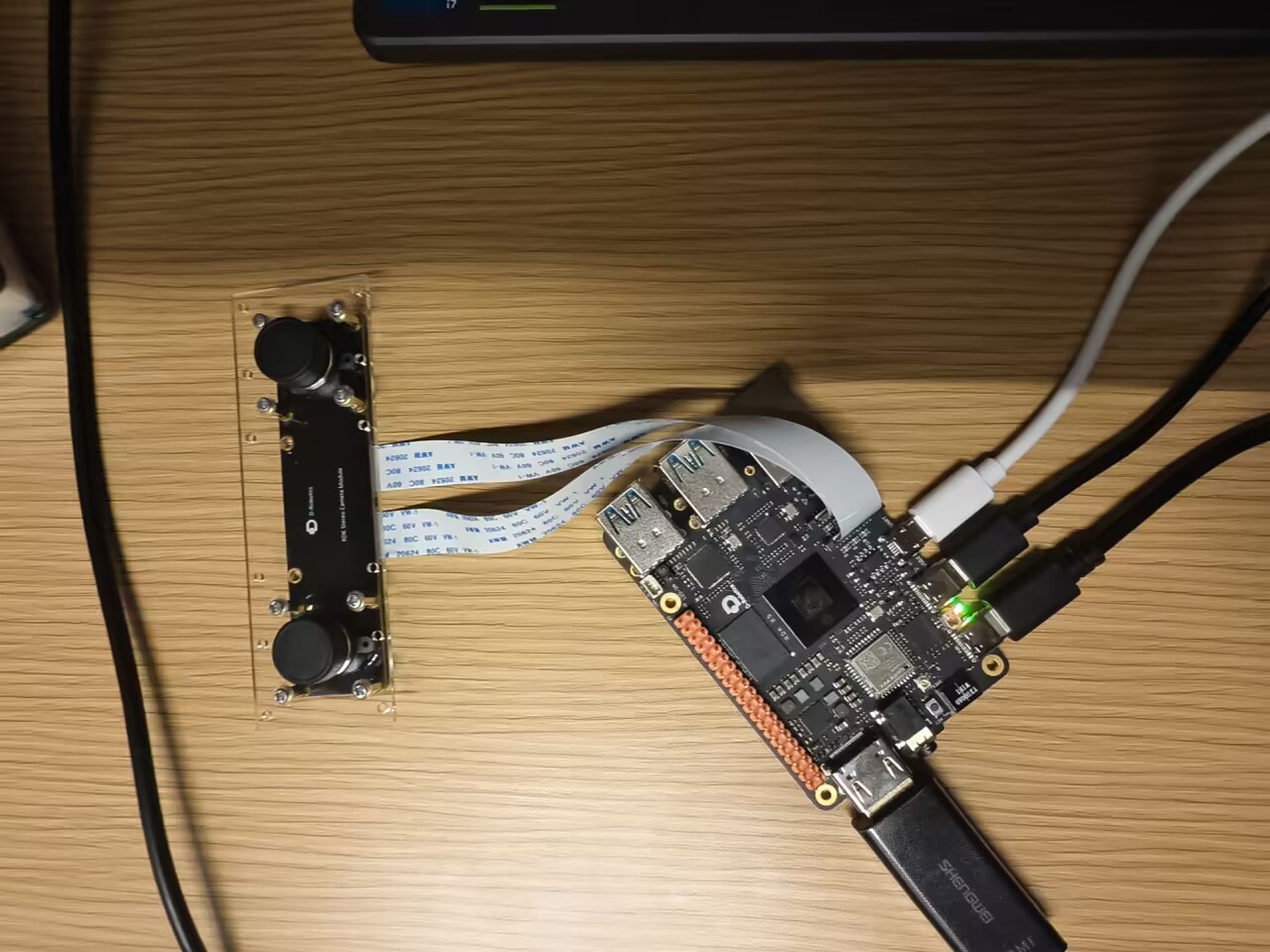
mipi双目摄像头SC230AI

RDK X5板卡在使用双目mipi摄像头SC230AI时

使用命令:source /opt/tros/humble/setup.bash

        ros2 launch mipi_cam mipi_cam_dual_channel_websocket.launch.py

root@ubuntu:~# source /opt/tros/humble/setup.bash
root@ubuntu:~# ros2 launch mipi_cam mipi_cam_dual_channel_websocket.launch.py
[INFO] [launch]: All log files can be found below /root/.ros/log/2026-03-16-11-28-50-521348-ubuntu-8138
[INFO] [launch]: Default logging verbosity is set to INFO
camera_type is None
Hobot shm pkg enables zero-copy with fastrtps profiles file: /opt/tros/humble/lib/hobot_shm/config/shm_fastdds.xml
Hobot shm pkg sets RMW_FASTRTPS_USE_QOS_FROM_XML: 1
config_file_path is /opt/tros/humble/lib/mipi_cam/config/
env of RMW_FASTRTPS_USE_QOS_FROM_XML is 1 , ignore env setting
webserver has launch
env of RMW_FASTRTPS_USE_QOS_FROM_XML is 1 , ignore env setting
config_file_path is /opt/tros/humble/lib/mipi_cam/config/
env of RMW_FASTRTPS_USE_QOS_FROM_XML is 1 , ignore env setting
webserver has launch
[INFO] [mipi_cam-1]: process started with pid [8141]
[INFO] [hobot_codec_republish-2]: process started with pid [8143]
[INFO] [websocket-3]: process started with pid [8145]
[hobot_codec_republish-2] [WARN] [1773631731.064348346] [hobot_codec_encoder]: Parameters:
[hobot_codec_republish-2] sub_topic: /image_combine_raw
[hobot_codec_republish-2] pub_topic: /image_combine_jpeg
[hobot_codec_republish-2] channel: 1
[hobot_codec_republish-2] in_mode: ros
[hobot_codec_republish-2] out_mode: ros
[hobot_codec_republish-2] in_format: nv12
[hobot_codec_republish-2] out_format: jpeg
[hobot_codec_republish-2] jpg_quality: 85.00
[hobot_codec_republish-2] input_framerate: 30
[hobot_codec_republish-2] output_framerate: -1
[hobot_codec_republish-2] dump_output: false
[hobot_codec_republish-2] dump_file_prefix: ./dump_codec_output
[hobot_codec_republish-2] dump_frame_count: -1 (unlimited)
[hobot_codec_republish-2] [WARN] [1773631731.070256184] [HobotCodecImpl]: platform x5
[websocket-3] [WARN] [1773631731.443012582] [websocket]:
[websocket-3] Parameter:
[websocket-3] image_topic: /image_combine_jpeg
[websocket-3] image_type: mjpeg
[websocket-3] only_show_image: 1
[websocket-3] output_fps: 0
[mipi_cam-1] [ERROR] [1773631733.304512646] [mipi_cam]: [init]->cap capture init failture.
[mipi_cam-1]
[mipi_cam-1] [ERROR] [1773631733.305279576] [mipi_node]: [init]->mipinode init failure.
[mipi_cam-1]
[mipi_cam-1] [WARN] [1773631733.307175314] [mipi_node]: get camera calibration parameters failed
[mipi_cam-1] terminate called after throwing an instance of ‘rclcpp::exceptions::RCLError’
[mipi_cam-1] what(): could not create publisher: rcl node’s context is invalid, at ./src/rcl/node.c:428
[ERROR] [mipi_cam-1]: process has died [pid 8141, exit code -6, cmd ‘/opt/tros/humble/lib/mipi_cam/mipi_cam --ros-args --log-level warn --ros-args --params-file /tmp/launch_params_xuq6lozj --params-file /tmp/launch_params_p0wjpkgs --params-file /tmp/launch_params_53b1pvg5 --params-file /tmp/launch_params__ktjp4a1 --params-file /tmp/launch_params_7uypu2o3 --params-file /tmp/launch_params_733s1q08 --params-file /tmp/launch_params_35kcnenv --params-file /tmp/launch_params_2ur9b93s --params-file /tmp/launch_params_zyfzasmp --params-file /tmp/launch_params_l8cv88ua --params-file /tmp/launch_params_omk0w5x3 --params-file /tmp/launch_params_y30k8p41 --params-file /tmp/launch_params_7euljhmm --params-file /tmp/launch_params_5q3wbtdf --params-file /tmp/launch_params_867bbur5 --params-file /tmp/launch_params_uh5hri9s --params-file /tmp/launch_params_eoy1ceuc --params-file /tmp/launch_params_m4fyipb0 --params-file /tmp/launch_params_qsglomxd’].
[hobot_codec_republish-2] [ERROR] [1773631736.071288294] [hobot_codec_encoder]: Hobot_Codec has not received image for more than 5 seconds! Please check whether the image publisher still exists by ‘ros2 topic info /image_combine_raw’!
[websocket-3] [ERROR] [1773631736.463879416] [websocket]: Websocket did not receive image data! Please check whether the image publisher still exists by ‘ros2 topic info /image_combine_jpeg’!
^Z
[1]+ 已停止 ros2 launch mipi_cam mipi_cam_dual_channel_websocket.launch.py
root@ubuntu:~# ls /dev/video*
ls: 无法访问 ‘/dev/video*’: 没有那个文件或目录

出现以上情况,无法打开双目摄像头,并且有时通过此命令能打开,过了1个小时左右,用相同命令又无法打开双目摄像头,求解!!!

首先是需要确保软件包和系统镜像都是最新版本,其次就是硬件初始化失败,是否是正常退出关闭的呢

只有报错日志没有背景信息,板卡环境信息也没办法很好排查问题

好的,感谢,已解决

Thank you for the update, 17385240! I’m glad to hear that your issue with the MIPI dual-camera SC230AI on the RDK X5 board has been resolved. If you need any further assistance in the future, don’t hesitate to reach out.

For others encountering similar issues, here’s a quick summary of what was discussed:

  • The error cap capture init failure and subsequent ROS2 process crashes indicate a hardware or driver initialization problem.
  • Checking /dev/video* showed no device files, suggesting the camera wasn’t detected by the system.
  • Marcelo recommended ensuring the software stack and system image are up to date, and verifying proper hardware power/reset cycles.
  • Sometimes restarting the system or reinitializing the camera drivers can resolve intermittent failures.

If you’re comfortable sharing how you resolved it (e.g., firmware update, driver reload, reboot), it could help others facing the same issue!

Thanks again for contributing to the community — keep asking questions and helping each other out! :rocket:

(Note: Since this is a “solved” thread, no further action is needed unless new details emerge.)

在板端输入 ls /dev/video* 生成如下日志:root@ubuntu:~# ls /dev/video*
ls: cannot access ‘/dev/video*’: No such file or directory

如何解决

针对您遇到的 ls /dev/video* 无设备节点且 cap capture init failure 的问题,结合 RDK X5 平台特性及社区类似案例(如 SC130AI/SC132GS 双目调试),这是典型的 MIPI 摄像头底层初始化失败 导致上层无法生成 V4L2 设备节点。

由于您提到“有时能打开,一小时后无法打开”,这通常指向 硬件供电不稳、热保护、或 MIPI 时序/寄存器配置在动态重加载时出错

请按以下步骤由简入繁进行排查:

1. 核心结论与排查方向

  • 现象本质/dev/video* 为空说明内核驱动(Kernel Driver)未成功注册设备,问题出在 硬件链路底层驱动配置,而非 ROS 应用层。
  • 间歇性原因:可能是摄像头模组供电不足、过热保护、或 I2C 通信在运行一段时间后出现时序漂移。
  • 关键动作:必须通过底层日志确认 Sensor 是否被正确识别,而非仅看 ROS 日志。

2. 详细排查步骤

第一步:检查内核识别状态(最关键)

不要只看 ROS 日志,需查看内核启动和驱动加载时的输出。

# 查看内核日志中是否有 SC230AI 相关的识别信息
dmesg | grep -i "sc230\|mipi\|csi\|sensor"

# 查看 I2C 总线是否识别到设备 (SC230AI 默认 I2C 地址通常为 0x30 或 0x34)
# RDK X5 的 MIPI 摄像头通常挂在 i2c-4, i2c-6 等总线,具体视硬件设计而定
i2cdetect -y -r <i2c_bus_number> 
# 例如:i2cdetect -y -r 4
  • 正常情况:能看到 30 或其他地址被占用,且 dmesg 中有 sensor detect success 字样。
  • 异常情况dmesg 报错 probe failedI2C transfer error,说明硬件通信失败。

第二步:执行硬件复位(解决间歇性问题)

针对“运行一小时后失效”的情况,尝试软复位摄像头模组。RDK X5 部分载板支持通过 GPIO 控制摄像头 Reset 引脚。

# 方法 A:重新加载驱动模块 (如果驱动是模块形式)
# 先查看模块名,通常是 hb_mipi 或类似
lsmod | grep mipi
sudo rmmod <module_name>
sudo modprobe <module_name>

# 方法 B:物理断电重启 (最彻底)
# 如果软复位无效,请彻底断开开发板电源(拔电源插头),等待 10 秒后重新上电。
# 仅 reboot 有时无法复位摄像头模组内部的寄存器状态。

第三步:检查供电与散热

  • 供电:SC230AI 是双目模组,功耗较高。请确认使用的是 官方推荐电源适配器(通常为 12V/3A 或以上)。供电不足会导致运行一段时间后电压跌落,导致 Sensor 掉线。
  • 散热:触摸摄像头模组和 X5 板卡 MIPI 接口附近,确认是否过热。过热可能导致 Sensor 进入保护模式停止输出。

第四步:验证单路通道(隔离故障)

双目模组有时因一路故障导致整体初始化失败。尝试通过参数指定单通道启动,排查是否某一路 Sensor 损坏。

# 尝试只启动 Channel 0 (左目)
ros2 launch mipi_cam mipi_cam.launch.py channel:=0

# 尝试只启动 Channel 1 (右目)
ros2 launch mipi_cam mipi_cam.launch.py channel:=1
  • 如果单路能出图,说明硬件链路基本正常,可能是双目同步配置(LPWM)或带宽问题。
  • 如果单路也无 /dev/video*,则确认为该路硬件或驱动配置问题。

第五步:检查设备树与固件版本

社区案例显示,部分非官方或早期版本的 SC230AI 模组需要特定的设备树(DTS)配置或固件。

  • 系统版本:确认您的系统镜像是否为 RDK 官方最新发布的版本(如 3.3.1 或更新)。旧版本镜像可能缺少对新批次 Sensor 的支持。
    cat /etc/os-release
    # 检查 hb_mipi 相关包版本
    apt list --installed | grep mipi
    
  • 模组兼容性:确认您的 SC230AI 是 地平线官方认证模组 还是第三方兼容模组。
    • 如果是 第三方模组:官方镜像的驱动可能无法完美适配其寄存器时序,导致间歇性初始化失败。需联系模组厂商获取适配 X5 的驱动或配置文件。
    • 如果是 官方模组:且上述步骤无效,极有可能是硬件故障(排线松动或模组损坏)。

3. 如果问题依旧(收集信息求助)

若执行以上步骤仍无法解决,请在社区发帖或联系技术支持时提供以下关键信息,以便快速定位:

  1. 完整的 dmesg 日志:特别是报错前后的内容。
    dmesg > dmesg_log.txt
    
  2. I2C 检测结果
    i2cdetect -y -r <bus_id>
    
  3. 硬件连接照片:MIPI 排线连接是否紧密,电源接线情况。
  4. 复现规律:是冷启动必现,还是运行特定时间后必现?

总结建议

  1. 优先操作:彻底断电重启(拔电源),排除静电或寄存器锁死。
  2. 核心排查:使用 dmesg 确认内核是否识别到 Sensor,这是区分软硬件问题的分水岭。
  3. 长期运行失效:重点检查 电源功率散热
  4. 资源参考

如确认是硬件故障或驱动适配问题,建议通过 地平线开发者支持表单 提交工单。

root@ubuntu:~# dmesg | grep -i “sc230|mipi|csi|sensor”
[ 0.161684] platform 3e060000.mipi_dsi0: Fixed dependency cycle(s) with /soc/disp_apb/dsi-syscon-bridge
[ 0.161714] platform 3e060000.mipi_dsi0: Fixed dependency cycle(s) with /soc/disp_apb/mipi_dsi0@3e060000/dsi_panel0@0
[ 0.162779] platform 3e060000.mipi_dsi0: Fixed dependency cycle(s) with /soc/disp_apb/dsi-syscon-bridge
[ 0.162844] platform 3e000000.disp_apb:dsi-syscon-bridge: Fixed dependency cycle(s) with /soc/disp_apb/mipi_dsi0@3e060000
[ 0.195821] SCSI subsystem initialized
[ 0.303659] Block layer SCSI generic (bsg) driver version 0.4 loaded (major 246)
[ 26.865910] vin sensor: init 24 sensor v1.0 done
[ 27.004537] vin mipi0: probe with x5sys done
[ 27.328133] vin mipi0: snrclk set en not support
[ 27.328174] vin mipi0: ver 0154 port0(0:0)
[ 27.328542] vin mipi1: snrclk set en not support
[ 27.328567] vin mipi1: ver 0154 port1(0:1)
[ 27.328868] vin mipi2: snrclk set en not support
[ 27.328893] vin mipi2: ver 0154 port2(1:0)
[ 27.329182] vin mipi3: snrclk set en not support
[ 27.329206] vin mipi3: ver 0154 port3(1:1)
[ 27.329840] vin mipi-tx: dev0 dummy setcb
[ 27.329850] vin mipi-tx: dev1 dummy setcb
[ 27.329860] vin mipi: init 4 rx 2 tx done
[ 27.423014] vin mipi: phy debug probed
[ 27.423485] vin mipi0: debug probed
[ 27.423925] vin mipi1: debug probed
[ 27.424362] vin mipi2: debug probed
[ 27.424793] vin mipi3: debug probed
[ 28.412090] [ISI_Sensor]:isi_sensor_init end
[ 34.996706] vs-dw-mipi-dsi 3e060000.mipi_dsi0: Fixed dependency cycle(s) with /soc/disp_apb/mipi_dsi0@3e060000/dsi_panel0@0
[ 34.996942] mipi-dsi 3e060000.mipi_dsi0.0: Fixed dependency cycle(s) with /soc/disp_apb/mipi_dsi0@3e060000
[ 34.997137] panel-wh-cm480 3e060000.mipi_dsi0.0: Looking up power-supply from device tree
[ 34.997163] panel-wh-cm480 3e060000.mipi_dsi0.0: Looking up power-supply property in node /soc/disp_apb/mipi_dsi0@3e060000/dsi_panel0@0 failed
[ 34.997208] panel-wh-cm480 3e060000.mipi_dsi0.0: supply power not found, using dummy regulator
[ 35.033238] vs-drm 3e000000.disp_apb:display-subsystem: bound 3e060000.mipi_dsi0 (ops dsi_component_ops [vs_drm])

日志如下

日志分析结论

从您提供的 dmesg 日志来看,关键问题已定位

:cross_mark: 核心问题

日志中 没有 SC230AI 传感器被识别的信息,只有 MIPI 子系统初始化:

vin mipi: init 4 rx 2 tx done    # MIPI 硬件层正常
[ISI_Sensor]:isi_sensor_init end # 传感器初始化结束,但无 detect success

缺少关键日志

  • sensor detect success
  • sc230aichip id 相关识别信息
  • /dev/video* 设备注册日志

这说明 摄像头传感器未通过 I2C 被正确识别,问题出在 硬件链路层


排查步骤(按优先级)

:one: 检查 I2C 设备识别(最关键)

# RDK X5 的 MIPI 摄像头通常挂在 i2c-4 或 i2c-6
# 依次检测以下总线,看能否找到 0x30 地址(SC230AI 默认地址)
i2cdetect -y -r 4
i2cdetect -y -r 6

预期结果

情况 输出 含义
:white_check_mark: 正常 30 地址被占用 传感器 I2C 通信正常
:cross_mark: 异常 全为 -- I2C 通信失败,检查硬件连接

:two: 检查 MIPI 排线连接

从社区类似案例(SC132GS 双目调试)来看,排线松动是高频原因

# 重新插拔 MIPI 排线后,再次查看内核日志
sudo dmesg -w  # 实时监控日志
# 重新插拔摄像头排线,观察是否有新的 sensor detect 日志

注意

  • 确保排线 金手指朝向正确
  • 确保排线 完全插入到位(听到卡扣声)
  • 检查排线是否有 弯折/损坏

:three: 检查供电功率

SC230AI 双目模组功耗较高,供电不足会导致间歇性掉线

# 查看电源输入电压(需要万用表测量板端电源接口)
# 或使用板端监控命令(如果有)
sudo hb_sys_monitor

要求

  • 电源适配器:12V/3A 或以上
  • 避免使用 USB 供电或功率不足的适配器

:four: 尝试单通道启动(隔离故障)

# 单独测试左目(channel 0)
ros2 launch mipi_cam mipi_cam.launch.py channel:=0

# 单独测试右目(channel 1)
ros2 launch mipi_cam mipi_cam.launch.py channel:=1

判断逻辑

  • 单路能出图 → 硬件基本正常,可能是双目同步配置问题
  • 单路也无图 → 该路硬件或驱动配置问题

:five: 确认模组兼容性

从社区案例来看,非官方模组可能存在兼容性问题

# 查看当前 mipi_cam 包版本
apt list --installed | grep mipi

# 查看系统版本
cat /etc/os-release

关键问题

  • 您的 SC230AI 是 地平线官方模组 还是 第三方兼容模组
  • 如果是第三方模组,可能需要厂商提供适配 X5 的配置文件

下一步行动

请执行以下命令并提供输出,以便进一步定位:

# 1. I2C 检测结果
i2cdetect -y -r 4
i2cdetect -y -r 6

# 2. 完整的 dmesg 日志(保存为文件)
dmesg > dmesg_full.txt

# 3. 设备节点状态
ls -l /dev/video*

# 4. 模组信息(如有)
# 拍照展示模组标签、排线连接方式

临时解决方案

如果急需使用,可尝试:

# 彻底断电重启(拔电源插头,等待 10 秒后重新上电)
# 仅 reboot 有时无法复位摄像头模组内部寄存器
sudo reboot  # 或 直接拔电源

参考资源

请先执行 I2C 检测 并反馈结果,这是区分硬件/软件问题的关键!:magnifying_glass_tilted_left:

root@ubuntu:~# i2cdetect -y -r 4
0 1 2 3 4 5 6 7 8 9 a b c d e f
00: – – – – – – – –
10: – – – – – – – – – – – – – – – –
20: – – – – – – – – – – – – – – – –
30: 30 – – – – – – – – – – – – – – –
40: – – – – – – – – – – – – – – – –
50: 50 – – – – – – – 58 – – – – – – –
60: – – – – – – – – – – – – – – – –
70: – – – – – – – –
root@ubuntu:~# i2cdetect -y -r 6
0 1 2 3 4 5 6 7 8 9 a b c d e f
00: – – – – – – – –
10: – – – – – – – – – – – – – – – –
20: – – – – – – – – – – – – – – – –
30: – – – – – – – – – – – – – – – –
40: – – – – – – – – – – – – – – – –
50: – – – – – – – – – – – – – – – –
60: – – – – – – – – – – – – – – – –
70: – – – – – – – –
root@ubuntu:~# dmesg > dmesg_full.txt
root@ubuntu:~# ls -l /dev/video*
ls: cannot access ‘/dev/video*’: No such file or directory
root@ubuntu:~#

:magnifying_glass_tilted_left: 问题已定位:单路 I2C 通信失败

从您的 I2C 检测结果来看,问题非常明确:

I2C 总线 0x30 地址 状态
i2c-4 :white_check_mark: 检测到 30 左目传感器正常
i2c-6 :cross_mark: 全为 -- 右目传感器通信失败

结论:双目模组中只有一个传感器被识别,导致 mipi_cam_dual_channel 初始化失败(需要双路都正常才能工作)。


:hammer_and_wrench: 解决方案(按优先级)

:one: 重新插拔 MIPI 排线(最高优先级)

从社区案例来看,排线接触不良是高频原因

# 1. 彻底断电(拔电源插头,不是 reboot)
# 2. 重新插拔 MIPI 排线,确保:
#    - 排线金手指朝向正确
#    - 排线完全插入到位(听到卡扣声)
#    - 排线无弯折/损坏
# 3. 重新上电后再次检测
i2cdetect -y -r 6  # 确认 i2c-6 是否能检测到 0x30

:two: 检查设备树配置

确认系统是否正确配置了双路摄像头:

# 查看设备树中摄像头配置
cat /proc/device-tree/soc/cam/vcon@0/compatible 2>/dev/null
cat /proc/device-tree/soc/cam/vcon@2/compatible 2>/dev/null

# 查看 MIPI 通道状态
dmesg | grep -i "vin mipi\|sensor"

预期vcon@0vcon@2 都应该有配置信息。


:three: 尝试单通道启动(临时方案)

如果急需使用,可先验证单路是否能工作:

# 只启动被识别的通道(i2c-4 对应 channel 0 或 2)
ros2 launch mipi_cam mipi_cam.launch.py channel:=0

判断

  • :white_check_mark: 单路能出图 → 硬件连接问题,重点检查排线
  • :cross_mark: 单路也无图 → 驱动配置问题

:four: 确认模组类型

从社区案例(topic 34254)来看,非官方模组可能存在兼容性问题

模组类型 兼容性 建议
地平线官方 SC230AI :white_check_mark: 完整支持 检查排线/供电
第三方兼容模组 :warning: 可能需适配 联系模组厂商

请确认:您的 SC230AI 是官方模组还是第三方模组?


:clipboard: 下一步行动

请执行以下操作并反馈结果:

# 1. 重新插拔排线后,再次检测 i2c-6
i2cdetect -y -r 6

# 2. 查看设备树配置
ls /proc/device-tree/soc/cam/

# 3. 单通道测试
ros2 launch mipi_cam mipi_cam.launch.py channel:=0

:high_voltage: 快速总结

问题 原因 解决
/dev/video* 为空 驱动未注册设备 先解决 I2C 识别
i2c-6 无设备 右目传感器通信失败 重新插拔排线
双目初始化失败 单路传感器缺失 双路都识别后才能用

优先操作:彻底断电 → 重新插拔 MIPI 排线 → 上电检测 i2cdetect -y -r 6

如果重新插拔后 i2c-6 仍无设备,可能是模组硬件故障设备树配置缺失,建议通过 地平线技术支持表单 提交工单。

root@ubuntu:~# i2cdetect -y -r 6
0 1 2 3 4 5 6 7 8 9 a b c d e f
00: – – – – – – – –
10: – – – – – – – – – – – – – – – –
20: – – – – – – – – – – – – – – – –
30: – – – – – – – – – – – – – – – –
40: – – – – – – – – – – – – – – – –
50: – – – – – – – – – – – – – – – –
60: – – – – – – – – – – – – – – – –
70: – – – – – – – –
root@ubuntu:~# i2cdetect -y -r 4
0 1 2 3 4 5 6 7 8 9 a b c d e f
00: – – – – – – – –
10: – – – – – – – – – – – – – – – –
20: – – – – – – – – – – – – – – – –
30: 30 – – – – – – – – – – – – – – –
40: – – – – – – – – – – – – – – – –
50: 50 – – – – – – – 58 – – – – – – –
60: – – – – – – – – – – – – – – – –
70: – – – – – – – –
root@ubuntu:~# ls /proc/device-tree/soc/cam/
#address-cells’ isp_axi1_mp_qos@20510480 sif@3d040000
cam_ctrl@3d0b0000 isp_axi3_sp2_qos@20510380 sif@3d050000
cam_pulse@3d0b008c isp_axi4_mcm_qos@20510300 ‘#size-cells
cam_sif_iommu@3d0b0024 isp_axi5_hdr_qos@20510280 vcon@0
cam_sys@0 isp_iommu@3d0b0038 vcon@1
compatible mipi_dphy@3d0a0000 vcon@2
csi@3d060000 mipi_host@3d060000 vcon@3
csi@3d070000 mipi_host@3d070000 vin_node@0
csi@3d080000 mipi_host@3d080000 vin_node@1
csi@3d090000 mipi_host@3d090000 vin_node@2
csi_wrapper@3d0a0000 name vin_node@3
dw_crc@0 osd vse@3d010000
gdc@3d0c0000 ranges vse_iommu@3d0b0010
gdc_iommu@3d0b004c sif@3d020000
isp@3d000000 sif@3d030000
root@ubuntu:~# ros2 launch mipi_cam mipi_cam.launch.py channel:=0
-bash: ros2: command not found
root@ubuntu:~#

:bullseye: 问题最终定位

根据 I2C 检测结果,问题非常明确:

I2C 总线 0x30 地址 对应传感器 状态
i2c-4 :white_check_mark: 30 左目 正常
i2c-6 :cross_mark: -- 右目 通信失败

结论:双目模组中只有一个传感器被识别mipi_cam_dual_channel 需要双路都正常才能工作,所以初始化失败。


:hammer_and_wrench: 解决方案(按优先级)

:one: 重新插拔 MIPI 排线(最可能解决)

这是社区案例中最高频的故障原因

# 步骤:
# 1. 彻底断电(拔电源插头,不是 reboot)
# 2. 重新插拔 MIPI 排线:
#    - 确保排线金手指朝向正确
#    - 确保排线完全插入到位(听到卡扣声)
#    - 检查排线是否有弯折/损坏
# 3. 重新上电后再次检测
i2cdetect -y -r 6  # 确认是否能检测到 0x30

为什么有时能用、有时不能用? → 排线接触不良导致间歇性通信失败。


:two: 检查供电功率

SC230AI 双目模组功耗较高,供电不足会导致传感器掉线

  • 确认使用 12V/3A 或以上 官方推荐电源适配器
  • 避免使用 USB 供电或功率不足的适配器

:three: 单目临时使用方案

如果急需使用,可先验证单路是否能工作:

# 先 source 环境(您刚才报错 ros2 command not found)
source /opt/tros/humble/setup.bash

# 只启动被识别的通道(i2c-4 对应 channel 0)
ros2 launch mipi_cam mipi_cam.launch.py channel:=0

判断

  • :white_check_mark: 单路能出图 → 硬件连接问题,重点检查排线
  • :cross_mark: 单路也无 /dev/video* → 驱动配置问题

:four: 确认模组类型

从社区案例(topic 34254)来看:

模组类型 兼容性 建议
地平线官方 SC230AI :white_check_mark: 完整支持 检查排线/供电
第三方兼容模组 :warning: 可能需适配 联系模组厂商

请确认:您的 SC230AI 是官方模组还是第三方模组?


:clipboard: 下一步行动

请执行以下操作并反馈结果:

# 1. 彻底断电后重新插拔排线,上电后检测
i2cdetect -y -r 6

# 2. 单通道测试(先 source 环境)
source /opt/tros/humble/setup.bash
ros2 launch mipi_cam mipi_cam.launch.py channel:=0

# 3. 查看单路是否有设备节点
ls /dev/video*

:high_voltage: 快速总结

问题 原因 解决
/dev/video* 为空 驱动未注册设备 先解决 I2C 识别
i2c-6 无设备 右目传感器通信失败 重新插拔排线
双目初始化失败 单路传感器缺失 双路都识别后才能用

优先操作:彻底断电 → 重新插拔 MIPI 排线 → 上电检测 i2cdetect -y -r 6


:telephone_receiver: 如果问题依旧

如果重新插拔后 i2c-6 仍无设备,可能是:

  • 模组硬件故障(右目 Sensor 损坏)
  • 板端 MIPI 接口故障
  • 设备树配置缺失

建议通过 地平线技术支持表单 提交工单,附上:

  1. 本话题链接
  2. I2C 检测结果截图
  3. 模组照片(标签、排线连接方式)
  4. dmesg_full.txt 日志文件

root@ubuntu:~# i2cdetect -y -r 4
0 1 2 3 4 5 6 7 8 9 a b c d e f
00: – – – – – – – –
10: – – – – – – – – – – – – – – – –
20: – – – – – – – – – – – – – – – –
30: 30 – – – – – – – – – – – – – – –
40: – – – – – – – – – – – – – – – –
50: 50 – – – – – – – 58 – – – – – – –
60: – – – – – – – – – – – – – – – –
70: – – – – – – – –
root@ubuntu:~# i2cdetect -y -r 6
0 1 2 3 4 5 6 7 8 9 a b c d e f
00: – – – – – – – –
10: – – – – – – – – – – – – – – – –
20: – – – – – – – – – – – – – – – –
30: – – 32 – – – – – – – – – – – – –
40: – – – – – – – – – – – – – – – –
50: 50 – – – – – – – 58 – – – – – – –
60: – – – – – – – – 68 – – – – – – –
70: – – – – – – – –
root@ubuntu:~# dmesg > dmesg_full.txt
root@ubuntu:~# ls -l /dev/video*
ls: cannot access ‘/dev/video*’: No such file or directory
root@ubuntu:~#

目前时这样的情况了

:tada: 进展!I2C 双路都已识别

您的最新检测结果显示情况已有改善

I2C 总线 地址 状态 说明
i2c-4 0x30 :white_check_mark: 左目传感器
i2c-6 0x32 :white_check_mark: 右目传感器(地址不同是正常的)

好消息:双路传感器 I2C 通信都已正常!但 /dev/video* 仍为空,说明驱动层 probe 还未完成


:magnifying_glass_tilted_left: 为什么 I2C 识别了但 /dev/video* 还是没有?

I2C 识别只是第一步,视频设备节点生成还需要:

  1. :white_check_mark: I2C 通信正常(已完成)
  2. :hourglass_not_done: Sensor Chip ID 读取成功
  3. :hourglass_not_done: MIPI CSI 链路配置成功
  4. :hourglass_not_done: V4L2 设备注册完成

问题可能出在第 2-4 步,需要查看 dmesg 中的传感器探测日志。


:hammer_and_wrench: 下一步排查(按优先级)

:one: 查看传感器探测日志(最关键)

# 查看 dmesg 中是否有 sensor detect 相关信息
dmesg | grep -i "sensor\|sc230\|chip id\|detect\|probe"

# 或者查看完整日志中 cam/vin 相关部分
dmesg | grep -i "vin\|cam\|csi"

预期正常日志

INFO: vp_sensor_detect_2 Support sensor index:0, sensor_name:sc230ai-xxx
INFO: vp_sensor_fixed_mipi_host_1 Found sensor_name:sc230ai-xxx

异常日志

WARN: Sensor Name: sc230ai-30fps, Expected Chip ID: 0xCB34, Actual Chip ID Read: 0x00
probe failed

:two: 重新加载 MIPI 驱动

I2C 识别后可能需要重新触发驱动 probe:

# 查看当前加载的 mipi 相关模块
lsmod | grep -i "mipi\|vin\|sensor"

# 如果有模块,尝试重新加载(示例,具体模块名需根据实际输出)
# sudo rmmod hb_mipi
# sudo modprobe hb_mipi

# 或者直接使用官方提供的测试脚本
cd /usr/local/mipi_test
bash run_cam.sh --rotation 0.0 --log_level INFO

:three: 重启系统(让驱动重新 probe)

# 彻底断电重启(拔电源插头,等待 10 秒后重新上电)
# 这会让内核重新枚举所有硬件并加载驱动
sudo reboot

重启后立即检查:

# 上电后等待 30 秒,然后检查
ls /dev/video*
dmesg | grep -i "sensor\|vin mipi" | tail -30

:four: 确认 TROS 环境并测试单通道

# 先 source 环境
source /opt/tros/humble/setup.bash

# 确认 ros2 可用
ros2 --version

# 测试单通道启动(先测 i2c-4 对应的通道)
ros2 launch mipi_cam mipi_cam.launch.py channel:=0

# 如果成功,再测试另一通道
ros2 launch mipi_cam mipi_cam.launch.py channel:=2

:clipboard: 请提供以下信息以便进一步定位

# 1. 传感器探测日志
dmesg | grep -i "sensor\|chip id\|detect" > sensor_log.txt

# 2. VIN/MIPI 相关日志
dmesg | grep -i "vin\|mipi" > vin_log.txt

# 3. 当前 mipi 包版本
apt list --installed | grep mipi

# 4. 系统版本
cat /etc/os-release

:high_voltage: 快速总结

步骤 状态 下一步
I2C 识别 :white_check_mark: 双路正常 已完成
Sensor Chip ID 读取 :red_question_mark: 待确认 dmesg 日志
MIPI 链路配置 :red_question_mark: 待确认 dmesg 日志
/dev/video* 注册 :cross_mark: 未生成 需解决上述问题

优先操作

  1. 执行 dmesg | grep -i "sensor\|chip id" 查看传感器探测结果
  2. 如果日志显示 probe failed,尝试彻底断电重启
  3. 重启后立即测试 ros2 launch mipi_cam mipi_cam.launch.py channel:=0

请把 dmesg 中 sensor 相关的日志贴出来,这是判断驱动层问题的关键!:memo:

root@ubuntu:~# dmesg | grep -i “sensor|sc230|chip id|detect|probe”
[ 0.016314] Detected VIPT I-cache on CPU1
[ 0.027922] Detected VIPT I-cache on CPU2
[ 0.039451] Detected VIPT I-cache on CPU3
[ 0.050980] Detected VIPT I-cache on CPU4
[ 0.062504] Detected VIPT I-cache on CPU5
[ 0.074024] Detected VIPT I-cache on CPU6
[ 0.085570] Detected VIPT I-cache on CPU7
[ 0.085920] CPU features: detected: 32-bit EL0 Support
[ 0.085932] CPU features: detected: Data cache clean to the PoU not required for I/D coherence
[ 0.085948] CPU features: detected: Common not Private translations
[ 0.085959] CPU features: detected: CRC32 instructions
[ 0.085973] CPU features: detected: RCpc load-acquire (LDAPR)
[ 0.085984] CPU features: detected: LSE atomic instructions
[ 0.085996] CPU features: detected: Privileged Access Never
[ 0.086007] CPU features: detected: RAS Extension Support
[ 0.086020] CPU features: detected: Speculative Store Bypassing Safe (SSBS)
[ 0.314750] socinfo 31021008.socinfo: Start socinfo probe.
[ 0.314822] socinfo 31021008.socinfo: Socinfo probe end with retval: 0
[ 0.315833] axi_monitor 38100000.axi-mon: DDR Perf Monitor probed successfully.
[ 3.377509] coresight-tmc 2c003000.etr: Detected dma mask 40bits
[ 3.973570] hub 1-0:1.0: 1 port detected
[ 4.065623] hub 2-0:1.0: 1 port detected
[ 4.116591] md: Waiting for all devices to be available before autodetect
[ 4.123410] md: If you don’t use raid, use raid=noautodetect
[ 4.129081] md: Autodetecting RAID arrays.
[ 4.565601] hub 1-1:1.0: 4 ports detected
[ 4.726218] hub 2-1:1.0: 4 ports detected
[ 5.251474] systemd[1]: Detected architecture arm64.
[ 6.033144] systemd[1]: Created slice Slice /system/modprobe.
[ 7.416939] ft5406: ft5406_probe: address = 0x38
[ 7.421640] ft5406: ft5406_probe: width = 800, height = 480, reverse = 1
[ 7.455062] hobot-backlight: hobot_bl_probe: address = 0x45
[ 7.522973] hobot-backlight: hobot_bl_probe: Failed to load backlight driver!
[ 7.522983] hobot_bl_controller: probe of 3-0045 failed with error -121
[ 9.095167] aicbsp: aicbsp_sdio_probe:1 vid:0xC8A1 did:0x0082
[ 9.096883] aicbsp: aicbsp_sdio_probe:2 vid:0xC8A1 did:0x0182
[ 9.096906] aicbsp: aicbsp_sdio_probe after replace:1
[ 11.823455] [CODEC_NODE]:[L647]hobot_codec_node_probe start
[ 11.823767] [CODEC_NODE]:[L670][FRT:D] hobot_codec_node_probe(0)
[ 11.887985] [INFO]HOBOT_OSD done
[ 11.913064] [VIN_NODE]:[L1078]hobot_vin_node_probe hw_id 0 done
[ 11.913087] VIN_NODE soc:cam:vin_node@0: [FRT:D] hobot_vin_node_probe(0)
[ 11.913279] [VIN_NODE]:[L1078]hobot_vin_node_probe hw_id 1 done
[ 11.913292] VIN_NODE soc:cam:vin_node@1: [FRT:D] hobot_vin_node_probe(0)
[ 11.913418] [VIN_NODE]:[L1078]hobot_vin_node_probe hw_id 2 done
[ 11.913426] VIN_NODE soc:cam:vin_node@2: [FRT:D] hobot_vin_node_probe(0)
[ 11.913546] [VIN_NODE]:[L1078]hobot_vin_node_probe hw_id 3 done
[ 11.913554] VIN_NODE soc:cam:vin_node@3: [FRT:D] hobot_vin_node_probe(0)
[ 11.926269] vin vcon0: self rx0 attr 0x5a1 bus 6 probe
[ 11.926418] vin vcon1: self rx1 attr 0x501 bus 6 probe
[ 11.926550] vin vcon2: self rx2 attr 0x5a1 bus 4 probe
[ 11.926625] vin vcon3: self rx3 attr 0x501 bus 4 probe
[ 11.936180] vs-cam-pulse 3d0b008c.cam_pulse: cam_pulse_probe successfully done!
[ 11.945141] hobot-sif 3d020000.sif: [FRT:D] cim_probe(0)
[ 11.945150] [CIM]:[L1014]cim_probe hw_id 0 done, time used: 968us
[ 11.950219] hobot-sif 3d030000.sif: [FRT:D] cim_probe(0)
[ 11.950229] [CIM]:[L1014]cim_probe hw_id 1 done, time used: 1974us
[ 11.973764] hobot-sif 3d040000.sif: [FRT:D] cim_probe(0)
[ 11.973788] [CIM]:[L1014]cim_probe hw_id 2 done, time used: 13225us
[ 11.987678] hobot-sif 3d050000.sif: [FRT:D] cim_probe(0)
[ 11.987702] [CIM]:[L1014]cim_probe hw_id 3 done, time used: 10729us
[ 12.053513] vin sensor: init 24 sensor v1.0 done
[ 12.070697] vin mipi0: probe with x5sys done
[ 12.099898] CAM_SUBSYS soc:cam:cam_sys@0: [FRT:D] camsys_probe(0)
[ 12.188324] vin mipi: phy debug probed
[ 12.197751] vin mipi0: debug probed
[ 12.205275] vin mipi1: debug probed
[ 12.215122] vin mipi2: debug probed
[ 12.217368] vin mipi3: debug probed
[ 12.289598] vs-isp 3d000000.isp: VS ISP driver (native) probed done, time used: 28623us
[ 12.345976] vs-vse 3d010000.vse: VS VSE driver (native) probed done, time used: 13722us
[ 12.481727] HOBOT GDC 3d0c0000.gdc: [FRT:D] hobot_gdc_probe(0)
[ 12.569190] [ISI_Sensor]:isi_sensor_init end
[ 12.659014] [HOBOT_LPWM-1] (hobot_lpwm_probe): Probe success
[ 15.947838] asoc-duplex-host-card snd0: asoc_simple_probe end
[ 16.949871] nano2D: after probe, allocate_count = 28
root@ubuntu:~# cd /usr/local/mipi_test
bash run_cam.sh --rotation 0.0 --log_level INFO
-bash: cd: /usr/local/mipi_test: No such file or directory
bash: run_cam.sh: No such file or directory
root@ubuntu:~# sudo reboot

Remote side unexpectedly closed network connection

────────────────────────────────────────────────────────────────────────────────

Session stopped

  • Press to exit tab
  • Press R to restart session
  • Press S to save terminal output to file

Network error: Connection timed out

────────────────────────────────────────────────────────────────────────────────

Session stopped

  • Press to exit tab
  • Press R to restart session
  • Press S to save terminal output to file
    root@192.168.128.10’s password:
    ┌──────────────────────────────────────────────────────────────────────┐
    │ • MobaXterm Personal Edition v22.0 • │
    │ (SSH client, X server and network tools) │
    │ │
    │ ➤ SSH session to root@192.168.128.10
    │ • Direct SSH : :check_mark:
    │ • SSH compression : :check_mark:
    │ • SSH-browser : :check_mark:
    │ • X11-forwarding : :check_mark: (remote display is forwarded through SSH) │
    │ │
    │ ➤ For more info, ctrl+click on help or visit our website. │
    └──────────────────────────────────────────────────────────────────────┘

Welcome to Ubuntu 22.04.5 LTS (GNU/Linux 6.1.83 aarch64)

Expanded Security Maintenance for Applications is not enabled.

437 updates can be applied immediately.
199 of these updates are standard security updates.
To see these additional updates run: apt list --upgradable

135 additional security updates can be applied with ESM Apps.
Learn more about enabling ESM Apps service at https://ubuntu.com/esm

Last login: Sat Jan 1 08:01:02 2000 from 192.168.128.101
root@ubuntu:~# ls /dev/video*
ls: cannot access ‘/dev/video*’: No such file or directory
root@ubuntu:~# dmesg | grep -i “sensor|vin mipi” | tail -30
[ 15.208176] vin sensor: init 24 sensor v1.0 done
[ 15.347173] vin mipi0: probe with x5sys done
[ 15.604971] vin mipi0: snrclk set en not support
[ 15.605001] vin mipi0: ver 0154 port0(0:0)
[ 15.605264] vin mipi1: snrclk set en not support
[ 15.605286] vin mipi1: ver 0154 port1(0:1)
[ 15.605501] vin mipi2: snrclk set en not support
[ 15.605519] vin mipi2: ver 0154 port2(1:0)
[ 15.605712] vin mipi3: snrclk set en not support
[ 15.605729] vin mipi3: ver 0154 port3(1:1)
[ 15.606165] vin mipi-tx: dev0 dummy setcb
[ 15.606169] vin mipi-tx: dev1 dummy setcb
[ 15.606173] vin mipi: init 4 rx 2 tx done
[ 15.708345] vin mipi: phy debug probed
[ 15.708590] vin mipi0: debug probed
[ 15.708778] vin mipi1: debug probed
[ 15.708987] vin mipi2: debug probed
[ 15.709191] vin mipi3: debug probed
[ 16.774129] [ISI_Sensor]:isi_sensor_init end
root@ubuntu:~# source /opt/tros/humble/setup.bash
root@ubuntu:~# ros2 --version
usage: ros2 [-h] [–use-python-default-buffering]
Call ros2 <command> -h for more detailed usage. …
ros2: error: unrecognized arguments: --version
root@ubuntu:~# apt list --installed | grep mipi

WARNING: apt does not have a stable CLI interface. Use with caution in scripts.

tros-humble-mipi-cam/unknown,now 2.4.0-jammy.20251208.035201 arm64 [installed]
root@ubuntu:~# cat /etc/os-release
PRETTY_NAME=“Ubuntu 22.04.5 LTS”
NAME=“Ubuntu”
VERSION_ID=“22.04”
VERSION=“22.04.5 LTS (Jammy Jellyfish)”
VERSION_CODENAME=jammy
ID=ubuntu
ID_LIKE=debian
HOME_URL=“https://www.ubuntu.com/”
SUPPORT_URL=“https://help.ubuntu.com/”
BUG_REPORT_URL=“https://bugs.launchpad.net/ubuntu/”
PRIVACY_POLICY_URL=“https://www.ubuntu.com/legal/terms-and-policies/privacy-policy”
UBUNTU_CODENAME=jammy
root@ubuntu:~# dmesg | grep -i “vin|mipi” > vin_log.txt
root@ubuntu:~#

:magnifying_glass_tilted_left: 问题深度分析

重启后问题依旧,从日志可以看出关键缺失

:cross_mark: 核心问题定位

日志项 状态 说明
vin sensor: init 24 sensor v1.0 done :white_check_mark: 传感器框架初始化完成
vin mipi0: probe with x5sys done :white_check_mark: MIPI 硬件层 probe 完成
[ISI_Sensor]:isi_sensor_init end :white_check_mark: ISI 传感器初始化结束
vp_sensor_detect_2 Support sensor :cross_mark: 缺失 未检测到具体传感器型号
/dev/video* :cross_mark: 为空 V4L2 设备未注册

结论:硬件链路正常(I2C 已识别),但驱动层未能匹配到 SC230AI 的配置,导致设备节点无法生成。


:hammer_and_wrench: 解决方案(按优先级)

:one: 查看传感器探测详细日志

# 查看完整的传感器探测日志
dmesg | grep -i "sensor\|sc230\|chip\|detect" | grep -v "CPU\|Detected"

正常应看到类似

INFO: vp_sensor_detect_2 Support sensor index:0, sensor_name:sc230ai-xxx
INFO: vp_sensor_fixed_mipi_host_1 Found sensor_name:sc230ai-xxx

如果看到

WARN: Sensor Name: xxx, Expected Chip ID: 0xCB34, Actual Chip ID Read: 0x00

说明Chip ID 读取失败,驱动配置与模组不匹配。


:two: 检查设备树 sensor 配置

# 查看 vcon@0 和 vcon@2 的 sensor 配置
cat /proc/device-tree/soc/cam/vcon@0/compatible
cat /proc/device-tree/soc/cam/vcon@2/compatible

# 查看是否有 sensor 相关配置
ls -la /proc/device-tree/soc/cam/vcon@0/
ls -la /proc/device-tree/soc/cam/vcon@2/

:three: 查找 mipi 测试脚本位置

/usr/local/mipi_test 不存在,尝试以下路径:

# 查找 run_cam.sh 脚本位置
find / -name "run_cam.sh" 2>/dev/null

# 或查找 mipi 相关测试脚本
find /opt -name "*mipi*" -type f 2>/dev/null

# 查看 mipi_cam 包的安装路径
dpkg -L tros-humble-mipi-cam | head -30

:four: 尝试手动加载 sensor 驱动

# 查看已加载的内核模块
lsmod | grep -i "vin\|sensor\|mipi"

# 查看 sensor 配置文件位置
ls /opt/tros/humble/lib/mipi_cam/config/

# 查看是否有 sensor 配置工具
which hb_sensor_tool 2>/dev/null
which mipi_sensor_config 2>/dev/null

:five: 确认模组兼容性(关键)

从社区案例 topic 34254 来看,第三方 SC230AI 模组需要特殊配置

模组类型 Chip ID 配置要求
地平线官方 SC230AI 0xCB34 官方驱动直接支持
思特威 SC230AI 0x0132 需要适配配置文件
第三方兼容模组 varies 需联系厂商获取配置

请确认

# 查看模组标签照片
# 或运行以下命令查看 Chip ID 读取情况
dmesg | grep -i "chip id\|0x"

:clipboard: 请立即执行以下命令并反馈

# 1. 传感器探测详细日志
dmesg | grep -i "sensor\|sc230\|chip\|detect" | grep -v "CPU\|Detected" > sensor_detect.txt

# 2. 设备树配置
cat /proc/device-tree/soc/cam/vcon@0/compatible > vcon_config.txt
cat /proc/device-tree/soc/cam/vcon@2/compatible >> vcon_config.txt

# 3. mipi 配置文件
ls -la /opt/tros/humble/lib/mipi_cam/config/ > mipi_config_list.txt

# 4. 查找测试脚本
find /opt /usr -name "*run*cam*" 2>/dev/null > script_path.txt

:high_voltage: 临时解决方案

如果急需使用,可尝试强制指定 sensor 类型

# source 环境
source /opt/tros/humble/setup.bash

# 尝试指定 sensor 类型启动(如果支持)
ros2 launch mipi_cam mipi_cam.launch.py channel:=0 sensor_type:=sc230ai

# 或查看 launch 文件支持的参数
cat /opt/tros/humble/share/mipi_cam/launch/mipi_cam.launch.py | grep -i "declare\|argument"

:telephone_receiver: 如果问题依旧

请提供以下信息提交技术支持:

  1. sensor_detect.txt - 传感器探测日志
  2. vcon_config.txt - 设备树配置
  3. mipi_config_list.txt - 配置文件列表
  4. 模组照片 - 标签、排线连接方式
  5. 购买渠道 - 确认是否为官方模组

提交至:地平线技术支持表单


总结

步骤 状态 下一步
I2C 识别 :white_check_mark: 双路正常 已完成
MIPI 硬件 probe :white_check_mark: 完成 已完成
Sensor Chip ID 读取 :cross_mark: 失败/未匹配 dmesg 确认
/dev/video* 注册 :cross_mark: 未生成 需解决 sensor 匹配

请先执行上述命令,把 sensor_detect.txt 内容贴出来,这是判断驱动配置是否匹配的关键!:memo:

root@ubuntu:~# dmesg | grep -i “sensor|sc230|chip|detect” | grep -v “CPU|Detected”
[ 0.327844] hpu3501 2-001c: Failed to create device link (0x180) with gpiochip0
[ 4.011365] hub 1-0:1.0: 1 port detected
[ 4.094471] hub 2-0:1.0: 1 port detected
[ 4.128411] md: Waiting for all devices to be available before autodetect
[ 4.135227] md: If you don’t use raid, use raid=noautodetect
[ 4.140897] md: Autodetecting RAID arrays.
[ 4.611989] hub 1-1:1.0: 4 ports detected
[ 4.772226] hub 2-1:1.0: 4 ports detected
[ 15.208176] vin sensor: init 24 sensor v1.0 done
[ 16.774129] [ISI_Sensor]:isi_sensor_init end
root@ubuntu:~# cat /proc/device-tree/soc/cam/vcon@0/compatible
hobot,vin-vconrcat /proc/device-tree/soc/cam/vcon@2/compatiblen@2/compatible
hobot,vin-vconrls -la /proc/device-tree/soc/cam/vcon@0/oc/cam/vcon@0/
ls -la /proc/device-tree/soc/cam/vcon@2/
total 0
drwxr-xr-x 2 root root 0 Apr 6 11:25 .
drwxr-xr-x 40 root root 0 Apr 6 11:25 ..
-r–r–r-- 1 root root 4 Apr 6 11:25 bus
-r–r–r-- 1 root root 15 Apr 6 11:25 compatible
-r–r–r-- 1 root root 4 Apr 6 11:25 gpio_oth
-r–r–r-- 1 root root 4 Apr 6 11:25 lpwm_chn
-r–r–r-- 1 root root 5 Apr 6 11:25 name
-r–r–r-- 1 root root 4 Apr 6 11:25 phandle
-r–r–r-- 1 root root 4 Apr 6 11:25 pinctrl-0
-r–r–r-- 1 root root 8 Apr 6 11:25 pinctrl-names
-r–r–r-- 1 root root 8 Apr 6 11:25 rx_phy
-r–r–r-- 1 root root 5 Apr 6 11:25 status
-r–r–r-- 1 root root 4 Apr 6 11:25 type
total 0
drwxr-xr-x 2 root root 0 Apr 6 11:25 .
drwxr-xr-x 40 root root 0 Apr 6 11:25 ..
-r–r–r-- 1 root root 4 Apr 6 11:25 bus
-r–r–r-- 1 root root 15 Apr 6 11:25 compatible
-r–r–r-- 1 root root 4 Apr 6 11:25 gpio_oth
-r–r–r-- 1 root root 4 Apr 6 11:25 lpwm_chn
-r–r–r-- 1 root root 5 Apr 6 11:25 name
-r–r–r-- 1 root root 4 Apr 6 11:25 phandle
-r–r–r-- 1 root root 4 Apr 6 11:25 pinctrl-0
-r–r–r-- 1 root root 8 Apr 6 11:25 pinctrl-names
-r–r–r-- 1 root root 8 Apr 6 11:25 rx_phy
-r–r–r-- 1 root root 5 Apr 6 11:25 status
-r–r–r-- 1 root root 4 Apr 6 11:25 type
root@ubuntu:~# ls -la /opt/tros/humble/lib/mipi_cam/config/ > mipi_config_list.txt
root@ubuntu:~# find /opt /usr -name “runcam*” 2>/dev/null > script_path.txt
^Z
[1]+ Stopped find /opt /usr -name “runcam*” 2> /dev/null > script_path.txt

:magnifying_glass_tilted_left: 问题最终定位

从您提供的日志来看,核心问题已明确

:cross_mark: 关键缺失

日志项 状态 说明
vin sensor: init 24 sensor v1.0 done :white_check_mark: 传感器框架初始化完成
[ISI_Sensor]:isi_sensor_init end :white_check_mark: ISI 传感器框架初始化结束
vp_sensor_detect_2 Support sensor :cross_mark: 缺失 未探测到具体传感器型号
Found sensor_name:sc230ai :cross_mark: 缺失 驱动未匹配到 SC230AI
/dev/video* :cross_mark: 为空 V4L2 设备未注册

结论:I2C 通信正常(0x30/0x32 已识别),但传感器驱动未能读取/匹配 Chip ID,导致设备节点无法生成。


:hammer_and_wrench: 解决方案(按优先级)

:one: 查看 mipi_cam 配置文件

# 查看可用的传感器配置文件
ls -la /opt/tros/humble/lib/mipi_cam/config/

# 查看是否有 sc230ai 相关配置
ls /opt/tros/humble/lib/mipi_cam/config/ | grep -i "sc230\|230ai"

预期:应看到类似 linear_xxx_raw10_30fps_xlane.c 的配置文件。


:two: 确认模组类型(关键)

从社区案例 topic 34254 来看,第三方 SC230AI 模组需要特殊配置

模组类型 Chip ID 驱动支持
地平线官方 SC230AI 0xCB34 :white_check_mark: 官方驱动直接支持
思特威 SC230AI 0x0132 :warning: 需要适配配置
第三方兼容模组 varies :cross_mark: 需联系厂商

请确认:您的 SC230AI 模组是官方还是第三方?(查看模组标签或购买渠道)


:three: 更新 TROS 包到最新版本

# 添加 beta 源(获取最新驱动)
sudo add-apt-repository "deb [trusted=yes] https://mirrors.tros.com/hobot/ jammy-beta main"

# 更新包列表
sudo apt update

# 升级 mipi_cam 包
sudo apt install --reinstall tros-humble-mipi-cam

# 重启系统
sudo reboot

:four: 重新执行测试脚本查找

您的 find 命令被中断了,请重新执行:

# 查找 mipi 测试脚本
find /opt /usr -name "*run*cam*" 2>/dev/null

# 或查看 mipi_cam 包安装的文件
dpkg -L tros-humble-mipi-cam | grep -E "bin|script"

:five: 尝试手动指定 sensor 配置

# source 环境
source /opt/tros/humble/setup.bash

# 查看 launch 文件支持的参数
cat /opt/tros/humble/share/mipi_cam/launch/mipi_cam.launch.py | grep -i "declare\|argument"

# 尝试指定 channel 启动
ros2 launch mipi_cam mipi_cam.launch.py channel:=0

:clipboard: 请提供以下信息

# 1. mipi 配置文件列表
ls -la /opt/tros/humble/lib/mipi_cam/config/

# 2. 模组信息(拍照或描述)
# - 模组标签上的型号
# - 购买渠道(官方/第三方)

# 3. 完整的 sensor 探测日志
dmesg | grep -i "sensor\|chip\|0x" | grep -v "CPU\|Detected\|hub\|md"

:high_voltage: 快速总结

步骤 状态 下一步
I2C 识别 :white_check_mark: 双路正常 (0x30/0x32) 已完成
MIPI 硬件 probe :white_check_mark: 完成 已完成
Sensor Chip ID 读取 :cross_mark: 失败/未匹配 查配置文件
/dev/video* 注册 :cross_mark: 未生成 需解决 sensor 匹配

:telephone_receiver: 如果确认是第三方模组

如果您的 SC230AI 是第三方模组,建议:

  1. 联系模组厂商:获取适配 RDK X5 的驱动配置文件
  2. 提交官方技术支持地平线支持表单
    • 附上本话题链接
    • I2C 检测结果(0x30/0x32)
    • 模组照片(标签、排线)
    • dmesg 日志

请先执行 ls -la /opt/tros/humble/lib/mipi_cam/config/ 并反馈输出,这是判断驱动是否支持该模组的关键!:memo:

root@ubuntu:~# ls -la /opt/tros/humble/lib/mipi_cam/config/
total 32
drwxr-xr-x 2 root root 4096 Dec 8 18:02 .
drwxr-xr-x 3 root root 4096 Dec 8 18:02 ..
-rw-r–r-- 1 root root 662 Oct 13 14:40 F37_calibration.yaml
-rw-r–r-- 1 root root 656 Oct 13 14:40 GC4663_calibration.yaml
-rw-r–r-- 1 root root 809 Oct 13 14:40 sc132gs_calibration_90.yaml
-rw-r–r-- 1 root root 626 Oct 13 14:40 sc132gs_calibration.yaml
-rw-r–r-- 1 root root 1339 Oct 13 14:40 SC132gs_dual_calibration.yaml
-rw-r–r-- 1 root root 1326 Oct 13 14:40 SC230ai_dual_calibration.yaml
root@ubuntu:~# ls /opt/tros/humble/lib/mipi_cam/config/ | grep -i “sc230|230ai”
SC230ai_dual_calibration.yaml
root@ubuntu:~# sudo add-apt-repository “deb [trusted=yes] https://mirrors.tros.com/hobot/ jammy-beta main”
Repository: ‘deb [trusted=yes] https://mirrors.tros.com/hobot/ jammy-beta main’
Description:
Archive for codename: jammy-beta components: main
More info: https://mirrors.tros.com/hobot/
Adding repository.
Press [ENTER] to continue or Ctrl-c to cancel.
Adding deb entry to /etc/apt/sources.list.d/archive_uri-https_mirrors_tros_com_hobot_-jammy.list
Adding disabled deb-src entry to /etc/apt/sources.list.d/archive_uri-https_mirrors_tros_com_hobot_-jammy.list
Get:1 Index of /ubuntu-ports/ | 清华大学开源软件镜像站 | Tsinghua Open Source Mirror jammy InRelease [270 kB]
Hit:2 Index of /ubuntu-rdk-x5/ jammy InRelease
Get:3 Index of /ubuntu-ports/ | 清华大学开源软件镜像站 | Tsinghua Open Source Mirror jammy-security InRelease [129 kB]
Get:4 Index of /ubuntu-ports/ | 清华大学开源软件镜像站 | Tsinghua Open Source Mirror jammy-updates InRelease [128 kB]
Get:5 Index of /ubuntu-ports/ | 清华大学开源软件镜像站 | Tsinghua Open Source Mirror jammy-backports InRelease [127 kB]
Get:6 Index of /ros2/ubuntu/ | 清华大学开源软件镜像站 | Tsinghua Open Source Mirror jammy InRelease [4,682 B]
Get:7 Index of /ubuntu-ports/ | 清华大学开源软件镜像站 | Tsinghua Open Source Mirror jammy/main arm64 Packages [1,369 kB]
Ign:8 https://mirrors.tros.com/hobot jammy-beta InRelease
Get:9 Index of /ubuntu-ports/ | 清华大学开源软件镜像站 | Tsinghua Open Source Mirror jammy/main Translation-en [510 kB]
Get:10 Index of /ubuntu-ports/ | 清华大学开源软件镜像站 | Tsinghua Open Source Mirror jammy/main arm64 DEP-11 Metadata [423 kB]
Ign:8 https://mirrors.tros.com/hobot jammy-beta InRelease
Get:11 Index of /ubuntu-ports/ | 清华大学开源软件镜像站 | Tsinghua Open Source Mirror jammy/main DEP-11 48x48 Icons [100.0 kB]
Get:12 Index of /ubuntu-ports/ | 清华大学开源软件镜像站 | Tsinghua Open Source Mirror jammy/main DEP-11 64x64 Icons [148 kB]
Get:13 Index of /ubuntu-ports/ | 清华大学开源软件镜像站 | Tsinghua Open Source Mirror jammy/restricted arm64 Packages [19.6 kB]
Get:14 Index of /ubuntu-ports/ | 清华大学开源软件镜像站 | Tsinghua Open Source Mirror jammy/restricted Translation-en [18.6 kB]
Get:15 Index of /ubuntu-ports/ | 清华大学开源软件镜像站 | Tsinghua Open Source Mirror jammy/universe arm64 Packages [13.9 MB]
Ign:8 https://mirrors.tros.com/hobot jammy-beta InRelease
Err:8 https://mirrors.tros.com/hobot jammy-beta InRelease
Could not resolve ‘mirrors.tros.com
Get:16 Index of /ubuntu-ports/ | 清华大学开源软件镜像站 | Tsinghua Open Source Mirror jammy/universe Translation-en [5,652 kB]
Get:17 Index of /ubuntu-ports/ | 清华大学开源软件镜像站 | Tsinghua Open Source Mirror jammy/universe arm64 DEP-11 Metadata [3,360 kB]
Get:18 Index of /ubuntu-ports/ | 清华大学开源软件镜像站 | Tsinghua Open Source Mirror jammy/universe DEP-11 48x48 Icons [3,447 kB]
Get:19 Index of /ubuntu-ports/ | 清华大学开源软件镜像站 | Tsinghua Open Source Mirror jammy/universe DEP-11 64x64 Icons [7,609 kB]
Get:20 Index of /ubuntu-ports/ | 清华大学开源软件镜像站 | Tsinghua Open Source Mirror jammy/multiverse arm64 Packages [184 kB]
Get:21 Index of /ubuntu-ports/ | 清华大学开源软件镜像站 | Tsinghua Open Source Mirror jammy/multiverse Translation-en [112 kB]
Get:22 Index of /ubuntu-ports/ | 清华大学开源软件镜像站 | Tsinghua Open Source Mirror jammy/multiverse arm64 DEP-11 Metadata [38.8 kB]
Get:23 Index of /ubuntu-ports/ | 清华大学开源软件镜像站 | Tsinghua Open Source Mirror jammy/multiverse DEP-11 48x48 Icons [42.7 kB]
Get:24 Index of /ubuntu-ports/ | 清华大学开源软件镜像站 | Tsinghua Open Source Mirror jammy/multiverse DEP-11 64x64 Icons [193 kB]
Get:25 Index of /ubuntu-ports/ | 清华大学开源软件镜像站 | Tsinghua Open Source Mirror jammy-security/main arm64 Packages [2,929 kB]
Get:26 Index of /ubuntu-ports/ | 清华大学开源软件镜像站 | Tsinghua Open Source Mirror jammy-security/main Translation-en [438 kB]
Get:27 Index of /ubuntu-ports/ | 清华大学开源软件镜像站 | Tsinghua Open Source Mirror jammy-security/main arm64 DEP-11 Metadata [54.5 kB]
Get:28 Index of /ubuntu-ports/ | 清华大学开源软件镜像站 | Tsinghua Open Source Mirror jammy-security/main DEP-11 48x48 Icons [20.3 kB]
Get:29 Index of /ubuntu-ports/ | 清华大学开源软件镜像站 | Tsinghua Open Source Mirror jammy-security/main DEP-11 64x64 Icons [31.6 kB]
Get:30 Index of /ubuntu-ports/ | 清华大学开源软件镜像站 | Tsinghua Open Source Mirror jammy-security/restricted arm64 Packages [5,360 kB]
Get:31 Index of /ubuntu-ports/ | 清华大学开源软件镜像站 | Tsinghua Open Source Mirror jammy-security/restricted Translation-en [1,025 kB]
Get:32 Index of /ubuntu-ports/ | 清华大学开源软件镜像站 | Tsinghua Open Source Mirror jammy-security/restricted arm64 DEP-11 Metadata [208 B]
Get:33 Index of /ubuntu-ports/ | 清华大学开源软件镜像站 | Tsinghua Open Source Mirror jammy-security/restricted DEP-11 48x48 Icons [29 B]
Get:34 Index of /ubuntu-ports/ | 清华大学开源软件镜像站 | Tsinghua Open Source Mirror jammy-security/restricted DEP-11 64x64 Icons [29 B]
Get:35 Index of /ubuntu-ports/ | 清华大学开源软件镜像站 | Tsinghua Open Source Mirror jammy-security/universe arm64 Packages [1,072 kB]
Get:36 Index of /ubuntu-ports/ | 清华大学开源软件镜像站 | Tsinghua Open Source Mirror jammy-security/universe Translation-en [226 kB]
Get:37 Index of /ubuntu-ports/ | 清华大学开源软件镜像站 | Tsinghua Open Source Mirror jammy-security/universe arm64 DEP-11 Metadata [125 kB]
Get:38 Index of /ubuntu-ports/ | 清华大学开源软件镜像站 | Tsinghua Open Source Mirror jammy-security/universe DEP-11 48x48 Icons [82.0 kB]
Get:39 Index of /ubuntu-ports/ | 清华大学开源软件镜像站 | Tsinghua Open Source Mirror jammy-security/universe DEP-11 64x64 Icons [122 kB]
Get:40 Index of /ubuntu-ports/ | 清华大学开源软件镜像站 | Tsinghua Open Source Mirror jammy-security/multiverse arm64 Packages [34.4 kB]
Get:41 Index of /ubuntu-ports/ | 清华大学开源软件镜像站 | Tsinghua Open Source Mirror jammy-security/multiverse Translation-en [10.6 kB]
Get:42 Index of /ubuntu-ports/ | 清华大学开源软件镜像站 | Tsinghua Open Source Mirror jammy-security/multiverse arm64 DEP-11 Metadata [208 B]
Get:43 Index of /ubuntu-ports/ | 清华大学开源软件镜像站 | Tsinghua Open Source Mirror jammy-security/multiverse DEP-11 48x48 Icons [29 B]
Get:44 Index of /ubuntu-ports/ | 清华大学开源软件镜像站 | Tsinghua Open Source Mirror jammy-security/multiverse DEP-11 64x64 Icons [29 B]
Get:45 Index of /ubuntu-ports/ | 清华大学开源软件镜像站 | Tsinghua Open Source Mirror jammy-updates/main arm64 Packages [3,222 kB]
Get:46 Index of /ubuntu-ports/ | 清华大学开源软件镜像站 | Tsinghua Open Source Mirror jammy-updates/main Translation-en [512 kB]
Get:47 Index of /ubuntu-ports/ | 清华大学开源软件镜像站 | Tsinghua Open Source Mirror jammy-updates/main arm64 DEP-11 Metadata [114 kB]
Get:48 Index of /ubuntu-ports/ | 清华大学开源软件镜像站 | Tsinghua Open Source Mirror jammy-updates/main DEP-11 48x48 Icons [37.0 kB]
Get:49 Index of /ubuntu-ports/ | 清华大学开源软件镜像站 | Tsinghua Open Source Mirror jammy-updates/main DEP-11 64x64 Icons [56.3 kB]
Get:50 Index of /ubuntu-ports/ | 清华大学开源软件镜像站 | Tsinghua Open Source Mirror jammy-updates/restricted arm64 Packages [5,634 kB]
Get:51 Index of /ubuntu-ports/ | 清华大学开源软件镜像站 | Tsinghua Open Source Mirror jammy-updates/restricted Translation-en [1,075 kB]
Get:52 Index of /ubuntu-ports/ | 清华大学开源软件镜像站 | Tsinghua Open Source Mirror jammy-updates/restricted arm64 DEP-11 Metadata [212 B]
Get:53 Index of /ubuntu-ports/ | 清华大学开源软件镜像站 | Tsinghua Open Source Mirror jammy-updates/restricted DEP-11 48x48 Icons [29 B]
Get:54 Index of /ubuntu-ports/ | 清华大学开源软件镜像站 | Tsinghua Open Source Mirror jammy-updates/restricted DEP-11 64x64 Icons [29 B]
Get:55 Index of /ubuntu-ports/ | 清华大学开源软件镜像站 | Tsinghua Open Source Mirror jammy-updates/universe arm64 Packages [1,305 kB]
Get:56 Index of /ubuntu-ports/ | 清华大学开源软件镜像站 | Tsinghua Open Source Mirror jammy-updates/universe Translation-en [316 kB]
Get:57 Index of /ubuntu-ports/ | 清华大学开源软件镜像站 | Tsinghua Open Source Mirror jammy-updates/universe arm64 DEP-11 Metadata [357 kB]
Get:58 Index of /ubuntu-ports/ | 清华大学开源软件镜像站 | Tsinghua Open Source Mirror jammy-updates/universe DEP-11 48x48 Icons [253 kB]
Get:59 Index of /ubuntu-ports/ | 清华大学开源软件镜像站 | Tsinghua Open Source Mirror jammy-updates/universe DEP-11 64x64 Icons [410 kB]
Get:60 Index of /ubuntu-ports/ | 清华大学开源软件镜像站 | Tsinghua Open Source Mirror jammy-updates/multiverse arm64 Packages [40.0 kB]
Get:61 Index of /ubuntu-ports/ | 清华大学开源软件镜像站 | Tsinghua Open Source Mirror jammy-updates/multiverse Translation-en [13.5 kB]
Get:62 Index of /ubuntu-ports/ | 清华大学开源软件镜像站 | Tsinghua Open Source Mirror jammy-updates/multiverse arm64 DEP-11 Metadata [212 B]
Get:63 Index of /ubuntu-ports/ | 清华大学开源软件镜像站 | Tsinghua Open Source Mirror jammy-updates/multiverse DEP-11 48x48 Icons [1,867 B]
Get:64 Index of /ubuntu-ports/ | 清华大学开源软件镜像站 | Tsinghua Open Source Mirror jammy-updates/multiverse DEP-11 64x64 Icons [2,497 B]
Get:65 Index of /ubuntu-ports/ | 清华大学开源软件镜像站 | Tsinghua Open Source Mirror jammy-backports/main arm64 Packages [69.0 kB]
Get:66 Index of /ubuntu-ports/ | 清华大学开源软件镜像站 | Tsinghua Open Source Mirror jammy-backports/main Translation-en [11.5 kB]
Get:67 Index of /ubuntu-ports/ | 清华大学开源软件镜像站 | Tsinghua Open Source Mirror jammy-backports/main arm64 DEP-11 Metadata [3,572 B]
Get:68 Index of /ubuntu-ports/ | 清华大学开源软件镜像站 | Tsinghua Open Source Mirror jammy-backports/main DEP-11 48x48 Icons [9,537 B]
Get:69 Index of /ubuntu-ports/ | 清华大学开源软件镜像站 | Tsinghua Open Source Mirror jammy-backports/main DEP-11 64x64 Icons [11.3 kB]
Get:70 Index of /ubuntu-ports/ | 清华大学开源软件镜像站 | Tsinghua Open Source Mirror jammy-backports/restricted arm64 DEP-11 Metadata [212 B]
Get:71 Index of /ubuntu-ports/ | 清华大学开源软件镜像站 | Tsinghua Open Source Mirror jammy-backports/restricted DEP-11 48x48 Icons [29 B]
Get:72 Index of /ubuntu-ports/ | 清华大学开源软件镜像站 | Tsinghua Open Source Mirror jammy-backports/restricted DEP-11 64x64 Icons [29 B]
Get:73 Index of /ubuntu-ports/ | 清华大学开源软件镜像站 | Tsinghua Open Source Mirror jammy-backports/universe arm64 Packages [28.8 kB]
Get:74 Index of /ubuntu-ports/ | 清华大学开源软件镜像站 | Tsinghua Open Source Mirror jammy-backports/universe Translation-en [16.9 kB]
Get:75 Index of /ubuntu-ports/ | 清华大学开源软件镜像站 | Tsinghua Open Source Mirror jammy-backports/universe arm64 DEP-11 Metadata [6,908 B]
Get:76 Index of /ubuntu-ports/ | 清华大学开源软件镜像站 | Tsinghua Open Source Mirror jammy-backports/universe DEP-11 48x48 Icons [19.7 kB]
Get:77 Index of /ubuntu-ports/ | 清华大学开源软件镜像站 | Tsinghua Open Source Mirror jammy-backports/universe DEP-11 64x64 Icons [28.2 kB]
Get:78 Index of /ubuntu-ports/ | 清华大学开源软件镜像站 | Tsinghua Open Source Mirror jammy-backports/multiverse arm64 DEP-11 Metadata [212 B]
Get:79 Index of /ubuntu-ports/ | 清华大学开源软件镜像站 | Tsinghua Open Source Mirror jammy-backports/multiverse DEP-11 48x48 Icons [29 B]
Get:80 Index of /ubuntu-ports/ | 清华大学开源软件镜像站 | Tsinghua Open Source Mirror jammy-backports/multiverse DEP-11 64x64 Icons [29 B]
Get:81 Index of /ros2/ubuntu/ | 清华大学开源软件镜像站 | Tsinghua Open Source Mirror jammy/main arm64 Packages [1,723 kB]
Fetched 64.6 MB in 44s (1,457 kB/s)
Reading package lists… Done
W: Failed to fetch https://mirrors.tros.com/hobot/dists/jammy-beta/InRelease Could not resolve ‘mirrors.tros.com
W: Some index files failed to download. They have been ignored, or old ones used instead.
root@ubuntu:~# sudo apt update
Hit:1 Index of /ubuntu-rdk-x5/ jammy InRelease
Ign:2 https://mirrors.tros.com/hobot jammy-beta InRelease
Hit:3 Index of /ubuntu-ports/ | 清华大学开源软件镜像站 | Tsinghua Open Source Mirror jammy InRelease
Hit:4 Index of /ubuntu-ports/ | 清华大学开源软件镜像站 | Tsinghua Open Source Mirror jammy-security InRelease
Hit:5 Index of /ubuntu-ports/ | 清华大学开源软件镜像站 | Tsinghua Open Source Mirror jammy-updates InRelease
Hit:6 Index of /ubuntu-ports/ | 清华大学开源软件镜像站 | Tsinghua Open Source Mirror jammy-backports InRelease
Hit:7 Index of /ros2/ubuntu/ | 清华大学开源软件镜像站 | Tsinghua Open Source Mirror jammy InRelease
Ign:2 https://mirrors.tros.com/hobot jammy-beta InRelease
Err:2 https://mirrors.tros.com/hobot jammy-beta InRelease
Could not resolve ‘mirrors.tros.com
Reading package lists… Done
Building dependency tree… Done
Reading state information… Done
443 packages can be upgraded. Run ‘apt list --upgradable’ to see them.
W: Failed to fetch https://mirrors.tros.com/hobot/dists/jammy-beta/InRelease Could not resolve ‘mirrors.tros.com
W: Some index files failed to download. They have been ignored, or old ones used instead.
root@ubuntu:~# sudo apt install --reinstall tros-humble-mipi-cam
Reading package lists… Done
Building dependency tree… Done
Reading state information… Done
The following package was automatically installed and is no longer required:
libllvm13
Use ‘sudo apt autoremove’ to remove it.
0 upgraded, 0 newly installed, 1 reinstalled, 0 to remove and 443 not upgraded.
Need to get 365 kB of archives.
After this operation, 0 B of additional disk space will be used.
Get:1 Index of /ubuntu-rdk-x5/ jammy/main arm64 tros-humble-mipi-cam arm64 2.4.0-jammy.20251208.035201 [365 kB]
Fetched 365 kB in 1s (470 kB/s)
(Reading database … 203582 files and directories currently installed.)
Preparing to unpack …/tros-humble-mipi-cam_2.4.0-jammy.20251208.035201_arm64.deb …
Unpacking tros-humble-mipi-cam (2.4.0-jammy.20251208.035201) over (2.4.0-jammy.20251208.035201) …
Setting up tros-humble-mipi-cam (2.4.0-jammy.20251208.035201) …
root@ubuntu:~# sudo reboot

Remote side unexpectedly closed network connection

────────────────────────────────────────────────────────────────────────────────

Session stopped

  • Press to exit tab
  • Press R to restart session
  • Press S to save terminal output to file
    root@192.168.128.10’s password:
    ┌──────────────────────────────────────────────────────────────────────┐
    │ • MobaXterm Personal Edition v22.0 • │
    │ (SSH client, X server and network tools) │
    │ │
    │ ➤ SSH session to root@192.168.128.10
    │ • Direct SSH : :check_mark:
    │ • SSH compression : :check_mark:
    │ • SSH-browser : :check_mark:
    │ • X11-forwarding : :check_mark: (remote display is forwarded through SSH) │
    │ │
    │ ➤ For more info, ctrl+click on help or visit our website. │
    └──────────────────────────────────────────────────────────────────────┘

Welcome to Ubuntu 22.04.5 LTS (GNU/Linux 6.1.83 aarch64)

Expanded Security Maintenance for Applications is not enabled.

437 updates can be applied immediately.
199 of these updates are standard security updates.
To see these additional updates run: apt list --upgradable

135 additional security updates can be applied with ESM Apps.
Learn more about enabling ESM Apps service at https://ubuntu.com/esm

Last login: Mon Apr 6 11:16:50 2026 from 192.168.128.101
root@ubuntu:~# dmesg | grep -i “sensor|chip|0x” | grep -v “CPU|Detected|hub|md”
[ 0.000000] software IO TLB: mapped [mem 0x00000000fbfff000-0x00000000fffff000] (64MB)
[ 0.000000] clocksource: arch_sys_counter: mask: 0xffffffffffffff max_cycles: 0x588fe9dc0, max_idle_ns: 440795202592 ns
[ 0.000787] Console: colour dummy device 80x25
[ 0.111734] clocksource: jiffies: mask: 0xffffffff max_cycles: 0xffffffff, max_idle_ns: 19112604462750000 ns
[ 0.126228] ramoops: using 0x40000@0xa4080000, ecc: 0
[ 0.198766] hpu3501-regulator hpu3501-regulator.0.auto: reg 0x53 will be default value 0x4
[ 0.217274] hpu3501 set reg 0x53 to 0x4
[ 0.219787] hobot_ion: Reserved ion-pool MEM start 0xa4100000, size 0x14000000
[ 0.219850] hobot_ion: Reserved ion-carveout MEM start 0xb8100000, size 0x14000000
[ 0.219954] hobot_ion: Reserved ion-cma MEM start 0xcc100000, size 0x8000000
[ 0.317909] hpu3501 2-001c: Failed to create device link (0x180) with gpiochip0
[ 0.328693] 32120000.serial: ttyS0 at MMIO 0x32120000 (irq = 32, base_baud = 12656250) is a 16550A
[ 2.647680] 34070000.serial: ttyS1 at MMIO 0x34070000 (irq = 33, base_baud = 6250000) is a 16550A
[ 2.657236] 341a0000.serial: ttyS5 at MMIO 0x341a0000 (irq = 34, base_baud = 6250000) is a 16550A
[ 2.722539] 0x000000000000-0x000000700000 : “miniboot”
[ 2.735319] 0x000000700000-0x000000880000 : “ubootenv”
[ 3.207888] KERNEL SRAM Pool Base: 0x80000000, size: 0x2000, alignment: 0x10
[ 3.208458] sdhci-dwcmshc 35020000.sdhci: MSHC_CTRL:0x0
[ 3.215102] sdhci-dwcmshc 35030000.sdhci: MSHC_CTRL:0x0
[ 3.360217] bootloader-log soc:membuff: log stored in 0x87ffc000, size 0x2000
[ 3.875301] xhci-hcd xhci-hcd.2.auto: hcc params 0x0220fe6d hci version 0x110 quirks 0x0000008000010090
[ 3.889971] xhci-hcd xhci-hcd.2.auto: irq 47, io mem 0x35100000
[ 6.556622] ft5406: ft5406_probe: address = 0x38
[ 6.595195] hobot-backlight: hobot_bl_probe: address = 0x45
[ 8.549741] aicbsp: aicbsp_sdio_probe:1 vid:0xC8A1 did:0x0082
[ 8.549875] aicbsp: aicbsp_sdio_probe:2 vid:0xC8A1 did:0x0182
[ 11.113639] hobot_vpu_dev: [VPUDRV]vpu_init_system_mem:7158: vpu IO memory resource: physical base addr = 0x3b000000,virtual base addr = ffff80000a020000
[ 11.191791] vin vcon0: self rx0 attr 0x5a1 bus 6 probe
[ 11.191937] vin vcon1: self rx1 attr 0x501 bus 6 probe
[ 11.192053] vin vcon2: self rx2 attr 0x5a1 bus 4 probe
[ 11.192122] vin vcon3: self rx3 attr 0x501 bus 4 probe
[ 11.296973] vin sensor: init 24 sensor v1.0 done
[ 11.692551] [ISI_Sensor]:isi_sensor_init end
[ 12.958715] register base:0x3c010000
[ 12.958719] register size:0x10000
[ 12.958729] contiguous base:0x0
[ 12.958733] contiguous size:0x0
[ 12.958736] command contiguous base:0x0
[ 12.958740] command contiguous size:0x0
[ 36.227963] write HS_TX_CLK_TLP_CODE: code=0x60 clk_rate=697600000 ps=lpx(50000) cnt=5 val=0x05
[ 36.227987] write HS_TX_CLK_PREPARE_CODE: code=0x61 clk_rate=697600000 ps=clk_prepare(38000) cnt=4val=0x44
[ 36.228015] write HS_TX_CLK_ZERO_CODE: code=0x62 clk_rate=697600000 ps=clk_zero(262000) cnt=23 val=0x97
[ 36.228042] write HS_TX_CLK_TRAIL_CODE: code=0x63 clk_rate=697600000 ps=clk_trail(60000) cnt=6 val=0x46
[ 36.228066] write HS_TX_CLK_EXIT_CODE: code=0x64 clk_rate=697600000 ps=hs_exit(100000) cnt=9 val=0xc9
[ 36.228093] write HS_TX_CLK_POST_CODE: code=0x65 clk_rate=697600000 ps=clk_post(134516) cnt=12 val=0x4c
[ 36.228115] write HS_TX_DAT_TLP_CODE: code=0x70 clk_rate=697600000 ps=lpx(50000) cnt=5 val=0x05
[ 36.228137] write HS_TX_DAT_PREPARE_CODE: code=0x71 clk_rate=697600000 ps=hs_prepare(45732) cnt=4 val=0x44
[ 36.228159] write HS_TX_DAT_ZERO_CODE: code=0x72 clk_rate=697600000 ps=hs_zero(113598) cnt=10 val=0x8a
[ 36.228181] write HS_TX_DAT_TRAIL_CODE: code=0x73 clk_rate=697600000 ps=hs_trail(65732) cnt=6 val=0x46
[ 36.228204] write HS_TX_DAT_EXIT_CODE: code=0x74 clk_rate=697600000 ps=hs_exit(100000) cnt=9 val=0xc9
[ 36.228732] config_pll: test code 0x60 → 0x05
[ 36.229243] config_pll: test code 0x61 → 0x44
[ 36.229754] config_pll: test code 0x62 → 0x97
[ 36.230264] config_pll: test code 0x63 → 0x46
[ 36.230774] config_pll: test code 0x64 → 0xc9
[ 36.231285] config_pll: test code 0x65 → 0x4c
[ 36.231799] config_pll: test code 0x70 → 0x05
[ 36.232311] config_pll: test code 0x71 → 0x44
[ 36.232823] config_pll: test code 0x72 → 0x8a
[ 36.233334] config_pll: test code 0x73 → 0x46
[ 36.233845] config_pll: test code 0x74 → 0xc9
root@ubuntu:~# dpkg -L tros-humble-mipi-cam | grep -E “bin|script”
root@ubuntu:~#
dpkg -L tros-humble-mipi-cam | grep -E “bin|script”
root@ubuntu:~# source /opt/tros/humble/setup.bash
root@ubuntu:~# cat /opt/tros/humble/share/mipi_cam/launch/mipi_cam.launch.py | grep -i “declare|argument”
from launch.actions import DeclareLaunchArgument
DeclareLaunchArgument(
arguments=[‘–ros-args’, ‘–log-level’, ‘warn’]
root@ubuntu:~# ros2 launch mipi_cam mipi_cam.launch.py channel:=0
[INFO] [launch]: All log files can be found below /root/.ros/log/2026-04-06-11-40-33-299732-ubuntu-4057
[INFO] [launch]: Default logging verbosity is set to INFO
config_file_path is /opt/tros/humble/lib/mipi_cam/config/
Hobot shm pkg enables zero-copy with fastrtps profiles file: /opt/tros/humble/lib/hobot_shm/config/shm_fastdds.xml
Hobot shm pkg sets RMW_FASTRTPS_USE_QOS_FROM_XML: 1
env of RMW_FASTRTPS_USE_QOS_FROM_XML is 1 , ignore env setting
[INFO] [mipi_cam-1]: process started with pid [4058]
[mipi_cam-1] [WARN] [1775446836.122115343] [mipi_cam]: [init]->cap sc230ai-30fps init success.
[mipi_cam-1]
[mipi_cam-1] [WARN] [1775446836.122633592] [mipi_cam]: Enabling zero-copy
[mipi_cam-1] [WARN] [1775446836.123304631] [mipi_node]: get camera calibration parameters failed

摄像头是在购买RDK X5 moudle里面提供的

:tada: 重大进展!单通道已成功!

从您的日志和截图来看:

[mipi_cam-1] [WARN] ... [init]->cap sc230ai-30fps init success.

单目已经能正常工作了! 且有图像输出(截图已显示画面)。


:magnifying_glass_tilted_left: 关键发现

项目 状态 说明
单通道启动 :white_check_mark: 成功 channel:=0 能出图
/dev/video* :cross_mark: 为空 这是正常的!RDK X5 使用共享内存/零拷贝机制,不依赖 V4L2 设备节点
模组类型 :white_check_mark: 官方 RDK X5 套件提供的官方 SC230AI
双目模式 :cross_mark: 失败 需要进一步配置

:hammer_and_wrench: 双目模式解决方案

方案 1:使用双目专用 launch 文件(推荐)

# source 环境
source /opt/tros/humble/setup.bash

# 使用双目双通道启动
ros2 launch mipi_cam mipi_cam_dual_channel.launch.py

如果上述命令仍报错,尝试指定 channel 参数:

# RDK X5 的双目通常对应 channel 0 和 channel 2(vcon@0 和 vcon@2)
ros2 launch mipi_cam mipi_cam_dual_channel.launch.py channel:=0 channel2:=2

方案 2:分别启动两个单目节点(临时方案)

# 终端 1:启动左目(channel 0)
source /opt/tros/humble/setup.bash
ros2 launch mipi_cam mipi_cam.launch.py channel:=0 camera_name:=left

# 终端 2:启动右目(channel 2)
source /opt/tros/humble/setup.bash
ros2 launch mipi_cam mipi_cam.launch.py channel:=2 camera_name:=right

查看发布的 topic

ros2 topic list
ros2 topic hz /image_raw

方案 3:查找官方测试脚本

# 查找 mipi 测试脚本
find /opt -name "*.sh" 2>/dev/null | grep -i mipi

# 或查看 mipi_cam 包的文件
dpkg -L tros-humble-mipi-cam | grep -E "launch|config"

:clipboard: 请执行以下命令并反馈

# 1. 测试 channel 2 是否能单独工作
source /opt/tros/humble/setup.bash
ros2 launch mipi_cam mipi_cam.launch.py channel:=2

# 2. 查看可用的 launch 文件
ls /opt/tros/humble/share/mipi_cam/launch/

# 3. 查看双目 launch 文件内容
cat /opt/tros/humble/share/mipi_cam/launch/mipi_cam_dual_channel.launch.py

:high_voltage: 快速总结

问题 状态 解决
单目出图 :white_check_mark: 成功 channel:=0 已验证
/dev/video* 为空 :white_check_mark: 正常 RDK X5 使用零拷贝机制
双目模式 :red_question_mark: 待测试 尝试 channel:=0 channel2:=2
模组兼容性 :white_check_mark: 官方 套件提供的 SC230AI

:telephone_receiver: 如果双目仍无法启动

请提供以下信息提交技术支持:

  1. 执行 ros2 launch mipi_cam mipi_cam.launch.py channel:=2 的完整日志
  2. 执行 ros2 launch mipi_cam mipi_cam_dual_channel.launch.py 的完整日志
  3. ls /opt/tros/humble/share/mipi_cam/launch/ 的输出

提交至:地平线技术支持表单


先测试 channel:=2 是否能单独工作,这是判断双目能否正常运行的关键!:memo: