RDK X5 无法启动,且闪连口 USB 枚举失败

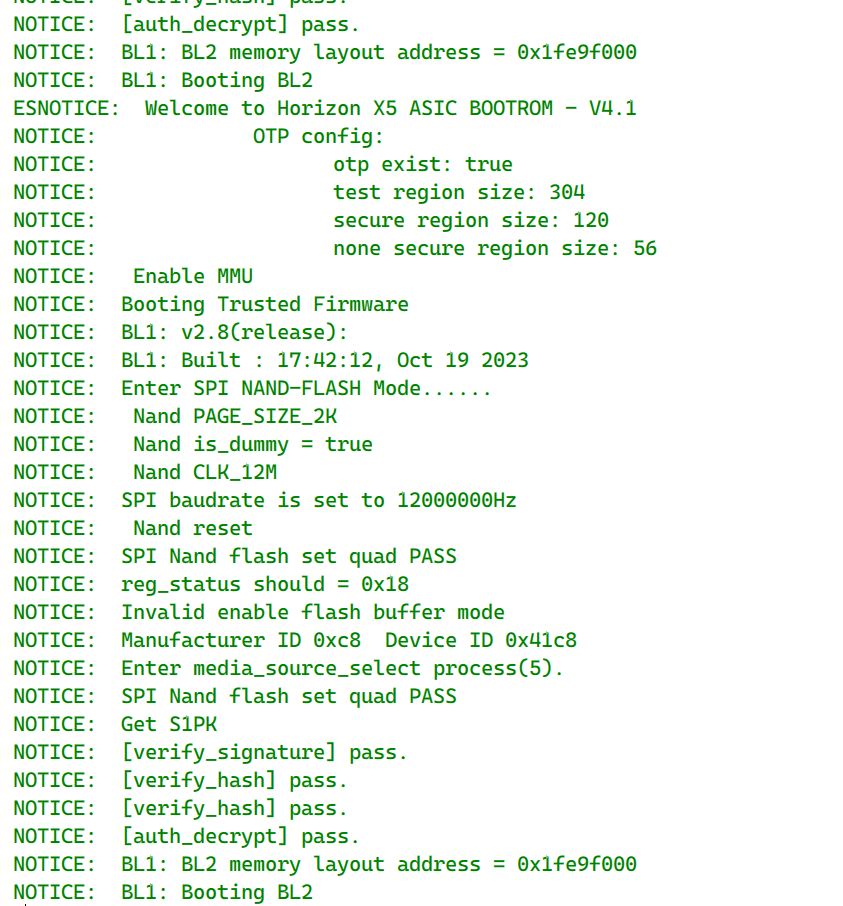
1. 串口日志:


2. 指示灯:绿灯常亮,橙灯从不闪烁

3. 已换另一块正常 X5 的可用 SD 卡 → 现象完全不变(排除 SD 卡)

4. 闪光口 USB 状态:
   - 已确认连接的是闪连接口(接口 3)
   - 已用验证过能读手机盘符的好线
   - 设备管理器显示「未知 USB 设备(设备描述符请求失败)」
   - 硬件 ID = USB\DEVICE_DESCRIPTOR_FAILURE(拿不到 VID/PID)
   - 已安装 XBurn v1.2.1 的两类驱动(均显示 Installed)
   - 已尝试更换 USB 端口

5. 板子此前可正常使用,某次上电后突然如此

请问:
- 这种情况下是否还有其它恢复手段?
- 是否需要走保修流程?

先说结论:绿灯常亮只代表供电正常,橙灯不闪说明系统从没启动完成;而闪连口(USB Device 口)要等设备端固件跑起来才会枚举,所以「设备描述符请求失败」和无法启动是同一个问题的两面——最可能是板载 NAND 里的 miniboot/引导损坏(USB、线、驱动都没问题的前提下),还有一条恢复路径可以试。

1. 裸板 + 标准供电先排除电源问题

拔掉所有外设(USB 外设、摄像头、M.2、40-Pin 模块),只用 5V/5A 原装适配器给板子供电(不要用电脑 USB 口供电,供电不足也会异常),看橙灯是否闪烁。社区有一例「绿灯亮、橙灯不亮」就是外设倒灌电触发了保护,裸板上电即恢复:s100p启动异常,绿灯能亮,但是橙灯不亮

2. 用 XBurn 的 Serial+USB(xmodem_fastboot)模式重刷 miniboot

这个模式就是给「设备无法正常启动」用的,不要求 USB 先能枚举:XBurn 先通过串口 Xmodem 把引导固件推下去,之后 USB 才以 fastboot 方式出现。接线和参数:

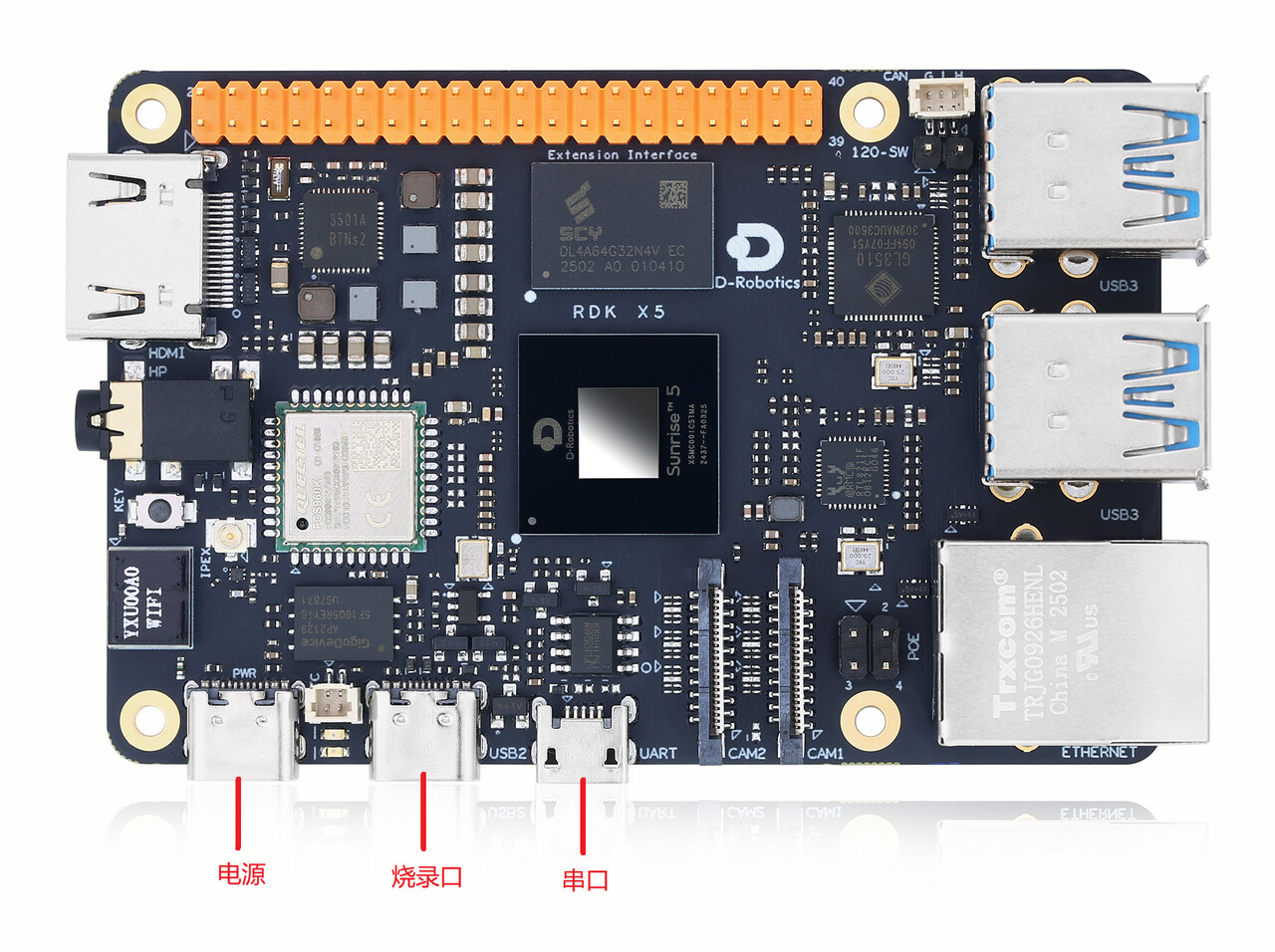
  • Micro-USB 调试串口连 PC(RDK X5 波特率 115200,X5 Module 是 921600)+ 烧录口 Type-C 连 PC + 5V/5A 独立供电
  • 产品类型 RDK X5,存储介质 NAND,固件类型 secure,连接类型 Serial+USB,下载模式 xmodem_fastboot
  • 固件从这里下载:Index of /downloads/miniboot/rdk_x5/

官方步骤:升级 miniboot | RDK X3/X5 DOC

3. 一个关键信息请补充

你贴的串口日志麻烦把文字内容发出来(或说明是哪种情况):完全无输出、卡在某一行(如 uboot、内核加载阶段)、还是有正常启动日志但中途停住。这直接决定下一步:

  • 串口完全无输出、Xmodem 也推不进去 → 基本可判定硬件级故障,建议走保修(联系购买渠道客服,或在论坛 @管理员 反馈);
  • 串口有输出但卡住 → 把卡住位置的日志贴出来,多半重刷 miniboot 就能救回。

现在日志还是这些,结果一上电绿灯和橙灯都亮了,无语了,刷boot都刷不了,驱动都下载了,就是说识别不到USB,我都试过,用这个USB线传输过文件了,就是不行,哎

日志其实已经把问题定位了:BOOTROM→BL1 阶段签名/校验全部 pass,但每次走到 BL1: Booting BL2 后又从头开始打印 → 板子在 BL2 阶段复位循环,就是 NAND 里的 miniboot/BL2 坏了(和 SD 卡无关,日志显示它走的是 SPI NAND)。这正是重刷 miniboot 能救的情况。

USB 识别不到是预期现象,不是线或驱动的问题:板子卡在 BL2,设备端的 fastboot 根本没跑起来,Type-C 烧录口就不会在 PC 上枚举(所以是「设备描述符请求失败」)。单独插 USB 等它出现,永远等不到。

必须用 XBurn 的 Serial+USB 连接类型 + xmodem_fastboot 下载模式,这个模式就是给无法启动的板子用的——先走串口把引导推下去,USB 之后才会以 fastboot 出现:

  1. 接线三根都要:
    • Micro-USB 调试串口 → PC(波特率 115200)
    • Type-C 烧录口 → PC
    • 5V/5A 电源适配器独立供电(别用电脑 USB 口供电)
  2. XBurn 配置:产品类型 RDK X5、存储介质 NAND、固件类型 secure、连接类型 Serial+USB、下载模式 xmodem_fastboot,板卡处填串口号和 115200。
  3. 固件从 Index of /downloads/miniboot/rdk_x5/ 下载最新压缩包并解压,镜像目录选解压出的文件夹,点「开始升级」,按提示给板子重新上电,XBurn 会先通过串口 Xmodem 传引导固件,传完后 USB 才会被识别并继续烧录。

官方步骤(含接线图):升级 miniboot | RDK X3/X5 DOC

如果你之前已经是用 Serial+USB 模式、Xmodem 阶段就失败(串口推不进去、日志还是原样循环),那基本可以判定硬件级故障,建议走保修:联系购买渠道客服,或在论坛 @管理员 反馈。

但是我试过很多线了,就是识别不到USB,导致我不能重刷miniboot

**
Running**

[MainThread][09:48:24] [INFO] xburn 1.2.1

[MainThread][09:48:24] [INFO] Platform: Windows 10 (AMD64)

[MainThread][09:48:24] [INFO] xburn Build Time 2026-05-18 17:34:06 [945979f-dirty]

invalid utf-8 sequence of 1 bytes from index 66

[MainThread][09:48:24] [INFO] Configuration merged with xburn config, command-line args and product config: {

“log_level”: “info”,

“product_type”: “X5”,

“link_type”: “serial_usb”,

“dl_mode”: “xmodem_fastboot”,

“img_files”: [

“D:\\download\\RDK X5\\product_20260408\\nand_disk.img”

],

“erase_scrub”: false,

“storage_type”: “nand”,

“security_type”: “secure”,

“boot_check”: true,

“batch_num”: 1,

“host_ip”: [

“192.168.1.100”

],

“board_ip”: [

“192.168.1.10”

],

“netmask”: [

“255.255.255.0”

],

“gateway”: [

“192.168.1.1”

],

“ipv6”: false,

“usb_port”: “usb2.0”,

“serial”: [

“COM3”

],

“baudrate”: [

“115200”

],

“mcu_serial”: [

“N/A”

],

“hsm_serial”: [

“N/A”

],

“erase_part”: [],

“select_part”: [

“all”

],

“backup_part”: [],

“fetch_part”: false,

“reboot”: true,

“compress_image”: true,

“check_version_latest”: true,

“support_images_name”: [

“*disk.img”,

“*disk.simg”

],

“support_baudrate”: [

“4800”,

“9600”,

“38400”,

“115200”,

“921600”

],

“xmodem_support_files”: “update files(*.img)”,

“ymodem_support_files”: “update files(*.img)”,

“dfu_support_files”: “update files(*.img *.json)”,

“fastboot_support_files”: “update files(*.img *.json)”,

“ota_support_files”: “update files(*.zip)”,

“mcu_support_files”: “update files(*.zip)”,

“separate”: “0x08000000”,

“ota_mode”: [

“sftp”

],

“boot_choose”: [

“misc”

],

“username”: “root”,

“password”: “root”,

“uboot_prompt”: “Hobot>”,

“login_prompt”: “login:”,

“shell_prompt”: “root@”,

“recovery_prompt”: “/userdata/cache”,

“boot_timeout”: 120,

“ota_update_timeout”: 180,

“ota_app_update_timeout”: 120,

“adb_detect_timeout”: 10,

“fastboot_detect_timeout”: 30,

“fastboot_timeout”: 4000,

“ddr_size”: “0x190000000”,

“load_address”: “0x90000000”,

“ota_result”: “/userdata/log/ota/result”,

“backup_timeout”: 1500,

“unzip_address”: “0xa0000000”,

“download_root”: “/userdata”,

invalid utf-8 sequence of 1 bytes from index 40

“boot_config”: [

{

“file”: “uart_usb/bl2_uart_ddr.bin”,

“uart”: “acore”,

“method”: “xmodem”,

“timeout”: 2

},

{

“file”: “uart_usb/bl3x_all.bin”,

“uart”: “acore”,

“method”: “xmodem”,

“timeout”: 2

}

],

“serial_prompt_info”: “[IMPORTANT] Please power on or reboot the Board!”,

“name”: “X5”,

“support_link_type”: [

“usb”,

“serial_usb”,

“serial_ethernet”,

“serial”

],

“support_partitions”: [

“all”,

“mbr”,

“miniboot”,

“miniboot_bak1”,

“misc”,

“uboot”,

“ubootenv”,

“vbmeta”,

“boot”,

“system”,

“hbre”,

“app”,

“private”,

“userdata”

],

“support_storage_type”: [

“emmc”

],

“support_firmware_type”: [

“secure”,

“nosecure”

],

“usb3_enable”: true,

“upfile_json”: [

“x5-soc-debug-gpt.json”,

“x5-soc-debug-nand-gpt.json”

],

“usb_select”: false,

“serial_into_usb”: “usb20”,

“usb_vendor”: “3652”,

“mmc_index”: “0”,

“cmd_reboot_usb2_fasboot”: “reboot -m usb2 -f”,

“cmd_reboot_usb3_fasboot”: “reboot -m usb3 -f”,

“original_img_dirs”: “D:\\download\\RDK X5\\product_20260408”

}

[MainThread][09:48:24] [INFO]

[MainThread][09:48:24] [INFO] ********************************************************************************

[MainThread][09:48:24] [INFO] Burning board [1/1], total boards: 1

[MainThread][09:48:24] [INFO] Product: X5

[MainThread][09:48:24] [INFO] Link type: serial_usb

[MainThread][09:48:24] [INFO] Download mode: xmodem_fastboot

[MainThread][09:48:24] [INFO] Serial: COM3

[MainThread][09:48:24] [INFO] Baudrate: 115200

[MainThread][09:48:24] [INFO] Image File(s): [‘D:\\download\\RDK X5\\product_20260408\\nand_disk.img’]

[MainThread][09:48:24] [INFO] Burn chain:

[MainThread][09:48:24] [INFO] Step 1: check_board_status → progress: [1, 5]%

[MainThread][09:48:24] [INFO] Step 2: prepare_boot → progress: [6, 10]%

[MainThread][09:48:24] [INFO] Step 3: xmodem_boot → progress: [11, 20]%

[MainThread][09:48:24] [INFO] Step 4: prepare_burn → progress: [21, 25]%

[MainThread][09:48:24] [INFO] Step 5: fastboot_burn → progress: [26, 85]%

[MainThread][09:48:24] [INFO] Step 6: after_burn → progress: [86, 90]%

[MainThread][09:48:24] [INFO] Step 7: check_burn_result → progress: [91, 100]%

[MainThread][09:48:24] [INFO] ********************************************************************************

[MainThread][09:48:24] [INFO]

[Burn thread-1][09:48:24] [INFO] Start burning…

[Burn thread-1][09:48:24] [INFO] Start step: check_board_status

[Burn thread-1][09:48:24] [PROGRESS] Board 1 burn progress 1.0%

[Burn thread-1][09:48:24] [INFO] Check board status to confirm the burn process…

[Burn thread-1][09:48:24] [INFO] Running probe_board_state…

[Burn thread-1][09:48:24] [INFO] Probing board state…

C[Burn thread-1][09:48:24] [INFO] State transition: UNKNOWN → UART_Download_Mode

[Burn thread-1][09:48:24] [INFO] Board is in UART_Download_Mode mode

[Burn thread-1][09:48:24] [INFO] Board state: UART_Download_Mode

[Burn thread-1][09:48:24] [INFO] Step ‘check_board_status’ completed successfully

[Burn thread-1][09:48:24] [PROGRESS] Board 1 burn progress 5.0%

[Burn thread-1][09:48:24] [INFO] Start step: prepare_boot

[Burn thread-1][09:48:24] [PROGRESS] Board 1 burn progress 6.0%

[Burn thread-1][09:48:24] [INFO] Prepare boot…

[Burn thread-1][09:48:24] [INFO] Step ‘prepare_boot’ completed successfully

[Burn thread-1][09:48:24] [PROGRESS] Board 1 burn progress 10.0%

[Burn thread-1][09:48:24] [INFO] Start step: xmodem_boot

[Burn thread-1][09:48:24] [PROGRESS] Board 1 burn progress 11.0%

[Burn thread-1][09:48:24] [INFO] Try entry UART download mode…

[Burn thread-1][09:48:24] [INFO] Successfully entered UART_DOWNLOAD mode.

CC[Burn thread-1][09:48:25] [INFO] Uart download wait 2 seconds …

CCCC[Burn thread-1][09:48:27] [INFO] Start uart download boot file D:\download\RDK X5\product_20260408\uart_usb/bl2_uart_ddr.bin, Total size: 675692 Bytes

[Burn thread-1][09:48:27] [INFO] start xmodem transfer.

[Burn thread-1][09:48:27] [PROGRESS] Board 1 burn progress 11.0%

[Burn thread-1][09:48:28] [ERROR] send error: expected ACK; got b’C’ for block 1

[Burn thread-1][09:48:28] [PROGRESS] Board 1 burn progress 11.0%

[Burn thread-1][09:48:28] [INFO] Transfer: 0.0% | Blocks: 0/660 | Errors: 1

[Burn thread-1][09:48:28] [ERROR] send error: expected ACK; got b’C’ for block 1

[Burn thread-1][09:48:29] [ERROR] send error: expected ACK; got b’C’ for block 1

[Burn thread-1][09:48:29] [ERROR] send error: expected ACK; got b’C’ for block 1

[Burn thread-1][09:48:30] [ERROR] send error: expected ACK; got b’C’ for block 1

[Burn thread-1][09:48:30] [ERROR] send error: expected ACK; got b’C’ for block 1

[Burn thread-1][09:48:31] [ERROR] send error: expected ACK; got b’C’ for block 1

[Burn thread-1][09:48:31] [ERROR] send error: expected ACK; got b’C’ for block 1

[Burn thread-1][09:48:32] [ERROR] send error: expected ACK; got b’C’ for block 1

[Burn thread-1][09:48:32] [ERROR] send error: expected ACK; got b’C’ for block 1

[Burn thread-1][09:48:33] [ERROR] send error: expected ACK; got b’C’ for block 1

[Burn thread-1][09:48:33] [PROGRESS] Board 1 burn progress 11.0%

[Burn thread-1][09:48:33] [INFO] Transfer: 0.0% | Blocks: 0/660 | Errors: 11

[Burn thread-1][09:48:33] [ERROR] send error: expected ACK; got b’C’ for block 1

[Burn thread-1][09:48:34] [ERROR] send error: expected ACK; got b’C’ for block 1

[Burn thread-1][09:48:34] [ERROR] send error: expected ACK; got b’C’ for block 1

[Burn thread-1][09:48:35] [ERROR] send error: expected ACK; got b’C’ for block 1

[Burn thread-1][09:48:35] [ERROR] send error: expected ACK; got b’C’ for block 1

[Burn thread-1][09:48:36] [ERROR] send error: expected ACK; got b’C’ for block 1

[Burn thread-1][09:48:36] [ERROR] send error: expected ACK; got b’C’ for block 1

[Burn thread-1][09:48:37] [ERROR] send error: expected ACK; got b’C’ for block 1

[Burn thread-1][09:48:38] [ERROR] send error: expected ACK; got b’C’ for block 1

[Burn thread-1][09:48:38] [ERROR] send error: expected ACK; got b’C’ for block 1

[Burn thread-1][09:48:38] [PROGRESS] Board 1 burn progress 11.0%

[Burn thread-1][09:48:38] [INFO] Transfer: 0.0% | Blocks: 0/660 | Errors: 21

[Burn thread-1][09:48:39] [ERROR] send error: expected ACK; got b’C’ for block 1

[Burn thread-1][09:48:39] [ERROR] send error: expected ACK; got b’C’ for block 1

[Burn thread-1][09:48:40] [ERROR] send error: expected ACK; got b’C’ for block 1

[Burn thread-1][09:48:40] [ERROR] send error: expected ACK; got b’C’ for block 1

[Burn thread-1][09:48:41] [ERROR] send error: expected ACK; got b’C’ for block 1

[Burn thread-1][09:48:41] [ERROR] send error: expected ACK; got b’C’ for block 1

[Burn thread-1][09:48:42] [ERROR] send error: expected ACK; got b’C’ for block 1

[Burn thread-1][09:48:42] [ERROR] send error: expected ACK; got b’C’ for block 1

[Burn thread-1][09:48:43] [ERROR] send error: expected ACK; got b’C’ for block 1

[Burn thread-1][09:48:43] [ERROR] send error: expected ACK; got b’C’ for block 1

[Burn thread-1][09:48:43] [PROGRESS] Board 1 burn progress 11.0%

[Burn thread-1][09:48:43] [INFO] Transfer: 0.0% | Blocks: 0/660 | Errors: 31

Process terminated, exit code: 1

[System] Process terminated via taskkill

[WARNING][System] xburn.exe terminated successfully

换线大概率没用——这不是线的问题。板子起不来时,USB 烧录口不会自己枚举:X5 无法启动的情况下,必须走 Serial+USB(xmodem_fastboot) 模式,先由串口用 Xmodem 把 miniboot 引导起来,USB 才会枚举成 fastboot 设备。只插 USB 线等它枚举是等不到的。

按这个顺序排查:

1. 确认插对口
X5 上有两个 Type-C:供电口的 Type-C 只供电、不带数据,烧录要用另一个 Type-C 烧录口,同时 Micro-USB 调试串口也要连 PC。接线如下图:

2. 用 XBurn 的 Serial+USB 模式烧

  • 连接类型选 Serial+USB,下载模式 xmodem_fastboot,产品类型 RDK X5,存储介质 NAND,固件类型 secure,波特率 115200
  • 固件从这里下载:Index of /downloads/miniboot/rdk_x5/
  • 点「开始升级」,看到提示后再插拔电源,串口引导成功后 USB 才会枚举开始下发。供电必须用 5V/5A 适配器,不要从电脑 USB 取电

3. 检查 PC 端驱动
Windows 需先按官方环境准备装驱动,否则 XBurn 认不到设备;Linux 下可在插拔电源后用 lsusb 看设备是否出现。

文档:

如果串口 Xmodem 引导这一步就没日志/失败,把串口输出贴出来再看。

日志其实是有进展的:板子已进入 UART 下载模式,check_board_status、prepare_boot 都通过了,说明串口链路没问题;那两条 invalid utf-8 sequence 是无害噪音,可忽略。USB 枚举在这条流程里是 Step 3 之后才发生的:XBurn 先经串口 Xmodem 把 bl2/bl3x 推进板子,这套固件跑起来后,烧录口才会枚举成 fastboot 设备。你的日志正好截断在 prepare_boot,所以现在还不能断定 USB 坏了。

按顺序确认三件事:

  1. 上电时机:XBurn 弹出 [IMPORTANT] Please power on or reboot the Board! 提示后再给板子上电/重新上电,Xmodem 引导窗口很短,错过就会在 Step 3 超时,板子永远到不了 fastboot,烧录口自然一直「设备描述符请求失败」。多试几次很正常。接线对照官方图(烧录口 Type-C 直连 PC,不过 hub;板子用独立 5V/5A 适配器供电,不要用 PC 口供电):

  1. 看日志结尾,两种情况结论完全不同:

    • Step 3 xmodem_boot 报 fail/timeout → 串口引导没成功,回到第 1 点重试;
    • xmodem 成功、但 Step 4/5 等不到 fastboot(设备管理器仍是描述符请求失败)→ 线、口、驱动你都排除过了,大概率是板子 USB 部分硬件故障,建议走保修(联系购买渠道客服或论坛 @管理员)。
  2. 顺带说明:橙灯闪烁才代表系统启动完成,常亮不等于正常启动。

麻烦把完整日志尾部(Step 3 之后到最后的 ERROR 行)贴出来,就能确定是上面哪种情况。

官方步骤参考:

整个流程是怎么样的?为什么我试了几次进度都是6%[MainThread][11:37:28] [INFO] xburn 1.2.1

[MainThread][11:37:28] [INFO] Platform: Windows 10 (AMD64)

[MainThread][11:37:28] [INFO] xburn Build Time 2026-05-18 17:34:06 [945979f-dirty]

invalid utf-8 sequence of 1 bytes from index 66

[MainThread][11:37:28] [INFO] Configuration merged with xburn config, command-line args and product config: {

“log_level”: “info”,

“product_type”: “X5”,

“link_type”: “serial_usb”,

“dl_mode”: “xmodem_fastboot”,

“img_files”: [

“D:\\download\\RDK X5\\product_20260408\\nand_disk.img”

],

“erase_scrub”: false,

“storage_type”: “nand”,

“security_type”: “secure”,

“boot_check”: true,

“batch_num”: 1,

“host_ip”: [

“192.168.1.100”

],

“board_ip”: [

“192.168.1.10”

],

“netmask”: [

“255.255.255.0”

],

“gateway”: [

“192.168.1.1”

],

“ipv6”: false,

“usb_port”: “usb2.0”,

“serial”: [

“COM3”

],

“baudrate”: [

“115200”

],

“mcu_serial”: [

“N/A”

],

“hsm_serial”: [

“N/A”

],

“erase_part”: [],

“select_part”: [

“all”

],

“backup_part”: [],

“fetch_part”: false,

“reboot”: true,

“compress_image”: true,

“check_version_latest”: true,

“support_images_name”: [

“*disk.img”,

“*disk.simg”

],

“support_baudrate”: [

“4800”,

“9600”,

“38400”,

“115200”,

“921600”

],

“xmodem_support_files”: “update files(*.img)”,

“ymodem_support_files”: “update files(*.img)”,

“dfu_support_files”: “update files(*.img *.json)”,

“fastboot_support_files”: “update files(*.img *.json)”,

“ota_support_files”: “update files(*.zip)”,

“mcu_support_files”: “update files(*.zip)”,

“separate”: “0x08000000”,

“ota_mode”: [

“sftp”

],

“boot_choose”: [

“misc”

],

“username”: “root”,

“password”: “root”,

“uboot_prompt”: “Hobot>”,

“login_prompt”: “login:”,

“shell_prompt”: “root@”,

“recovery_prompt”: “/userdata/cache”,

“boot_timeout”: 120,

“ota_update_timeout”: 180,

“ota_app_update_timeout”: 120,

“adb_detect_timeout”: 10,

“fastboot_detect_timeout”: 30,

“fastboot_timeout”: 4000,

“ddr_size”: “0x190000000”,

“load_address”: “0x90000000”,

“ota_result”: “/userdata/log/ota/result”,

“backup_timeout”: 1500,

“unzip_address”: “0xa0000000”,

“download_root”: “/userdata”,

invalid utf-8 sequence of 1 bytes from index 40

“boot_config”: [

{

“file”: “uart_usb/bl2_uart_ddr.bin”,

“uart”: “acore”,

“method”: “xmodem”,

“timeout”: 2

},

{

“file”: “uart_usb/bl3x_all.bin”,

“uart”: “acore”,

“method”: “xmodem”,

“timeout”: 2

}

],

“serial_prompt_info”: “[IMPORTANT] Please power on or reboot the Board!”,

“name”: “X5”,

“support_link_type”: [

“usb”,

“serial_usb”,

“serial_ethernet”,

“serial”

],

“support_partitions”: [

“all”,

“mbr”,

“miniboot”,

“miniboot_bak1”,

“misc”,

“uboot”,

“ubootenv”,

“vbmeta”,

“boot”,

“system”,

“hbre”,

“app”,

“private”,

“userdata”

],

“support_storage_type”: [

“emmc”

],

“support_firmware_type”: [

“secure”,

“nosecure”

],

“usb3_enable”: true,

“upfile_json”: [

“x5-soc-debug-gpt.json”,

“x5-soc-debug-nand-gpt.json”

],

“usb_select”: false,

“serial_into_usb”: “usb20”,

“usb_vendor”: “3652”,

“mmc_index”: “0”,

“cmd_reboot_usb2_fasboot”: “reboot -m usb2 -f”,

“cmd_reboot_usb3_fasboot”: “reboot -m usb3 -f”,

“original_img_dirs”: “D:\\download\\RDK X5\\product_20260408”

}

[MainThread][11:37:28] [INFO]

[MainThread][11:37:28] [INFO] ********************************************************************************

[MainThread][11:37:28] [INFO] Burning board [1/1], total boards: 1

[MainThread][11:37:28] [INFO] Product: X5

[MainThread][11:37:28] [INFO] Link type: serial_usb

[MainThread][11:37:28] [INFO] Download mode: xmodem_fastboot

[MainThread][11:37:28] [INFO] Serial: COM3

[MainThread][11:37:28] [INFO] Baudrate: 115200

[MainThread][11:37:28] [INFO] Image File(s): [‘D:\\download\\RDK X5\\product_20260408\\nand_disk.img’]

[MainThread][11:37:28] [INFO] Burn chain:

[MainThread][11:37:28] [INFO] Step 1: check_board_status → progress: [1, 5]%

[MainThread][11:37:28] [INFO] Step 2: prepare_boot → progress: [6, 10]%

[MainThread][11:37:28] [INFO] Step 3: xmodem_boot → progress: [11, 20]%

[MainThread][11:37:28] [INFO] Step 4: prepare_burn → progress: [21, 25]%

[MainThread][11:37:28] [INFO] Step 5: fastboot_burn → progress: [26, 85]%

[MainThread][11:37:28] [INFO] Step 6: after_burn → progress: [86, 90]%

[MainThread][11:37:28] [INFO] Step 7: check_burn_result → progress: [91, 100]%

[MainThread][11:37:28] [INFO] ********************************************************************************

[MainThread][11:37:28] [INFO]

[Burn thread-1][11:37:28] [INFO] Start burning…

[Burn thread-1][11:37:28] [INFO] Start step: check_board_status

[Burn thread-1][11:37:28] [PROGRESS] Board 1 burn progress 1.0%

[Burn thread-1][11:37:28] [INFO] Check board status to confirm the burn process…

[Burn thread-1][11:37:28] [INFO] Running probe_board_state…

[Burn thread-1][11:37:28] [INFO] Probing board state…

[Burn thread-1][11:37:29] [WARNING] Operation timed out after 0.5 seconds

[Burn thread-1][11:37:29] [WARNING] Board state: UNKNOWN

[Burn thread-1][11:37:29] [INFO] Step ‘check_board_status’ completed successfully

[Burn thread-1][11:37:29] [PROGRESS] Board 1 burn progress 5.0%

[Burn thread-1][11:37:29] [INFO] Start step: prepare_boot

[Burn thread-1][11:37:29] [PROGRESS] Board 1 burn progress 6.0%

[Burn thread-1][11:37:29] [INFO] Prepare boot…

[Burn thread-1][11:37:29] [INFO] Please try enter UART download mode

[Burn thread-1][11:37:29] [INFO] Try entry UART download mode…

[Burn thread-1][11:37:29] [WARNING] [IMPORTANT] Please power on or reboot the Board! Wait 30 seconds…

dSNOTICE: Welcome to Horizon X5 ASIC BOOTROM - V4.1

NOTICE: OTP c;;vg:

NOTICE: otp exist: true

NOTMSE: )test egi{;/{\u07ffsecreregio syg:'120NOTICE: none secure region size: 56

NOTICE: Enable MMU

NOTICE: Booting Trusted Firmware

NOTICE: BL1: v2.8(release):

NOTICE: BL1: Built : 17:42:12, Oct 19 2023

NOTICE: Enter SPI NAND-FLASH Mode…

NOTICE: Nand PAGE_SIZE_2K

NOTICE: Nand is_dummy = true

NOTICE: Nand CLK_12M

NOTICE: SPI baudrate is set to 12000000Hz

NOTICE: Nand reset

NOTICE: reg_status should = 0x18

NOTICE: Invalid enable flash buffer mode

NOTICE: Manufacturer ID 0xc8 Device ID 0x41c8

NOTICE: Enter media_source_select process(5).

NOTICE: SPI Nand flash set quad PASS

NOTICE: Get S1PK

NOTICE: [verify_signature] pass.

NOTICE: [verify_hash] pass.

NOTICE: [verify_hash] pass.

NOTICE: [auth_decrypt] pass.

NOTICE: BL1: BL2 memory layout address = 0x1fe9f000

NOTICE: BL1: Booting BL2

ESNOTICE: Welcome to Horizon X5 ASIC BOOTROM - V4.1

NOTICE: OTP config:

NOTICE: otp exist: true

NOTICE: test region size: 304

NOTICE: secure region size: 120

NOTICE: none secure region size: 56

NOTICE: Enable MMU

NOTICE: Booting Trusted Firmware

NOTICE: BL1: v2.8(release):

NOTICE: BL1: Built : 17:42:12, Oct 19 2023

NOTICE: Enter SPI NAND-FLASH Mode…

NOTICE: Nand PAGE_SIZE_2K

NOTICE: Nand is_dummy = true

NOTICE: Nand CLK_12M

NOTICE: SPI baudrate is set to 12000000Hz

NOTICE: Nand reset

NOTICE: SPI Nand flash set quad PASS

NOTICE: reg_status should = 0x18

NOTICE: Invalid enable flash buffer mode

NOTICE: Manufacturer ID 0xc8 Device ID 0x41c8

NOTICE: Enter media_source_select process(5).

NOTICE: SPI Nand flash set quad PASS

NOTICE: Get S1PK

NOTICE: [verify_signature] pass.

NOTICE: [verify_hash] pass.

NOTICE: [verify_hash] pass.

NOTICE: [auth_decrypt] pass.

NOTICE: BL1: BL2 memory layout address = 0x1fe9f000

NOTICE: BL1: Booting BL2

E[Burn thread-1][11:37:59] [WARNING] Entry UART download mode timed out after 30 seconds.

[Burn thread-1][11:37:59] [ERROR] Failed to enter UART download mode, Board state: UNKNOWN

[Burn thread-1][11:37:59] [ERROR] Step ‘prepare_boot’ failed

[Burn thread-1][11:37:59] [ERROR] Board-1, burn failed

[Burn thread-1][11:37:59] [ERROR] Board-1 [Storage: nand] Status: FAILED

Process terminated, exit code: 0

先回答流程问题,7 步和你日志里的一一对应:

  1. check_board_status(1-5%):串口探测板子当前状态
  2. prepare_boot(6-10%):让板子进入 UART 下载模式
  3. xmodem_boot(11-20%):经串口把 bl2/bl3x 引导固件推进板子
  4. prepare_burn(21-25%):等 USB 烧录口枚举成 fastboot 设备
  5. fastboot_burn(26-85%):经 USB 下发整个 nand_disk.img
    6-7. 重启、校验结果

USB 要到第 4 步才登场,你现在连第 2 步都没过,和 USB 无关。

卡 6% 的原因看你日志结尾就清楚了:Operation timed out after 0.5 seconds → Board state: UNKNOWN,然后停在 Try entry UART download mode...。对比你上午 09:48 那次日志——那次开头直接 State transition: UNKNOWN → UART_Download_Mode,说明串口链路本身是通的;这次 bootrom 在串口上没应答,工具进不去下载模式。最可能是 COM3 被别的程序占用,或上电时机没对上。

按顺序排查:

  1. 关掉所有可能占着 COM3 的程序(PuTTY / MobaXterm / 串口助手等,同一时间只能有一个程序占用串口)。之前你抓串口日志用的终端如果还开着,XBurn 就探测不到板子。
  2. 点开始烧录后,等日志/弹窗出现 [IMPORTANT] Please power on or reboot the Board! 再立刻重新上电(拔插 5V 电源或按复位)。bootrom 的串口下载窗口很短,错过就是 UNKNOWN,多试几次是正常的。
  3. 进入成功的标志是日志出现 Board state: UART_Download_Mode,随后走 Step 3。如果又出现上次那种 expected ACK; got b'C',是板子传输中复位或串口受扰:确认用独立 5V/5A 适配器供电(不要 PC 口取电)、串口线直连不过 hub,再重试。

那两条 invalid utf-8 sequence 是无害噪音,不用管。

流程细节可对照官方文档:连接类型与下载模式 | Xburn

为什么我的XBurn没有存储介质固定选项的

XBurn 里没有叫「存储介质固定」的选项——文档那句「存储介质固定为 NAND」是说:产品类型选 RDK X5 后,「存储介质」这个字段就定死为 NAND(自动填好或置灰),不需要你再找额外选项。烧 miniboot 时确认 存储介质=NAND、固件类型=secure 即可。

如果你的 XBurn 里连「存储介质」字段都没有、或产品类型下拉里没有 RDK X5,多半是版本太旧,去官网下最新版重装:

烧录参数完整说明在这页(含 X5 硬件连接图):

另外针对标题里的 USB 枚举失败:X5 烧录口是 Type-C,若 USB 连接模式下 PC 一直枚举不到设备,改用连接类型 Serial+USB + 下载模式 xmodem_fastboot(串口 Micro-USB 连 PC,波特率 115200),这个模式不依赖板子 U-Boot 正常,无法启动的板子也能烧。

[MainThread][11:56:54] [INFO] xburn 1.2.1

[MainThread][11:56:54] [INFO] Platform: Windows 10 (AMD64)

[MainThread][11:56:54] [INFO] xburn Build Time 2026-05-18 17:34:06 [945979f-dirty]

invalid utf-8 sequence of 1 bytes from index 66

[MainThread][11:56:54] [INFO] Configuration merged with xburn config, command-line args and product config: {

“log_level”: “info”,

“product_type”: “X5”,

“link_type”: “serial_usb”,

“dl_mode”: “xmodem_fastboot”,

“img_files”: [

“D:\\download\\RDK X5\\product_20260408\\nand_disk.img”

],

“erase_scrub”: false,

“storage_type”: “nand”,

“security_type”: “secure”,

“boot_check”: true,

“batch_num”: 1,

“host_ip”: [

“192.168.1.100”

],

“board_ip”: [

“192.168.1.10”

],

“netmask”: [

“255.255.255.0”

],

“gateway”: [

“192.168.1.1”

],

“ipv6”: false,

“usb_port”: “usb2.0”,

“serial”: [

“COM7”

],

“baudrate”: [

“115200”

],

“mcu_serial”: [

“N/A”

],

“hsm_serial”: [

“N/A”

],

“erase_part”: [],

“select_part”: [

“all”

],

“backup_part”: [],

“fetch_part”: false,

“reboot”: true,

“compress_image”: true,

“check_version_latest”: true,

“support_images_name”: [

“*disk.img”,

“*disk.simg”

],

“support_baudrate”: [

“4800”,

“9600”,

“38400”,

“115200”,

“921600”

],

“xmodem_support_files”: “update files(*.img)”,

“ymodem_support_files”: “update files(*.img)”,

“dfu_support_files”: “update files(*.img *.json)”,

“fastboot_support_files”: “update files(*.img *.json)”,

“ota_support_files”: “update files(*.zip)”,

“mcu_support_files”: “update files(*.zip)”,

“separate”: “0x08000000”,

“ota_mode”: [

“sftp”

],

“boot_choose”: [

“misc”

],

“username”: “root”,

“password”: “root”,

“uboot_prompt”: “Hobot>”,

“login_prompt”: “login:”,

“shell_prompt”: “root@”,

“recovery_prompt”: “/userdata/cache”,

“boot_timeout”: 120,

“ota_update_timeout”: 180,

“ota_app_update_timeout”: 120,

“adb_detect_timeout”: 10,

“fastboot_detect_timeout”: 30,

“fastboot_timeout”: 4000,

“ddr_size”: “0x190000000”,

“load_address”: “0x90000000”,

“ota_result”: “/userdata/log/ota/result”,

“backup_timeout”: 1500,

“unzip_address”: “0xa0000000”,

“download_root”: “/userdata”,

invalid utf-8 sequence of 1 bytes from index 40

“boot_config”: [

{

“file”: “uart_usb/bl2_uart_ddr.bin”,

“uart”: “acore”,

“method”: “xmodem”,

“timeout”: 2

},

{

“file”: “uart_usb/bl3x_all.bin”,

“uart”: “acore”,

“method”: “xmodem”,

“timeout”: 2

}

],

“serial_prompt_info”: “[IMPORTANT] Please power on or reboot the Board!”,

“name”: “X5”,

“support_link_type”: [

“usb”,

“serial_usb”,

“serial_ethernet”,

“serial”

],

“support_partitions”: [

“all”,

“mbr”,

“miniboot”,

“miniboot_bak1”,

“misc”,

“uboot”,

“ubootenv”,

“vbmeta”,

“boot”,

“system”,

“hbre”,

“app”,

“private”,

“userdata”

],

“support_storage_type”: [

“emmc”

],

“support_firmware_type”: [

“secure”,

“nosecure”

],

“usb3_enable”: true,

“upfile_json”: [

“x5-soc-debug-gpt.json”,

“x5-soc-debug-nand-gpt.json”

],

“usb_select”: false,

“serial_into_usb”: “usb20”,

“usb_vendor”: “3652”,

“mmc_index”: “0”,

“cmd_reboot_usb2_fasboot”: “reboot -m usb2 -f”,

“cmd_reboot_usb3_fasboot”: “reboot -m usb3 -f”,

“original_img_dirs”: “D:\\download\\RDK X5\\product_20260408”

}

[MainThread][11:56:54] [INFO]

[MainThread][11:56:54] [INFO] ********************************************************************************

[MainThread][11:56:54] [INFO] Burning board [1/1], total boards: 1

[MainThread][11:56:54] [INFO] Product: X5

[MainThread][11:56:54] [INFO] Link type: serial_usb

[MainThread][11:56:54] [INFO] Download mode: xmodem_fastboot

[MainThread][11:56:54] [INFO] Serial: COM7

[MainThread][11:56:54] [INFO] Baudrate: 115200

[MainThread][11:56:54] [INFO] Image File(s): [‘D:\\download\\RDK X5\\product_20260408\\nand_disk.img’]

[MainThread][11:56:54] [INFO] Burn chain:

[MainThread][11:56:54] [INFO] Step 1: check_board_status → progress: [1, 5]%

[MainThread][11:56:54] [INFO] Step 2: prepare_boot → progress: [6, 10]%

[MainThread][11:56:54] [INFO] Step 3: xmodem_boot → progress: [11, 20]%

[MainThread][11:56:54] [INFO] Step 4: prepare_burn → progress: [21, 25]%

[MainThread][11:56:54] [INFO] Step 5: fastboot_burn → progress: [26, 85]%

[MainThread][11:56:54] [INFO] Step 6: after_burn → progress: [86, 90]%

[MainThread][11:56:54] [INFO] Step 7: check_burn_result → progress: [91, 100]%

[MainThread][11:56:54] [INFO] ********************************************************************************

[MainThread][11:56:54] [INFO]

[Burn thread-1][11:56:54] [INFO] Start burning…

[Burn thread-1][11:56:54] [INFO] Start step: check_board_status

[Burn thread-1][11:56:54] [PROGRESS] Board 1 burn progress 1.0%

[Burn thread-1][11:56:54] [INFO] Check board status to confirm the burn process…

[Burn thread-1][11:56:54] [INFO] Running probe_board_state…

[Burn thread-1][11:56:54] [INFO] Probing board state…

C[Burn thread-1][11:56:55] [INFO] State transition: UNKNOWN → UART_Download_Mode

[Burn thread-1][11:56:55] [INFO] Board is in UART_Download_Mode mode

[Burn thread-1][11:56:55] [INFO] Board state: UART_Download_Mode

[Burn thread-1][11:56:55] [INFO] Step ‘check_board_status’ completed successfully

[Burn thread-1][11:56:55] [PROGRESS] Board 1 burn progress 5.0%

[Burn thread-1][11:56:55] [INFO] Start step: prepare_boot

[Burn thread-1][11:56:55] [PROGRESS] Board 1 burn progress 6.0%

[Burn thread-1][11:56:55] [INFO] Prepare boot…

[Burn thread-1][11:56:55] [INFO] Step ‘prepare_boot’ completed successfully

[Burn thread-1][11:56:55] [PROGRESS] Board 1 burn progress 10.0%

[Burn thread-1][11:56:55] [INFO] Start step: xmodem_boot

[Burn thread-1][11:56:55] [PROGRESS] Board 1 burn progress 11.0%

[Burn thread-1][11:56:55] [INFO] Try entry UART download mode…

[Burn thread-1][11:56:55] [INFO] Successfully entered UART_DOWNLOAD mode.

CC[Burn thread-1][11:56:56] [INFO] Uart download wait 2 seconds …

CCCC[Burn thread-1][11:56:58] [INFO] Start uart download boot file D:\download\RDK X5\product_20260408\uart_usb/bl2_uart_ddr.bin, Total size: 675692 Bytes

[Burn thread-1][11:56:58] [INFO] start xmodem transfer.

[Burn thread-1][11:56:58] [PROGRESS] Board 1 burn progress 11.0%

[Burn thread-1][11:56:59] [ERROR] send error: expected ACK; got b’C’ for block 1

[Burn thread-1][11:56:59] [PROGRESS] Board 1 burn progress 11.0%

[Burn thread-1][11:56:59] [INFO] Transfer: 0.0% | Blocks: 0/660 | Errors: 1

[Burn thread-1][11:56:59] [ERROR] send error: expected ACK; got b’C’ for block 1

[Burn thread-1][11:57:00] [ERROR] send error: expected ACK; got b’C’ for block 1

[Burn thread-1][11:57:00] [ERROR] send error: expected ACK; got b’C’ for block 1

[Burn thread-1][11:57:01] [ERROR] send error: expected ACK; got b’C’ for block 1

[Burn thread-1][11:57:01] [ERROR] send error: expected ACK; got b’C’ for block 1

[Burn thread-1][11:57:02] [ERROR] send error: expected ACK; got b’C’ for block 1

[Burn thread-1][11:57:02] [ERROR] send error: expected ACK; got b’C’ for block 1

[Burn thread-1][11:57:03] [ERROR] send error: expected ACK; got b’C’ for block 1

[Burn thread-1][11:57:03] [ERROR] send error: expected ACK; got b’C’ for block 1

[Burn thread-1][11:57:04] [ERROR] send error: expected ACK; got b’C’ for block 1

[Burn thread-1][11:57:04] [PROGRESS] Board 1 burn progress 11.0%

[Burn thread-1][11:57:04] [INFO] Transfer: 0.0% | Blocks: 0/660 | Errors: 11

[Burn thread-1][11:57:04] [ERROR] send error: expected ACK; got b’C’ for block 1

[Burn thread-1][11:57:05] [ERROR] send error: expected ACK; got b’C’ for block 1

[Burn thread-1][11:57:05] [ERROR] send error: expected ACK; got b’C’ for block 1

[Burn thread-1][11:57:06] [ERROR] send error: expected ACK; got b’C’ for block 1

[Burn thread-1][11:57:06] [ERROR] send error: expected ACK; got b’C’ for block 1

[Burn thread-1][11:57:07] [ERROR] send error: expected ACK; got b’C’ for block 1

[Burn thread-1][11:57:07] [ERROR] send error: expected ACK; got b’C’ for block 1

[Burn thread-1][11:57:08] [ERROR] send error: expected ACK; got b’C’ for block 1

[Burn thread-1][11:57:08] [ERROR] send error: expected ACK; got b’C’ for block 1

[Burn thread-1][11:57:09] [ERROR] send error: expected ACK; got b’C’ for block 1

[Burn thread-1][11:57:09] [PROGRESS] Board 1 burn progress 11.0%

[Burn thread-1][11:57:09] [INFO] Transfer: 0.0% | Blocks: 0/660 | Errors: 21

[Burn thread-1][11:57:09] [ERROR] send error: expected ACK; got b’C’ for block 1

[Burn thread-1][11:57:10] [ERROR] send error: expected ACK; got b’C’ for block 1

[Burn thread-1][11:57:10] [ERROR] send error: expected ACK; got b’C’ for block 1

[Burn thread-1][11:57:11] [ERROR] send error: expected ACK; got b’C’ for block 1

[Burn thread-1][11:57:11] [ERROR] send error: expected ACK; got b’C’ for block 1

[Burn thread-1][11:57:12] [ERROR] send error: expected ACK; got b’C’ for block 1

[Burn thread-1][11:57:12] [ERROR] send error: expected ACK; got b’C’ for block 1

[Burn thread-1][11:57:13] [ERROR] send error: expected ACK; got b’C’ for block 1

[Burn thread-1][11:57:13] [ERROR] send error: expected ACK; got b’C’ for block 1

[Burn thread-1][11:57:14] [ERROR] send error: expected ACK; got b’C’ for block 1

[Burn thread-1][11:57:14] [PROGRESS] Board 1 burn progress 11.0%

[Burn thread-1][11:57:14] [INFO] Transfer: 0.0% | Blocks: 0/660 | Errors: 31

[Burn thread-1][11:57:14] [ERROR] send error: expected ACK; got b’C’ for block 1

[Burn thread-1][11:57:15] [ERROR] send error: expected ACK; got b’C’ for block 1

[Burn thread-1][11:57:15] [ERROR] send error: NAK received 33 times, aborting.

[Burn thread-1][11:57:15] [INFO]

Transfer complete:

[Burn thread-1][11:57:15] [INFO] - File size: 675,692 bytes

[Burn thread-1][11:57:15] [INFO] - Time elapsed: 17.14 seconds

[Burn thread-1][11:57:15] [INFO] - Transfer rate: 38.49 KB/s

[Burn thread-1][11:57:15] [INFO] - Successful blocks: 0

[Burn thread-1][11:57:15] [INFO] - Transmission failed

[Burn thread-1][11:57:15] [PROGRESS] Board 1 burn progress 15.5%

[Burn thread-1][11:57:15] [ERROR] xmodem load D:\download\RDK X5\product_20260408\uart_usb/bl2_uart_ddr.bin fail

[Burn thread-1][11:57:15] [ERROR] Step ‘xmodem_boot’ failed

[Burn thread-1][11:57:15] [ERROR] Board-1, burn failed

[Burn thread-1][11:57:15] [ERROR] Board-1 [Storage: nand] Status: FAILED

Process terminated, exit code: 0又出现这种了
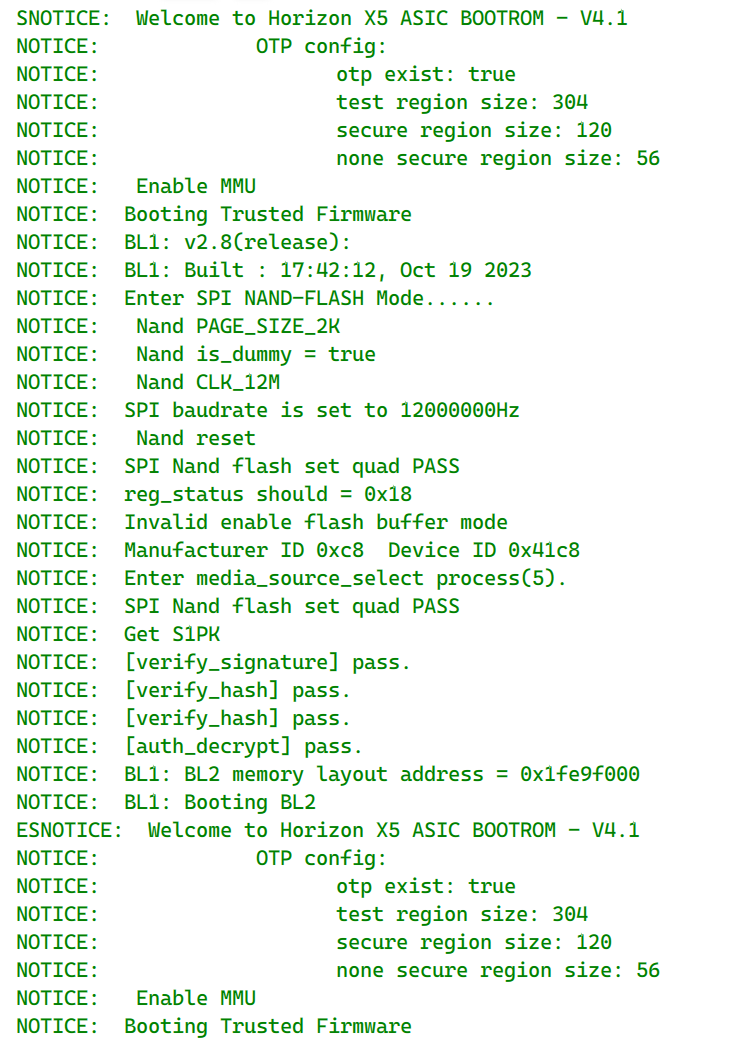
进度卡在 6% 的原因你上一份完整日志(11:37 那次)已经给出了:Entry UART download mode timed out after 30 seconds → Step 2 prepare_boot 失败。整个 xmodem_fastboot 流程是:

  1. Step 2-3:串口 Xmodem 先把 bl2/bl3x 引导固件推进板子(6%~20%)
  2. Step 4-5:这套固件跑起来后,Type-C 烧录口才枚举成 fastboot,开始下发镜像(26%~85%)

你的板子在 BL2 复位循环,上电后经常直接冲去读 NAND 而不是停在 UART 下载模式,所以 Step 2 要碰时机;而 09:48 那次进了下载模式,却卡在 expected ACK; got b'C' for block 1——板子没收到有效的第 1 块数据,这是 PC→板子串口方向的问题,跟 USB 线、烧录口无关。

按这两点分别处理:

  1. 抓上电时机:点「开始升级」后,等弹出 [IMPORTANT] Please power on or reboot the Board! 再插拔电源;若插拔后串口丢失,先不上电,看到提示后再上电(官方步骤原话)。串口出现连续 C 才代表停在下载模式,错过就重来,多试几次是正常的。

  2. 解决 block 1 不 ACK:

    • 关掉 MobaXterm 等一切占用该 COM 口的串口工具,XBurn 必须独占;
    • 确认 XBurn 里填的串口号和设备管理器当前实际枚举的一致(你先后出现过 COM3 和 COM7,说明串口在变,重新插拔后要核对);
    • Micro-USB 串口线直连 PC 后置 USB2.0 口,不过 hub,并换一根确认能传数据的 Micro-USB 线试试。

参考:升级 miniboot、连接类型与下载模式

如果串口已稳定进入下载模式(连续 C)、上面几条也都排除了,Xmodem 还是每个 block 1 都失败,那基本可判定板子硬件级故障,建议走保修:联系购买渠道客服,或在论坛 @管理员 反馈。

这次已经成功进入 UART_Download_Mode,问题不在 Type-C 烧录口,而是 XMODEM 第一个数据块没有被板端接收:板端一直回 C,所以进度停在 11%。

先关闭 MobaXterm/串口助手,确保 XBurn 独占 COM7;重点更换 Micro-USB 调试串口线和电脑 USB 口,板子继续用独立 5V/5A 供电。若换线、换 USB 口,甚至换一台电脑后仍始终是 expected ACK; got b'C' for block 1,基本就是板端 UART RX 链路异常,建议走售后检测。

官方步骤:升级 miniboot | RDK X3/X5 DOC