RDK YOLO Toolkit —— 用 Skill 跑通 YOLO → RDK X5 全流程部署
把 YOLO 训练 → ONNX 导出 → BPU 量化 → 板端推理 → TROS ROS2 集成做成一份 Claude Agent Skill。本文记录一次完整端到端跑通的命令、日志和性能数据。
1. 这个 Skill 是什么
RDK YOLO Toolkit v1.0 是一份 Claude Code 可加载的 Agent Skill(基于 Anthropic 的 Agent Skills 机制)。
放进 Claude Code 后,让 Agent 自动完成 6 阶段流水线:
[训练机 GPU]                              [板端 RDK X5]
   阶段 0  阶段 1  阶段 2  阶段 3            阶段 -1  阶段 4   阶段 5
   conda → 数据 → train → ONNX+量化  →→→   自检 → Python推理 → TROS/ROS2
   (一次性)                       *.bin                Forward<30ms  /hobot_dnn_detection
每个阶段 Agent 用自然语言询问环境SSH 远程 / 输出指导),用户自然语言回答即可。
支持的模型
基于 rdk_model_zoo 的 ultralytics_yolo 和 ultralytics_yolo26 两个 sample:
| 系列 | 检测 | 分割 | 姿态 | OBB | 分类 (224) |
|---|---|---|---|---|---|
| YOLOv5u / v8 / v9 / v10 / v11 / v12 / v13 |  |
(v8/v9/v11) |
(v8/v11) |
— | |
| YOLO26 (n/s/m/l/x) | |
|
|
|
|
目标平台
v1.0:RDK X5(bayes-e BPU,hb_mapper 1.24.x,OS ≥ 3.5.0)。
2. 装 & 用
2.1 准备
- 训练机:x86 Linux + NVIDIA GPU(实测 WSL2 + RTX 3060 Laptop 可用)
- 板端:RDK X5,OS ≥ 3.5.0-beta,dnn_node ≥ 2.6.1
- 本地:Claude Code(参考 安装指南)实测 Codex / Opencode+GLM 均可完成任务。
2.2 安装 Skill
下载 RDK_YOLO_Toolkit_v1.0.zip(708 KB)并解压。包结构:
RDK_YOLO_Toolkit_v1.0/
├── SKILL.md                        # 主入口(899 行,AI 加载这一份即可)
├── README.md
├── examples/
│   ├── data.yaml                   # YOLO 数据集 yaml 模板
│   ├── custom_workconfig.json      # TROS HobotDnn 配置(dnn_Parser=ultralytics_yolo)
│   └── custom.list                 # 类别名占位
├── scripts/
│   ├── install_train_env.sh        # 训练机一键装环境
│   └── check_rdkx5_env.sh          # RDK X5 板端环境自检
└── screenshots/                    # 实测效果图(6 张)
按 Agent Skills 文档 放到 skills 目录即可。
2.3 触发对话
在 Claude Code 里说一句:
帮我用 YOLOv11s 训自定义检测模型,部署到 RDK X5
Agent 自动加载 skill,按节点对话式追问环境,你用自然语言回答(贴 ssh 命令 / 说"本机就行" / 说"只要命令"都行)。
3. 实战记录:YOLOv11s 自定义 3 类检测
3.1 数据集
- 自定义场景:小车导航
- 3 类:
park/qrcode/obstacle - 训练集 32 张 + 验证集 8 张
- 校准集:训练集 32 张全部复用
3.2 训练(RTX 3060 Laptop @ WSL2)
Agent 自动跑训练机环境检测:
SSH 通了 ✅
Linux PC-... 6.6.87.2-microsoft-standard-WSL2 #1 SMP PREEMPT_DYNAMIC x86_64
GPU 0: NVIDIA GeForce RTX 3060 Laptop GPU (UUID: ...)
环境装包过程中触发了 4 个真实问题,Skill 已经在 SKILL.md 里写好了应对:
| 问题 | 报错 | Skill 中的解法 |
|---|---|---|
| conda 26+ ToS | CondaToSNonInteractiveError: Terms of Service have not been accepted |
conda tos accept --override-channels --channel ... |
| pip 源超时 | Retrying ... ReadTimeoutError ... download.pytorch.org |
换清华源 + --timeout 60 --retries 10 |
| 量化挂在 pkg_resources | ModuleNotFoundError: No module named 'pkg_resources' |
pip install setuptools |
| 训练卡在 Arial.ttf | Download failure, retrying ... ultralytics.com/assets/Arial.ttf |
cp /usr/share/fonts/truetype/dejavu/DejaVuSans.ttf ~/.config/Ultralytics/Arial.ttf |
训练命令:
yolo detect train model=yolo11s.pt data=dataset/data.yaml epochs=100 imgsz=640 \
  batch=16 device=0 project=runs name=yolov11s_park exist_ok=True
训练完成日志:
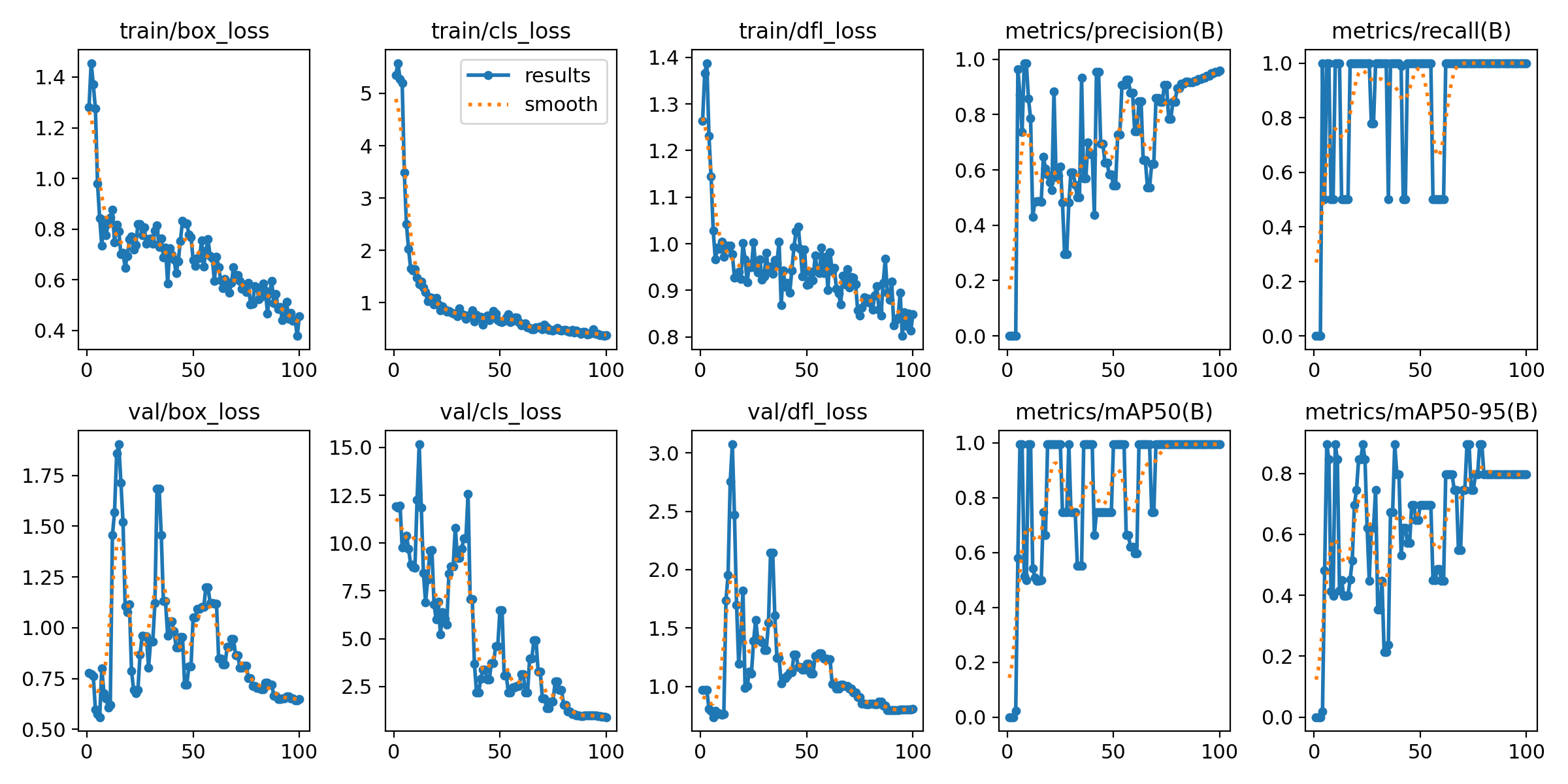
100 epochs completed in 0.044 hours.
YOLO11s summary (fused): 101 layers, 9,413,961 parameters, 21.3 GFLOPs

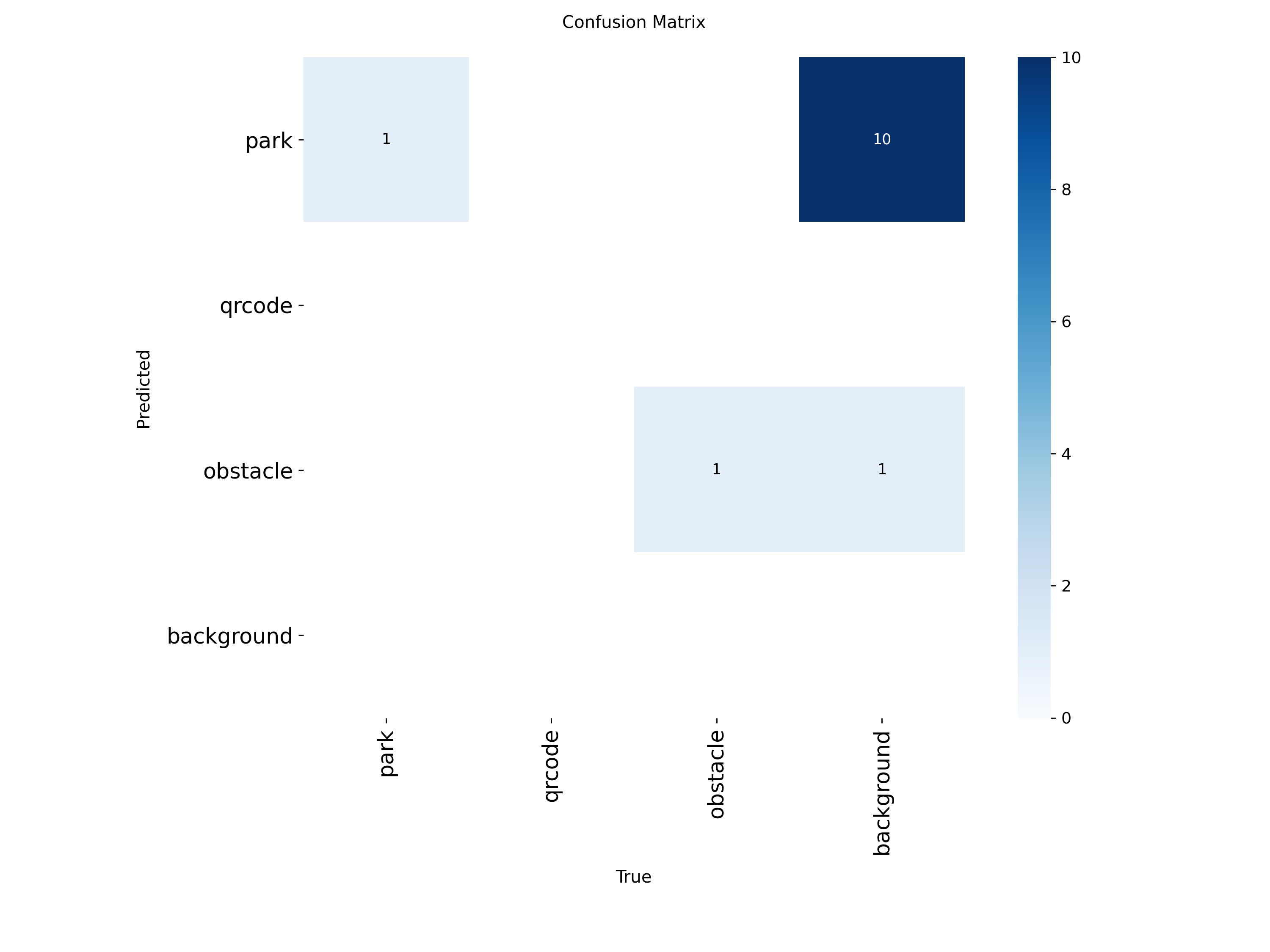
                 Class     Images  Instances     Box(P    R   mAP50  mAP50-95)
                  all          8          2     0.845    1   0.995    0.895
                  park          1          1     0.734    1   0.995    0.995
              obstacle          1          1     0.957    1   0.995    0.796
3 分钟训完,mAP50 = 0.995,mAP50-95 = 0.895,best.pt 19 MB。
3.3 ONNX 导出
python3 export_monkey_patch.py --pt best.pt
日志:
[Cauchy] Replaced Attention_forward in attn
[Cauchy] Replaced Detect_forward in 23
Ultralytics 8.4.63 🚀 Python-3.10.20 torch-2.5.1+cu121

PyTorch: starting from 'best.pt' with input shape (1, 3, 640, 640) BCHW
ONNX: starting export with onnx 1.15.0 opset 11...
ONNX: export success ✅ 0.7s, saved as 'best.onnx' (36.0 MB)
6 个独立 NHWC 输出(3 stride × 2 [cls, bbox]):(1,80,80,3) (1,80,80,64) (1,40,40,3) (1,40,40,64) (1,20,20,3) (1,20,20,64)。
3.4 量化(mapper.py 自动调 hb_mapper)
python3 mapper.py --onnx best.onnx --cal-images ./calibration_data \
  --cal-sample-num 32 --optimize-level O3 --output-dir .
mapper.py 内部生成 .temporary_workspace/config.yaml(用户不需手写),关键字段:
model_parameters:
  onnx_model: 'best.onnx'
  march: "bayes-e"
  output_model_file_prefix: 'best_bayese_640x640_nv12'
input_parameters:
  input_type_rt: 'nv12'
  input_type_train: 'rgb'
  input_layout_train: 'NCHW'
  norm_type: 'data_scale'
  scale_value: 0.003921568627451     # = 1/255
calibration_parameters:
  cal_data_dir: '...calibration_data_temporary_folder'
  cal_data_type: 'float32'
  calibration_type: 'default'
  optimization: set_Softmax_input_int8,set_Softmax_output_int8
compiler_parameters:
  jobs: 16
  compile_mode: 'latency'
  debug: true
  optimize_level: 'O3'
量化完成后 cosine similarity 日志:
======================================================================
Output      Cosine Similarity  L1 Distance  L2 Distance  Chebyshev Distance
----------------------------------------------------------------------
output0     0.999921           0.097216     0.000950     1.235699
478         0.995124           0.118130     0.000285     3.842017
492         0.999865           0.128738     0.002406     0.944633
500         0.995682           0.133142     0.000619     3.630603
514         0.999161           0.259361     0.010596     3.175956
522         0.996972           0.153208     0.001568     2.810952
======================================================================

2026-06-10 16:39:33,405 INFO Convert to runtime bin file successfully!
2026-06-10 16:39:33,406 INFO End Model Convert
耗时约 24 分钟(O3 优化 + 32 张校准),输出 best_bayese_640x640_nv12.bin 9.9 MB。
官方文档
quantize_compile.rst.txt红线:cosine < 0.8 视为 significant loss。本次全部 ≥ 0.995。
3.5 板端 Python 推理(hbm_runtime)
板端环境自检:
OS: 3.5.0-beta
hbm_runtime: ✅
hrt_model_exec: /usr/sbin/hrt_model_exec
cv2 4.11.0 | numpy 1.26.4
/dev/bpu  /dev/bpu_core0
跑 main.py:
cd /home/root/inference/rdk_model_zoo/samples/vision/ultralytics_yolo/runtime/python
python3 main.py --task detect \
  --model-path ../../model/best_bayese_640x640_nv12.bin \
  --test-img ../../test_data/test.jpg \
  --label-file ../../test_data/custom_classes.names \
  --classes-num 3 --reg 16 --strides 8,16,32 \
  --score-thres 0.25 --nms-thres 0.7
实测日志:
[BPU_PLAT]BPU Platform Version(1.3.6)! soc info(x5)
[HBRT] set log level as 0. version = 3.15.55.0
[DNN] Runtime version = 1.24.5_(3.15.55 HBRT)
[A][DNN][packed_model.cpp:247][Model] [HorizonRT] The model builder version = 1.24.3

[Ultralytics_YOLO] Load Model time = 344.98 ms
[Ultralytics_YOLO] Pre-process time = 48.75 ms
[Ultralytics_YOLO] Forward time = 22.23 ms
[Ultralytics_YOLO] Post Process time = 9.72 ms
[YOLO26] (224, 255, 640, 478) -> park: 0.92
[YOLO26] (348, 71, 640, 235) -> park: 0.49
另一张图:
[Ultralytics_YOLO] Load Model time = 310.61 ms
[Ultralytics_YOLO] Pre-process time = 7.81 ms
[Ultralytics_YOLO] Forward time = 18.33 ms
[Ultralytics_YOLO] Post Process time = 4.58 ms
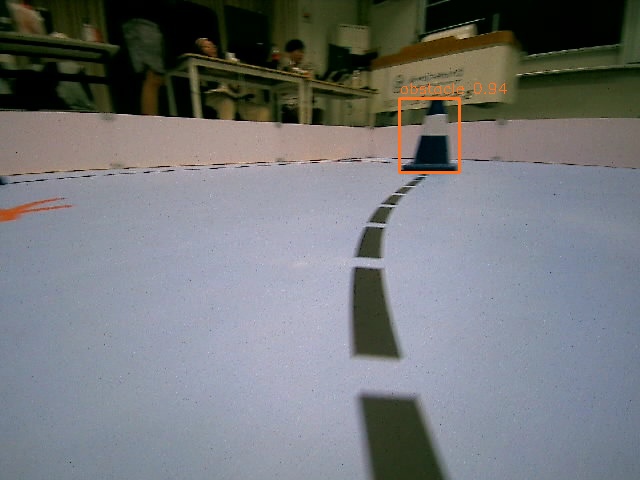
[YOLO26] (399, 98, 459, 172) -> obstacle: 0.94
3.6 TROS ROS2 集成(hbmem 零拷贝)
custom_workconfig.json:
{
  "model_file": "config/best_bayese_640x640_nv12.bin",
  "task_num": 4,
  "dnn_Parser": "ultralytics_yolo",
  "model_output_count": 6,
  "reg_max": 16,
  "class_num": 3,
  "cls_names_list": "config/custom.list",
  "strides": [8, 16, 32],
  "score_threshold": 0.25,
  "nms_threshold": 0.7,
  "nms_top_k": 300,
  "output_order": [0, 1, 2, 3, 4, 5]
}
注意
dnn_Parser用"ultralytics_yolo",不是官方默认/opt/tros/humble/lib/dnn_node_example/config/yolov11workconfig.json里的"yolov8"。
板端无摄像头时用 hobot_image_publisher 循环发图验证完整 ROS2 链路:
# 后台 1:图像源 → /hbmem_img(注意必须把默认 /test_msg 改成 /hbmem_img)
nohup ros2 launch hobot_image_publisher hobot_image_publisher.launch.py \
  publish_image_source:=/home/root/hobot_ws/config/test.jpg \
  publish_image_format:=jpg \
  publish_source_image_w:=640 publish_source_image_h:=480 \
  publish_fps:=10 publish_is_loop:=True \
  publish_message_topic_name:=/hbmem_img \
  publish_is_shared_mem:=True > pub.log 2>&1 &

# 后台 2:dnn_node 订阅 /hbmem_img → 发 /hobot_dnn_detection
nohup bash -c "cd /home/root/hobot_ws && \
  ros2 run dnn_node_example example --ros-args \
    -p feed_type:=1 -p is_shared_mem_sub:=1 \
    -p config_file:=config/custom_workconfig.json" > dnn.log 2>&1 &
ros2 topic hz /hobot_dnn_detection:
average rate: 9.909
        min: 0.067s max: 0.134s std dev: 0.01349s window: 42
average rate: 9.982
        min: 0.067s max: 0.134s std dev: 0.01298s window: 53
average rate: 9.940
average rate: 9.947
ros2 topic echo --once /hobot_dnn_detection(一帧消息样本):
header:
  stamp: { sec: 1781084919, nanosec: 319679973 }
  frame_id: '244'
fps: 10
perfs:
- type: best_bayese_640x640_nv12_recvedimg
  time_ms_duration: 9.0
- type: best_bayese_640x640_nv12_preprocess
  time_ms_duration: 2.0
- type: best_bayese_640x640_nv12_predict_infer
  time_ms_duration: 15.0
- type: best_bayese_640x640_nv12_postprocess
  time_ms_duration: 1.0
- type: best_bayese_640x640_nv12_pipeline
  time_ms_duration: 29.0
targets:
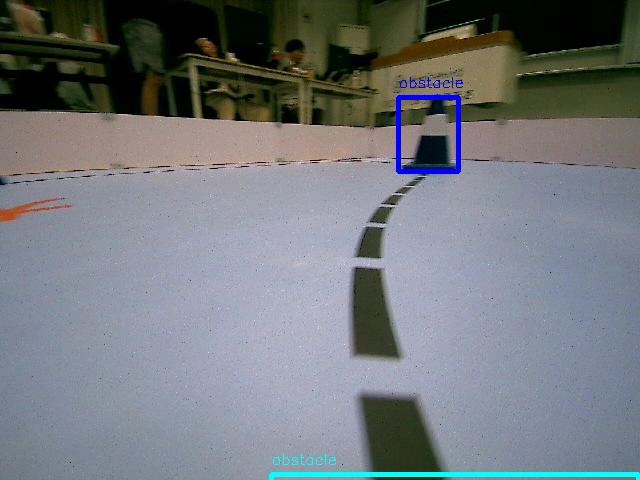
- type: obstacle
  rois:
  - rect: { x_offset: 398, y_offset: 97, height: 74, width: 61 }
    confidence: 0.9368804097175598
- type: park
  rois:
  - rect: { x_offset: 202, y_offset: 481, height: 157, width: 436 }
    confidence: 0.6118204593658447
4. 性能数据汇总
YOLOv11s + 自定义 3 类 + 640x640 @ RDK X5(OS 3.5.0-beta / dnn_node 2.6.1 / hbmem 零拷贝):
| 阶段 | 数值 |
|---|---|
| 训练(RTX 3060 Laptop) | 3 分钟 / 100 epoch |
| 训练 mAP50 | 0.995 |
| 训练 mAP50-95 | 0.895 |
| ONNX 导出 | 0.7 秒 |
| ONNX 大小 | 36 MB |
| hb_mapper 量化(O3,32 张校准) | ~24 分钟 |
| 量化后 bin | 9.9 MB |
| 量化精度(cosine) | 0.9951 ~ 0.9999 |
| 板端 Load Model | 310 ~ 345 ms(一次性) |
| 板端 Preprocess | 2 ~ 50 ms |
| 板端 BPU Forward | 18 ~ 22 ms(Python 路径)/ 15 ms(hbmem 零拷贝路径) |
| 板端 Postprocess | 1 ~ 10 ms |
| ROS2 端到端 / 帧 | 29 ms |
| ROS2 实测帧率 | 9.95 Hz(publisher fps=10 满吃) |
| ROS2 消息类型 | ai_msgs/msg/PerceptionTargets |
5. 资源
-
Skill 下载:RDK_YOLO_Toolkit_v1.0.zip (707.3 KB)
-
Skill Hub:rdk-yolo-toolkit
-
官方工具链文档 v1.2.6:地平线旭日5 算法工具链 — Horizon Open Explorer
-
rdk_model_zoo 仓库:https://github.com/D-Robotics/rdk_model_zoo
-
ultralytics_yolo sample:https://github.com/D-Robotics/rdk_model_zoo/tree/rdk_x5/samples/vision/ultralytics_yolo
-
ultralytics_yolo26 sample:https://github.com/D-Robotics/rdk_model_zoo/tree/rdk_x5/samples/vision/ultralytics_yolo26
-
官方工具链更新地址 :【持续更新】地瓜机器人工具链 & OELLM 最新版本发布汇总
-
Claude Code:https://claude.com/claude-code
-
Agent Skills 文档:App unavailable in region | Claude
本文实测环境:训练机 = WSL2 + Ubuntu + RTX 3060 Laptop GPU;板端 = RDK X5 + OS 3.5.0-beta + dnn_node 2.6.1 + BPU 1.3.6 + HBRT 3.15.55.0 + hb_mapper 1.24.3。所有日志和截图来自一次完整端到端跑通的产物目录,未做处理。