板卡型号:RDK X5
系统和minibot均为最新版本
hb_perf_result:

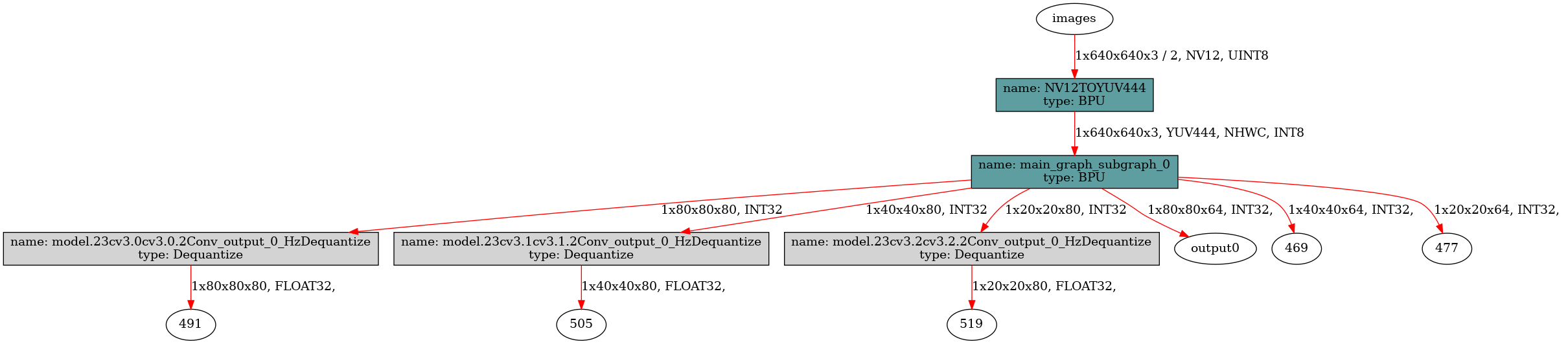
my_yolo11_workconfig.json
块引用{
“model_file”: “yolo11n_detect_bayese_640x640_nv12_modified.bin”,
“dnn_Parser”: “yolov8”,
“model_output_count”: 6,
“reg_max”: 16,
“class_num”: 80,
“cls_names_list”: “config/coco.list”,
“strides”: [8, 16, 32],
“score_threshold”: 0.25,
“nms_threshold”: 0.7,
“nms_top_k”: 300
}
报错信息
块引用
sunrise@ubuntu:~/yolo11_ws$ ros2 launch dnn_node_example dnn_node_example.launch.py dnn_example_config_file:=config/my_yolo11_workconfig.json
[INFO] [launch]: All log files can be found below /home/sunrise/.ros/log/2025-06-25-17-39-43-249730-ubuntu-38148
[INFO] [launch]: Default logging verbosity is set to INFO
dnn_node_example_path is /opt/tros/humble/lib/dnn_node_example
cp_cmd is cp -r /opt/tros/humble/lib/dnn_node_example/config .
camera_type is usb
using usb cam
Hobot shm pkg enables zero-copy with fastrtps profiles file: /opt/tros/humble/lib/hobot_shm/config/shm_fastdds.xml
Hobot shm pkg sets RMW_FASTRTPS_USE_QOS_FROM_XML: 1
config_file_path is /opt/tros/humble/lib/hobot_usb_cam/config/usb_camera_calibration.yaml
env of RMW_FASTRTPS_USE_QOS_FROM_XML is 1 , ignore env setting
env of RMW_FASTRTPS_USE_QOS_FROM_XML is 1 , ignore env setting
webserver has launch
env of RMW_FASTRTPS_USE_QOS_FROM_XML is 1 , ignore env setting
config_file_path is /opt/tros/humble/lib/hobot_usb_cam/config/usb_camera_calibration.yaml
env of RMW_FASTRTPS_USE_QOS_FROM_XML is 1 , ignore env setting
env of RMW_FASTRTPS_USE_QOS_FROM_XML is 1 , ignore env setting
env of RMW_FASTRTPS_USE_QOS_FROM_XML is 1 , ignore env setting
env of RMW_FASTRTPS_USE_QOS_FROM_XML is 1 , ignore env setting
webserver has launch
[INFO] [hobot_usb_cam-1]: process started with pid [38177]
[INFO] [hobot_codec_republish-2]: process started with pid [38179]
[INFO] [example-3]: process started with pid [38181]
[INFO] [websocket-4]: process started with pid [38183]
[hobot_codec_republish-2] [WARN] [1750844384.389317341] [hobot_codec_decoder]: Parameters:
[hobot_codec_republish-2] sub_topic: /image
[hobot_codec_republish-2] pub_topic: /hbmem_img
[hobot_codec_republish-2] channel: 1
[hobot_codec_republish-2] in_mode: ros
[hobot_codec_republish-2] out_mode: shared_mem
[hobot_codec_republish-2] in_format: jpeg
[hobot_codec_republish-2] out_format: nv12
[hobot_codec_republish-2] enc_qp: 10
[hobot_codec_republish-2] jpg_quality: 60
[hobot_codec_republish-2] input_framerate: 30
[hobot_codec_republish-2] output_framerate: -1
[hobot_codec_republish-2] dump_output: 0
[hobot_codec_republish-2] [WARN] [1750844384.406202565] [HobotCodecImpl]: platform x5
[hobot_usb_cam-1] [WARN] [1750844384.531485454] [hobot_usb_cam]: framerate: 30
[hobot_usb_cam-1] [WARN] [1750844384.532378541] [hobot_usb_cam]: pixel_format_name: mjpeg
[hobot_usb_cam-1] [WARN] [1750844384.572985722] [hobot_usb_cam]: Camera calibration file: [/opt/tros/humble/lib/hobot_usb_cam/config/usb_camera_calibration.yaml] does not exist!
[hobot_usb_cam-1] If you need calibration msg, please make sure the calibration file path is correct and the calibration file exists!
[hobot_usb_cam-1] [WARN] [1750844384.612691900] [hobot_usb_cam]: Try to open device [/dev/video0]
[example-3] [WARN] [1750844384.849870966] [dnn_example_node]: Parameter:
[example-3] feed_type(0:local, 1:sub): 1
[example-3] image: config/test.jpg
[example-3] image_type: 0
[example-3] dump_render_img: 0
[example-3] is_shared_mem_sub: 1
[example-3] config_file: config/my_yolo11_workconfig.json
[example-3] msg_pub_topic_name: hobot_dnn_detection
[example-3] info_msg_pub_topic_name: hobot_dnn_detection_info
[example-3] ros_img_topic_name: /image
[example-3] sharedmem_img_topic_name: /hbmem_img
[example-3] [WARN] [1750844384.863143387] [dnn_example_node]: Load [80] class types from file [config/coco.list]
[example-3] [WARN] [1750844384.863316471] [dnn_example_node]: Parameter:
[example-3] model_file_name: /opt/hobot/model/x5/basic/yolov8_640x640_nv12.bin
[example-3] model_name:
[example-3] [WARN] [1750844384.863392971] [dnn_example_node]: model_file_name_: /opt/hobot/model/x5/basic/yolov8_640x640_nv12.bin, task_num: 4
[hobot_usb_cam-1] [WARN] [1750844384.901750478] [hobot_usb_cam]: This devices supproted formats:
[hobot_usb_cam-1] [WARN] [1750844384.902027021] [hobot_usb_cam]: Motion-JPEG: 1920 x 1080 (30 Hz)
[hobot_usb_cam-1] [WARN] [1750844384.902127813] [hobot_usb_cam]: Motion-JPEG: 1920 x 1080 (30 Hz)
[hobot_usb_cam-1] [WARN] [1750844384.902169146] [hobot_usb_cam]: Motion-JPEG: 160 x 120 (30 Hz)
[hobot_usb_cam-1] [WARN] [1750844384.902206396] [hobot_usb_cam]: Motion-JPEG: 320 x 240 (30 Hz)
[hobot_usb_cam-1] [WARN] [1750844384.902244563] [hobot_usb_cam]: Motion-JPEG: 352 x 288 (30 Hz)
[hobot_usb_cam-1] [WARN] [1750844384.902281063] [hobot_usb_cam]: Motion-JPEG: 640 x 480 (30 Hz)
[hobot_usb_cam-1] [WARN] [1750844384.902318022] [hobot_usb_cam]: Motion-JPEG: 800 x 600 (30 Hz)
[hobot_usb_cam-1] [WARN] [1750844384.902354563] [hobot_usb_cam]: Motion-JPEG: 1024 x 768 (30 Hz)
[hobot_usb_cam-1] [WARN] [1750844384.902391272] [hobot_usb_cam]: Motion-JPEG: 1280 x 720 (30 Hz)
[hobot_usb_cam-1] [WARN] [1750844384.902428147] [hobot_usb_cam]: Motion-JPEG: 1280 x 1024 (30 Hz)
[hobot_usb_cam-1] [WARN] [1750844384.902464980] [hobot_usb_cam]: Motion-JPEG: 1920 x 1080 (30 Hz)
[hobot_usb_cam-1] [WARN] [1750844384.902501855] [hobot_usb_cam]: Motion-JPEG: 1920 x 1080 (30 Hz)
[hobot_usb_cam-1] [WARN] [1750844384.902538772] [hobot_usb_cam]: YUYV 4:2:2: 1920 x 1080 (5 Hz)
[hobot_usb_cam-1] [WARN] [1750844384.902575231] [hobot_usb_cam]: YUYV 4:2:2: 640 x 480 (30 Hz)
[hobot_usb_cam-1] [WARN] [1750844384.902611523] [hobot_usb_cam]: YUYV 4:2:2: 1280 x 720 (10 Hz)
[hobot_usb_cam-1] [WARN] [1750844384.902649023] [hobot_usb_cam]: YUYV 4:2:2: 800 x 600 (20 Hz)
[hobot_usb_cam-1] [WARN] [1750844384.902686814] [hobot_usb_cam]: YUYV 4:2:2: 960 x 540 (15 Hz)
[example-3] [BPU_PLAT]BPU Platform Version(1.3.6)!
[example-3] [HBRT] set log level as 0. version = 3.15.55.0
[example-3] [DNN] Runtime version = 1.24.5_(3.15.55 HBRT)
[hobot_usb_cam-1] [WARN] [1750844384.942287201] [hobot_usb_cam]: Open & Init device /dev/video0 success.
[websocket-4] [WARN] [1750844385.022071433] [websocket]:
[websocket-4] Parameter:
[websocket-4] image_topic: /image
[websocket-4] image_type: mjpeg
[websocket-4] only_show_image: 0
[websocket-4] smart_topic: hobot_dnn_detection
[websocket-4] output_fps: 0
[example-3] [A][DNN][packed_model.cpp:247]Model [HorizonRT] The model builder version = 1.23.6
[example-3] [WARN] [1750844385.236638879] [dnn_example_node]: Get model name: yolov8n_640x640_nv12 from load model.
[example-3] [WARN] [1750844385.236845088] [dnn_example_node]: Create ai msg publisher with topic_name: hobot_dnn_detection
[example-3] [WARN] [1750844385.260742212] [dnn_example_node]: Create img hbmem_subscription with topic_name: /hbmem_img
[example-3] [WARN] [1750844385.591364598] [dnn_example_node]: Loaned messages are only safe with const ref subscription callbacks. If you are using any other kind of subscriptions, set the ROS_DISABLE_LOANED_MESSAGES environment variable to 1 (the default).
[example-3] [WARN] [1750844385.591644932] [dnn_example_node]: Recved img encoding: nv12, h: 600, w: 800, step: 800, index: 0, stamp: 1750844384_918735000, data size: 720000, comm delay [672.8895]ms
[ERROR] [example-3]: process has died [pid 38181, exit code -11, cmd ‘/opt/tros/humble/lib/dnn_node_example/example --ros-args --log-level warn --ros-args --params-file /tmp/launch_params_0vou6gpo --params-file /tmp/launch_params__6bm8uku --params-file /tmp/launch_params_bn16_u6p --params-file /tmp/launch_params_9mzqal8v --params-file /tmp/launch_params_jsnl_rk4’].
^C[WARNING] [launch]: user interrupted with ctrl-c (SIGINT)
[hobot_usb_cam-1] [WARN] [1750844387.914996367] [hobot_usb_cam]: Shutting down
[INFO] [websocket-4]: process has finished cleanly [pid 38183]
[INFO] [hobot_codec_republish-2]: process has finished cleanly [pid 38179]
[INFO] [hobot_usb_cam-1]: process has finished cleanly [pid 38177]