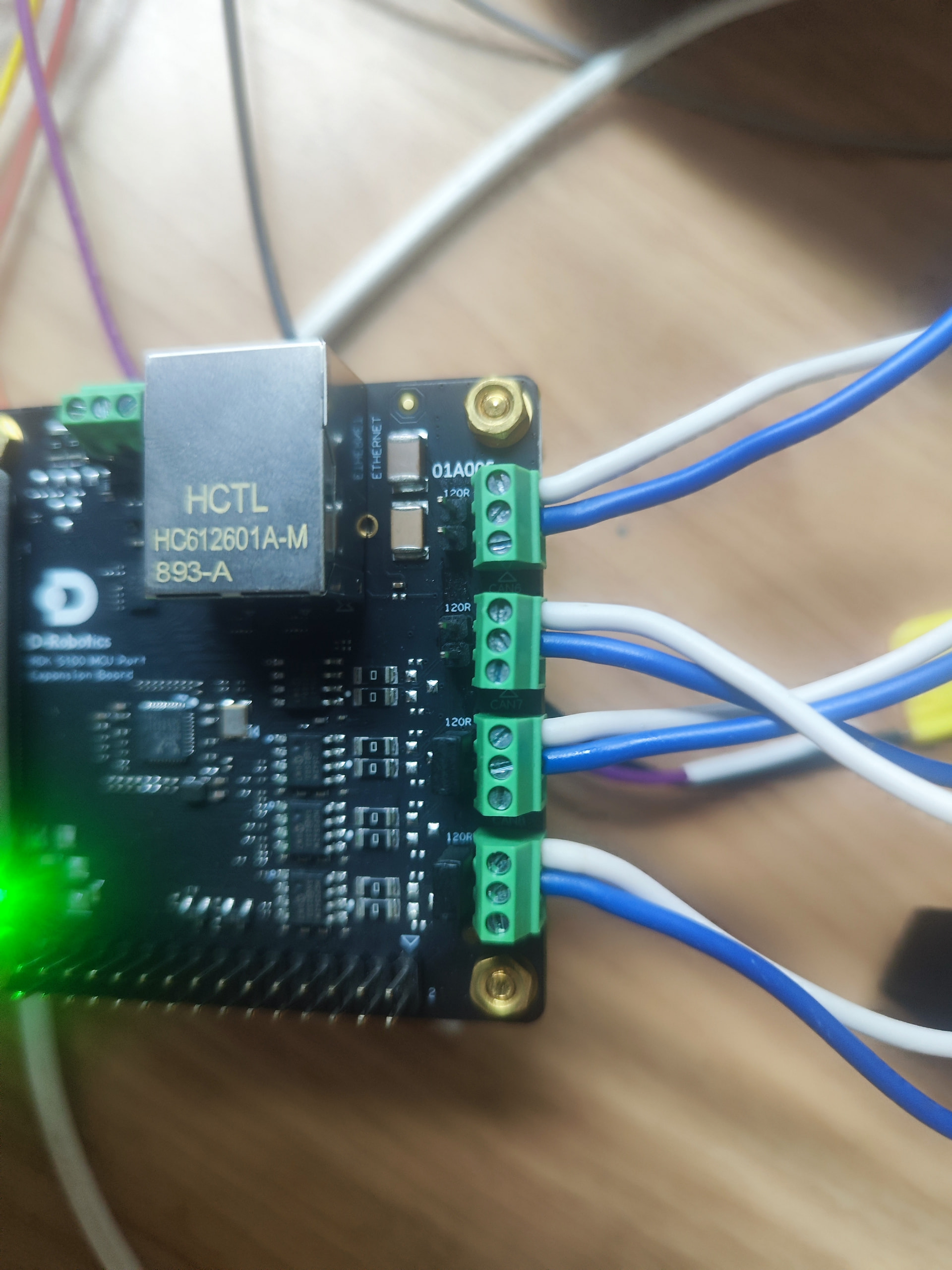
我使用RDKS100+MCU扩展板,测试/app的can通讯,按照文档要求can8和can9对接,也插入跳帽,但是发现能发消息,但是接收不到消息,请帮忙看看,紧急
日志是:
日志.txt (7.5 KB)
接线图:
我使用RDKS100+MCU扩展板,测试/app的can通讯,按照文档要求can8和can9对接,也插入跳帽,但是发现能发消息,但是接收不到消息,请帮忙看看,紧急
日志是:
日志.txt (7.5 KB)
接线图:
根据你的问题描述和日志,CAN8/CAN9 自收发自测失败的核心原因是:配置文件未正确映射硬件通道。
CAN 通讯需要正确配置 ipcf_channel.json 文件:
cat /app/Can/can_multi_ch/config/ipcf_channel.json
CAN8 发送、CAN9 接收的正确配置应如下:
{
  "enable": true,
  "channels": [
    {
      "name": "bypass",
      "hw_chan": 9,
      "sw_chan": 0,
      "baudrate": 500000,
      "role": "receiver"
    },
    {
      "name": "bypass",
      "hw_chan": 8,
      "sw_chan": 0,
      "baudrate": 500000,
      "role": "transmitter"
    }
  ]
}
从你的接线图看,需要确认:
# 终端1:启动接收(先启动)
sudo ./canhal_get bypass

# 终端2:启动发送
sudo ./canhal_send bypass 8
从你上传的日志看,关键错误是:
[CANHAL][ERROR][ipcf_dev.cpp:136]:HorizonHal_IPCF_Recv of id:0 failed, ret is -11
错误码 -11 表示通道未正确初始化或配置不匹配
sudo 运行建议先检查配置文件内容,然后发出来,我可以帮你确认配置是否正确。
can.zip (16.6 KB)
这是现在的程序和配置,请帮忙看看呢,我现在只使用get和send
看了你上传的配置文件包,我来帮你分析 CAN8/CAN9 收发问题。
从你描述的"能发不能收" + 错误码 -11,90% 是配置文件映射问题。
请运行以下命令并贴出输出:
cat /app/Can/can_multi_ch/config/ipcf_channel.json
ipcf_channel.json 应该包含两个通道配置:
{
  "enable": true,
  "channels": [
    {
      "name": "bypass",
      "hw_chan": 9,
      "sw_chan": 0,
      "baudrate": 500000,
      "role": "receiver"
    },
    {
      "name": "bypass",
      "hw_chan": 8,
      "sw_chan": 0,
      "baudrate": 500000,
      "role": "transmitter"
    }
  ]
}
关键检查点:

hw_chan: 9 对应 role: receiver hw_chan: 8 对应 role: transmitter 两个通道的 sw_chan 必须相同(都是 0) name 必须一致(都是 “bypass”) 波特率必须一致从你的接线图,请确认:
| 信号 | CAN8 端子 | CAN9 端子 |
|---|---|---|
| TX | 蓝线 | → 白线 (RX) |
| RX | 白线 | ← 蓝线 (TX) |
| GND | 黑线 | ↔ 黑线 |
跳线帽位置: MCU 扩展板上 CAN 回路选择跳线必须插在 CAN8-CAN9 位置(不是 CAN5-CAN6)
# 终端 1:先启动接收
cd /app/Can/can_get
sudo ./canhal_get bypass

# 等待 3 秒后,终端 2:启动发送
cd /app/Can/can_send
sudo ./canhal_send bypass 8
# 查看 CAN 通道状态
ip link show | grep can

# 查看系统日志
dmesg | grep -i can

# 检查配置文件权限
ls -la /app/Can/can_multi_ch/config/ipcf_channel.json
| 现象 | 可能原因 | 解决方案 |
|---|---|---|
| 错误码 -11 | 通道未初始化 | 检查 ipcf_channel.json 中 hw_chan 和 role 映射 |
| 错误码 -14 | 发送失败 | 检查波特率是否匹配 |
| 能发不能收 | 接收通道配置错误 | 确认 hw_chan: 9 配置为 receiver |
| candump 无设备 | MCU 固件未加载 | 重启板子或重新烧录 MCU 固件 |
请贴出你的 ipcf_channel.json 完整内容,我可以直接帮你指出配置问题。
同时参考这个成功案例:S100 MCU CAN 通讯打通
我使用https://archive.d-robotics.cc/downloads/os_images/rdk_s100/的V4.0.5现有的S100_MCU_DEBUG.elf
来启动的MCU0和MCU1,但是发现有问题,sunrise@ubuntu:/proc$ cat remoteproc_mcu0
[00.042397 0]MCU FreeRtos Lite Init Success!
[00.044674 0]Mcu Pmic Otp Version is:0x3
[00.070530 0]DumpPmic 0x0:
[00.071692 0]Site: 0x0, RegAddr:0x60, RegData:0x4
[00.072406 0]DumpPmic 0x0
[00.076112 0]PvtChipId: 5, CPU: 770
[00.076516 0]PvtChipId: 5, BPU: 845
[00.077360 0][MCU0] Welcome to D-Robotics MCU lite!
[00.077480 0]Instance 5 open success
[00.258857 0]Crc is open for DramPmic
[00.258993 0]Check Dram Pmic id OK
[00.264940 0]DumpPmic 0x2:
[00.265305 0]DumpPmic 0x2
[00.265887 0]Crc is open for MainPwrMonitor
[00.266000 0]pmic init ok
[00.299808 0]A:0x2b047000 0x8a 0x7e
[00.299819 0]C:0x2b047004 0x762762 0xec4ec4
[00.699558 0]main_domain_init done
[00.699947 0]McuOs execution Bl_FlashBoot
[00.699956 0]SA 0x700 DA 0xc9a64d4 L 512
[00.699994 0]SA 0xb00000 DA 0xc9a6ad4 L 192
[00.700028 0]SA 0xb000c0 DA 0xc9a66d4 L 1024
[00.700083 0]Cmd 0x4
[00.701543 0]Hash 0xc9a64a0 Length 0x20 Ret 0
[00.701560 0]SA 0xb004c0 DA 0x8000000 L 520192
[00.718149 0]SA 0xb000c0 DA 0xc9a66d4 L 1024
[00.718203 0]Cmd 0xc
[00.724456 0]Hash 0xc9a64a0 Length 0x20 Ret 0
[00.724473 0]A_v 0x0 I_v 0x0
[00.724533 0]McuOs Boot success!
[00.724918 0]Acore Wdt Begin
[01.224322 0]DDRC init Success
[01.249332 0]power int
[01.249590 0]PwrIf_Init
[01.250973 0]P:cpu
[01.251008 0]P:cmn
[01.251043 0]P:mediatbot
[01.251053 0]P:mediatop
[01.251124 0]P:mcu
[01.251577 0]P:ddr0
[01.251882 0]P:ddr1
[01.252195 0]P:ddr2
[01.253152 0]P:peri
[01.253993 0]P:hsi
[01.254399 0]P:video
[01.255312 0]P:camera
[01.256264 0]P:bpu
[01.256481 0]P:vdsp
[01.256893 0]P:gpu
[01.258039 0]power int ok
[01.258052 0]MCU Software Type is: GccReleaseLite
[01.258608 0]MCU Board Type is: SIP_V2.0
[01.259068 0]MCU Build time is: Feb 11 2026 15:42:54
[01.259714 0]main domain started!
[04.575040 0]s_p_d:2 0x612 1
[04.577038 0]s_p_d:3 0x613 1
[04.579039 0]s_p_d:4 0x614 1
[04.581041 0]s_p_d:5 0x621 1
[04.583041 0]s_p_d:6 0x622 1
[04.915166 0]Instance 8 Remote Core ready
[06.236826 0]c 0x0 f 0x0 o 0x0 l 0x700
[06.236870 0]C state 0
[06.267887 0]dev:20 0x2802 mod:1
[06.335924 0]perf:0x0 to 1000000
[07.937681 0]c 0x2 f 0x0 o 0x1980000 l 0x8e4
[07.937694 0]c type: 0x5
[07.937749 0]C state 0
[07.962696 0]c 0x3 f 0x0 o 0x600000 l 0x800
[07.996191 0]C state 0
[08.020723 0]c 0x3 f 0x0 o 0x600800 l 0x2000
[08.079883 0]C state 0
[01811.084931 0]Ipc_Acore_Boot_Cluster done, PowerType is power_on
[01862.535671 0]Ipc_Acore_Boot_Cluster fail, RetVal 1
sunrise@ubuntu:/proc$ cat remoteproc_mcu1
903549.904304 0][MCU1] Enter Abort Handler!!!
[08549.904310 0]Abort Counter: 30170674
!!!549.904316 0]DFAR reg/faulting address of synchronous Data Abort exception: 0x23400298
[08549.904326 0]DFSR reg/Data Fault Status of the abort: 0x1210
[08549.904333 0]fault status: Synchronous external abort.
[08549.904340 0]the PC cause the fault: 0xcab6547
[08549.904347 0]the cpsr when fault occur: 0x600001bb
[08549.904354 0]Main addr error: 0x23400298
[08549.904361 0]!!!
[08549.904367 0]$$$$$$$$$$$$$$$$$$$$$$$$$$$$$$$$$
[08549.904373 0]!!!
[08549.904380 0]$$$$$$$$$$$$$$$$$$$$$$$$$$$$$$$$$
[08549.904386 0]!!!
[08549.904393 0]$$$$$$$$$$$$$$$$$$$$$$$$$$$$$$$$$
[08549.904399 0]!!!
[08549.904406 0]$$$$$$$$$$$$$$$$$$$$$$$$$$$$$$$$$
[08549.904412 0]!!!
[08549.904419 0]$$$$$$$$$$$$$$$$$$$$$$$$$$$$$$$$$
[08549.904425 0]!!!
[08549.904432 0]$$$$$$$$$$$$$$$$$$$$$$$$$$$$$$$$$
[08549.904438 0]!!!
[08549.904445 0]$$$$$$$$$$$$$$$$$$$$$$$$$$$$$$$$$
[08549.904451 0]!!!
[08549.904458 0]$$$$$$$$$$$$$$$$$$$$$$$$$$$$$$$$$
[08549.904464 0]!!!
[08549.904471 0]$$$$$$$$$$$$$$$$$$$$$$$$$$$$$$$$$
[08549.904477 0]!!!
[08549.904483 0]$$$$$$$$$$$$$$$$$$$$$$$$$$$$$$$$$
[08549.904490 0][MCU1] Enter Abort Handler!!!
[08549.904496 0]Abort Counter: 30170675
[08549.904502 0]DFAR reg/faulting address of synchronous Data Abort exception: 0x23400298
[08549.904512 0]DFSR reg/Data Fault Status of the abort: 0x1210
[08549.904520 0]fault status: Synchronous external abort.
[08549.904527 0]the PC cause the fault: 0xcab6547
[08549.904534 0]the cpsr when fault occur: 0x600001bb
[08549.904541 0]Main addr error: 0x23400298
[08549.904547 0]!!!
[08549.904554 0]$$$$$$$$$$$$$$$$$$$$$$$$$$$$$$$$$
[08549.904560 0]!!!
[08549.904567 0]$$$$$$$$$$$$$$$$$$$$$$$$$$$$$$$$$
[08549.904573 0]!!!
[08549.904579 0]$$$$$$$$$$$$$$$$$$$$$$$$$$$$$$$$$
[08549.904586 0]!!!
[08549.904592 0]$$$$$$$$$$$$$$$$$$$$$$$$$$$$$$$$$
[08549.904599 0]!!!
[08549.904605 0]$$$$$$$$$$$$$$$$$$$$$$$$$$$$$$$$$
[08549.904612 0]!!!
[08549.904618 0]$$$$$$$$$$$$$$$$$$$$$$$$$$$$$$$$$
[08549.904625 0]!!!
[08549.904631 0]$$$$$$$$$$$$$$$$$$$$$$$$$$$$$$$$$
[08549.904638 0]!!!
[08549.904644 0]$$$$$$$$$$$$$$$$$$$$$$$$$$$$$$$$$
[08549.904651 0]!!!
[08549.904657 0]$$$$$$$$$$$$$$$$$$$$$$$$$$$$$$$$$
[08549.904664 0]!!!
[08549.904670 0]$$$$$$$$$$$$$$$$$$$$$$$$$$$$$$$$$
[08549.904676 0][MCU1] Enter Abort Handler!!!
[08549.904683 0]Abort Counter: 30170676
[08549.904689 0]DFAR reg/faulting address of synchronous Data Abort exception: 0x23400298
[08549.904699 0]DFSR reg/Data Fault Status of the abort: 0x1210
[08549.904706 0]fault status: Synchronous external abort.
[08549.904713 0]the PC cause the fault: 0xcab6547
[08549.904720 0]the cpsr when fault occur: 0x600001bb
[08549.904727 0]Main addr error: 0x23400298
[08549.904734 0]!!!
[08549.904740 0]$$$$$$$$$$$$$$$$$$$$$$$$$$$$$$$$$
[08549.904747 0]!!!
[08549.904753 0]$$$$$$$$$$$$$$$$$$$$$$$$$$$$$$$$$
[08549.904759 0]!!!
[08549.904766 0]$$$$$$$$$$$$$$$$$$$$$$$$$$$$$$$$$
[08549.904772 0]!!!
[08549.904779 0]$$$$$$$$$$$$$$$$$$$$$$$$$$$$$$$$$
[08549.904785 0]!!!
[08549.904792 0]$$$$$$$$$$$$$$$$$$$$$$$$$$$$$$$$$
[08549.904798 0]!!!
[08549.904805 0]$$$$$$$$$$$$$$$$$$$$$$$$$$$$$$$$$
[08549.904811 0]!!!
[08549.904818 0]$$$$$$$$$$$$$$$$$$$$$$$$$$$$$$$$$
[08549.904824 0]!!!
[08549.904831 0]$$$$$$$$$$$$$$$$$$$$$$$$$$$$$$$$$
[08549.904837 0]!!!
[08549.904843 0]$$$$$$$$$$$$$$$$$$$$$$$$$$$$$$$$$
[08549.904850 0]!!!
[08549.904856 0]$$$$$$$$$$$$$$$$$$$$$$$$$$$$$$$$$
[08549.904863 0][MCU1] Enter Abort Handler!!!
[08549.904869 0]Abort Counter: 30170677
[08549.904875 0]DFAR reg/faulting address of synchronous Data Abort exception: 0x23400298
[08549.904885 0]DFSR reg/Data Fault Status of the abort: 0x1210
[08549.904893 0]fault status: Synchronous external abort.
[08549.904900 0]the PC cause the fault: 0xcab6547
[08549.904906 0]the cpsr when fault occur: 0x600001bb
[08549.904913 0]Main addr error: 0x23400298
[08549.904920 0]!!!
[08549.904926 0]$$$$$$$$$$$$$$$$$$$$$$$$$$$$$$$$$
[08549.904933 0]!!!
[08549.904939 0]$$$$$$$$$$$$$$$$$$$$$$$$$$$$$$$$$
[08549.904946 0]!!!
[08549.904952 0]$$$$$$$$$$$$$$$$$$$$$$$$$$$$$$$$$
[08549.904959 0]!!!
[08549.904965 0]$$$$$$$$$$$$$$$$$$$$$$$$$$$$$$$$$
[08549.904972 0]!!!
[08549.904978 0]$$$$$$$$$$$$$$$$$$$$$$$$$$$$$$$$$
[08549.904985 0]!!!
[08549.904991 0]$$$$$$$$$$$$$$$$$$$$$$$$$$$$$$$$$
[08549.904998 0]!!!
[08549.905004 0]$$$$$$$$$$$$$$$$$$$$$$$$$$$$$$$$$
[08549.905010 0]!!!
[08549.905017 0]$$$$$$$$$$$$$$$$$$$$$$$$$$$$$$$$$
[08549.905023 0]!!!
[08549.905030 0]$$$$$$$$$$$$$$$$$$$$$$$$$$$$$$$$$
[08549.905036 0]!!!
[08549.905043 0]$$$$$$$$$$$$$$$$$$$$$$$$$$$$$$$$$
[08549.905049 0][MCU1] Enter Abort Handler!!!
[08549.905056 0]Abort Counter: 30170678
[08549.905062 0]DFAR reg/faulting address of synchronous Data Abort exception: 0x23400298
[08549.905071 0]DFSR reg/Data Fault Status of the abort: 0x1210
是否一定要自己编译MCU程序呢?
是的,你需要自己编译 MCU 固件。你使用的 S100_MCU_DEBUG.elf 存在明显问题:
| MCU 核心 | 状态 | 问题 |
|---|---|---|
| MCU0 | 正常启动 |
MCU FreeRtos Lite Init Success |
| MCU1 |  持续崩溃 持续崩溃 |
Synchronous external abort @ 0x23400298 |
错误码解读:
DFSR: 0x1210 = Synchronous external abort(同步外部中止)PC: 0xcab6547 = 崩溃时的程序计数器DEBUG 版本不稳定,先试试 RELEASE 版本:
# 1. 下载 RELEASE 固件
wget https://archive.d-robotics.cc/downloads/os_images/rdk_s100/S100_MCU_RELEASE.elf

# 2. 烧录到 MCU1
sudo cp S100_MCU_RELEASE.elf /lib/firmware/
sudo echo "S100_MCU_RELEASE.elf" > /sys/class/remoteproc/remoteproc_mcu1/firmware

# 3. 重启 MCU1
sudo echo "start" > /sys/class/remoteproc/remoteproc_mcu1/state

# 4. 验证状态
cat /proc/remoteproc_mcu1
如果 RELEASE 版本也不行,需要自己编译:
# 1. 获取 MCU SDK
git clone https://github.com/D-Robotics/mcu-community.git
cd mcu-community

# 2. 配置编译环境
python3 build_freertos.py lite matrix B s100 mcu1 gcc release

# 3. 编译
python3 build_freertos.py lite matrix B s100 mcu1 gcc release --build

# 4. 生成的固件位置
# output/s100_mcu1_release/S100_MCU.elf
关键配置: 确保 CAN 驱动在编译配置中启用:
# 检查 Config/McalCdd/gen_s100_sip_B_mcu1/Can/src/Can_PBcfg.c
# 确认 CAN8/CAN9 通道已配置
# 1. 检查当前 MCU 状态
cat /proc/remoteproc_mcu0
cat /proc/remoteproc_mcu1

# 2. 查看 CAN 通道是否注册
ip link show | grep can

# 3. 检查系统日志中的 CAN 错误
dmesg | grep -i "can\|mcu"

# 4. 重启 MCU 子系统
sudo echo "stop" > /sys/class/remoteproc/remoteproc_mcu1/state
sudo echo "start" > /sys/class/remoteproc/remoteproc_mcu1/state
你的 CAN 收发问题 90% 是 MCU1 崩溃导致的,先解决固件问题,再调配置文件。
需要我帮你找具体的编译配置示例吗?
可以具体提供下手册链接和操作步骤来协助排查问题