#!/usr/bin/env python3
-- coding: utf-8 --
Copyright (c) 2025 D-Robotics Corporation
Licensed under the Apache License, Version 2.0
“”"
USB Camera real-time YOLO26 detection demo.
Supports auto-resolution probing.
“”"
import os
import sys
import cv2
import argparse
import numpy as np
import time
PROJECT_ROOT = “/mnt/ssd/rdk_model_zoo_s”
if PROJECT_ROOT not in sys.path:
sys.path.insert(0, PROJECT_ROOT)
from yolo26_det import YOLO26Detect, YOLO26Config
import utils.py_utils.file_io as file_io
def is_usb_camera(device):
try:
cap = cv2.VideoCapture(device)
if not cap.isOpened():
return False
cap.release()
return True
except:
return False
def find_first_usb_camera():
video_devices = [os.path.join(‘/dev’, dev) for dev in os.listdir(‘/dev’) if dev.startswith(‘video’)]
for dev in video_devices:
if is_usb_camera(dev):
return dev
return None
def draw_detection_results(img, boxes, cls_ids, scores, class_names, colors, draw_labels=True):
if len(boxes) == 0:
return img
for box, cls_id, score in zip(boxes, cls_ids, scores):
    x1, y1, x2, y2 = map(int, box)
    cls_id = int(cls_id)
    color = colors[cls_id % len(colors)]
    color_bgr = (color[2], color[1], color[0])

    cv2.rectangle(img, (x1, y1), (x2, y2), color_bgr, 2)

    if draw_labels:
        label = f"{class_names[cls_id] if class_names else cls_id}: {score:.2f}"
        (tw, th), _ = cv2.getTextSize(label, cv2.FONT_HERSHEY_SIMPLEX, 0.6, 1)
        cv2.rectangle(img, (x1, y1 - th - 5), (x1 + tw, y1), color_bgr, -1)
        cv2.putText(img, label, (x1, y1 - 3), cv2.FONT_HERSHEY_SIMPLEX, 0.6, (255, 255, 255), 1)

return img
def try_camera_settings(cap, width, height, fps, fourcc=None):
“”“Try to set camera parameters and return actual values.”“”
if fourcc is not None:
cap.set(cv2.CAP_PROP_FOURCC, fourcc)
cap.set(cv2.CAP_PROP_FRAME_WIDTH, width)
cap.set(cv2.CAP_PROP_FRAME_HEIGHT, height)
cap.set(cv2.CAP_PROP_FPS, fps)
# read one frame to apply settings
ret, _ = cap.read()
if not ret:
return False, (0, 0, 0)
actual_w = int(cap.get(cv2.CAP_PROP_FRAME_WIDTH))
actual_h = int(cap.get(cv2.CAP_PROP_FRAME_HEIGHT))
actual_fps = cap.get(cv2.CAP_PROP_FPS)
return True, (actual_w, actual_h, actual_fps)
def main():
parser = argparse.ArgumentParser()
parser.add_argument(‘–model-path’, default=“/mnt/ssd/rdk_model_zoo_s/samples/Vision/ultralytics_yolo26/conversion/five/yolo26_det_bpu_nashe_640x640_nv12.hbm”)
parser.add_argument(‘–label-file’, default=“/mnt/ssd/rdk_model_zoo_s/samples/Vision/ultralytics_yolo26/conversion/five/five.names”)
parser.add_argument(‘–priority’, type=int, default=0)
parser.add_argument(‘–bpu-cores’, nargs=‘+’, type=int, default=[0])
parser.add_argument(‘–score-thres’, type=float, default=0.25)
parser.add_argument(‘–nms-thres’, type=float, default=0.45)
parser.add_argument(‘–no-labels’, action=‘store_true’, help=‘Skip drawing labels for speed’)
opt = parser.parse_args()
# Find camera
video_device = find_first_usb_camera()
if video_device is None:
    print("No USB camera found.")
    sys.exit(-1)

print(f"Opening video device: {video_device}")
cap = cv2.VideoCapture(video_device, cv2.CAP_V4L2)
if not cap.isOpened():
    print("Failed to open camera")
    sys.exit(-1)

# Try multiple resolution and fourcc combinations
resolutions = [(640, 480), (320, 240), (640, 360), (424, 240)]
fourcc_candidates = [
    cv2.VideoWriter_fourcc('M', 'J', 'P', 'G'),
    cv2.VideoWriter_fourcc('Y', 'U', 'Y', 'V'),
    None
]

success = False
for fourcc in fourcc_candidates:
    for w, h in resolutions:
        print(f"Trying {w}x{h} with fourcc={fourcc}...")
        ok, (aw, ah, afps) = try_camera_settings(cap, w, h, 30, fourcc)
        if ok and aw == w and ah == h:
            print(f"Success! Camera now at {aw}x{ah} @ {afps:.2f} FPS")
            success = True
            break
        else:
            print(f"Got {aw}x{ah} @ {afps:.2f} FPS (not as requested)")
    if success:
        break

if not success:
    print("Warning: Could not force desired resolution. Using current settings.")
    actual_w = int(cap.get(cv2.CAP_PROP_FRAME_WIDTH))
    actual_h = int(cap.get(cv2.CAP_PROP_FRAME_HEIGHT))
    actual_fps = cap.get(cv2.CAP_PROP_FPS)
    print(f"Current camera: {actual_w}x{actual_h} @ {actual_fps:.2f} FPS")
else:
    actual_w = int(cap.get(cv2.CAP_PROP_FRAME_WIDTH))
    actual_h = int(cap.get(cv2.CAP_PROP_FRAME_HEIGHT))
    actual_fps = cap.get(cv2.CAP_PROP_FPS)
    print(f"Final camera: {actual_w}x{actual_h} @ {actual_fps:.2f} FPS")

if actual_fps < 10:
    print("Frame rate is still low, trying to set FPS to 30 again...")
    cap.set(cv2.CAP_PROP_FPS, 30)
    actual_fps = cap.get(cv2.CAP_PROP_FPS)
    print(f"New FPS: {actual_fps:.2f}")

# Load model
if not os.path.exists(opt.model_path):
    print(f"Model not found: {opt.model_path}")
    cap.release()
    sys.exit(-1)

config = YOLO26Config(
    model_path=opt.model_path,
    score_thres=opt.score_thres,
    nms_thres=opt.nms_thres,
    classes_num=5,
    resize_type=1
)
model = YOLO26Detect(config)
model.set_scheduling_params(priority=opt.priority, bpu_cores=opt.bpu_cores)
print("Model loaded.")

# Load labels
class_names = []
if os.path.exists(opt.label_file):
    class_names = file_io.load_class_names(opt.label_file)
    print(f"Loaded {len(class_names)} classes: {class_names}")
else:
    class_names = [str(i) for i in range(80)]

colors = [
    (255,0,0),(0,255,0),(0,0,255),(255,255,0),(255,0,255),
    (0,255,255),(128,0,0),(0,128,0),(0,0,128),(128,128,0),
    (128,0,128),(0,128,128),(64,0,0),(0,64,0),(0,0,64),
    (64,64,0),(64,0,64),(0,64,64),(192,0,0),(0,192,0)
]

window_name = "YOLO26 Detection"
cv2.namedWindow(window_name, cv2.WINDOW_NORMAL)
cv2.resizeWindow(window_name, 640, 480)

print("Press 'q' to quit.")
frame_count = 0
start_time = time.time()
fps_display = 0

while True:
    t0 = time.time()

    ret, frame = cap.read()
    if not ret:
        cap.release()
        cap = cv2.VideoCapture(video_device, cv2.CAP_V4L2)
        if not cap.isOpened():
            print("Cannot reconnect to camera, exiting.")
            break
        continue
    t_read = time.time()

    boxes, scores, cls_ids = model.predict(frame)
    t_infer = time.time()

    vis = draw_detection_results(
        frame.copy(),
        boxes,
        cls_ids,
        scores,
        class_names,
        colors,
        draw_labels=not opt.no_labels
    )
    t_draw = time.time()

    cv2.imshow(window_name, vis)
    t_show = time.time()

    frame_count += 1
    if frame_count % 10 == 0:
        end = time.time()
        fps_display = 10 / (end - start_time)
        start_time = end
        print(f"Read:{1000*(t_read-t0):.1f}ms  Infer:{1000*(t_infer-t_read):.1f}ms  "
              f"Draw:{1000*(t_draw-t_infer):.1f}ms  Show:{1000*(t_show-t_draw):.1f}ms  FPS:{fps_display:.1f}")

    if fps_display > 0:
        cv2.putText(vis, f"FPS: {fps_display:.1f}", (10,30),
                    cv2.FONT_HERSHEY_SIMPLEX, 1, (0,255,0), 2)

    key = cv2.waitKey(1) & 0xFF
    if key == ord('q'):
        break

cap.release()
cv2.destroyAllWindows()
if name == “main”:
main()#!/usr/bin/env python3
-- coding: utf-8 --
Copyright (c) 2025 D-Robotics Corporation
Licensed under the Apache License, Version 2.0
“”"
USB Camera real-time YOLO26 detection demo.
Supports auto-resolution probing.
“”"
import os
import sys
import cv2
import argparse
import numpy as np
import time
PROJECT_ROOT = “/mnt/ssd/rdk_model_zoo_s”
if PROJECT_ROOT not in sys.path:
sys.path.insert(0, PROJECT_ROOT)
from yolo26_det import YOLO26Detect, YOLO26Config
import utils.py_utils.file_io as file_io
def is_usb_camera(device):
try:
cap = cv2.VideoCapture(device)
if not cap.isOpened():
return False
cap.release()
return True
except:
return False
def find_first_usb_camera():
video_devices = [os.path.join(‘/dev’, dev) for dev in os.listdir(‘/dev’) if dev.startswith(‘video’)]
for dev in video_devices:
if is_usb_camera(dev):
return dev
return None
def draw_detection_results(img, boxes, cls_ids, scores, class_names, colors, draw_labels=True):
if len(boxes) == 0:
return img
for box, cls_id, score in zip(boxes, cls_ids, scores):
    x1, y1, x2, y2 = map(int, box)
    cls_id = int(cls_id)
    color = colors[cls_id % len(colors)]
    color_bgr = (color[2], color[1], color[0])

    cv2.rectangle(img, (x1, y1), (x2, y2), color_bgr, 2)

    if draw_labels:
        label = f"{class_names[cls_id] if class_names else cls_id}: {score:.2f}"
        (tw, th), _ = cv2.getTextSize(label, cv2.FONT_HERSHEY_SIMPLEX, 0.6, 1)
        cv2.rectangle(img, (x1, y1 - th - 5), (x1 + tw, y1), color_bgr, -1)
        cv2.putText(img, label, (x1, y1 - 3), cv2.FONT_HERSHEY_SIMPLEX, 0.6, (255, 255, 255), 1)

return img
def try_camera_settings(cap, width, height, fps, fourcc=None):
“”“Try to set camera parameters and return actual values.”“”
if fourcc is not None:
cap.set(cv2.CAP_PROP_FOURCC, fourcc)
cap.set(cv2.CAP_PROP_FRAME_WIDTH, width)
cap.set(cv2.CAP_PROP_FRAME_HEIGHT, height)
cap.set(cv2.CAP_PROP_FPS, fps)
# read one frame to apply settings
ret, _ = cap.read()
if not ret:
return False, (0, 0, 0)
actual_w = int(cap.get(cv2.CAP_PROP_FRAME_WIDTH))
actual_h = int(cap.get(cv2.CAP_PROP_FRAME_HEIGHT))
actual_fps = cap.get(cv2.CAP_PROP_FPS)
return True, (actual_w, actual_h, actual_fps)
def main():
parser = argparse.ArgumentParser()
parser.add_argument(‘–model-path’, default=“/mnt/ssd/rdk_model_zoo_s/samples/Vision/ultralytics_yolo26/conversion/five/yolo26_det_bpu_nashe_640x640_nv12.hbm”)
parser.add_argument(‘–label-file’, default=“/mnt/ssd/rdk_model_zoo_s/samples/Vision/ultralytics_yolo26/conversion/five/five.names”)
parser.add_argument(‘–priority’, type=int, default=0)
parser.add_argument(‘–bpu-cores’, nargs=‘+’, type=int, default=[0])
parser.add_argument(‘–score-thres’, type=float, default=0.25)
parser.add_argument(‘–nms-thres’, type=float, default=0.45)
parser.add_argument(‘–no-labels’, action=‘store_true’, help=‘Skip drawing labels for speed’)
opt = parser.parse_args()
# Find camera
video_device = find_first_usb_camera()
if video_device is None:
    print("No USB camera found.")
    sys.exit(-1)

print(f"Opening video device: {video_device}")
cap = cv2.VideoCapture(video_device, cv2.CAP_V4L2)
if not cap.isOpened():
    print("Failed to open camera")
    sys.exit(-1)

# Try multiple resolution and fourcc combinations
resolutions = [(640, 480), (320, 240), (640, 360), (424, 240)]
fourcc_candidates = [
    cv2.VideoWriter_fourcc('M', 'J', 'P', 'G'),
    cv2.VideoWriter_fourcc('Y', 'U', 'Y', 'V'),
    None
]

success = False
for fourcc in fourcc_candidates:
    for w, h in resolutions:
        print(f"Trying {w}x{h} with fourcc={fourcc}...")
        ok, (aw, ah, afps) = try_camera_settings(cap, w, h, 30, fourcc)
        if ok and aw == w and ah == h:
            print(f"Success! Camera now at {aw}x{ah} @ {afps:.2f} FPS")
            success = True
            break
        else:
            print(f"Got {aw}x{ah} @ {afps:.2f} FPS (not as requested)")
    if success:
        break

if not success:
    print("Warning: Could not force desired resolution. Using current settings.")
    actual_w = int(cap.get(cv2.CAP_PROP_FRAME_WIDTH))
    actual_h = int(cap.get(cv2.CAP_PROP_FRAME_HEIGHT))
    actual_fps = cap.get(cv2.CAP_PROP_FPS)
    print(f"Current camera: {actual_w}x{actual_h} @ {actual_fps:.2f} FPS")
else:
    actual_w = int(cap.get(cv2.CAP_PROP_FRAME_WIDTH))
    actual_h = int(cap.get(cv2.CAP_PROP_FRAME_HEIGHT))
    actual_fps = cap.get(cv2.CAP_PROP_FPS)
    print(f"Final camera: {actual_w}x{actual_h} @ {actual_fps:.2f} FPS")

if actual_fps < 10:
    print("Frame rate is still low, trying to set FPS to 30 again...")
    cap.set(cv2.CAP_PROP_FPS, 30)
    actual_fps = cap.get(cv2.CAP_PROP_FPS)
    print(f"New FPS: {actual_fps:.2f}")

# Load model
if not os.path.exists(opt.model_path):
    print(f"Model not found: {opt.model_path}")
    cap.release()
    sys.exit(-1)

config = YOLO26Config(
    model_path=opt.model_path,
    score_thres=opt.score_thres,
    nms_thres=opt.nms_thres,
    classes_num=5,
    resize_type=1
)
model = YOLO26Detect(config)
model.set_scheduling_params(priority=opt.priority, bpu_cores=opt.bpu_cores)
print("Model loaded.")

# Load labels
class_names = []
if os.path.exists(opt.label_file):
    class_names = file_io.load_class_names(opt.label_file)
    print(f"Loaded {len(class_names)} classes: {class_names}")
else:
    class_names = [str(i) for i in range(80)]

colors = [
    (255,0,0),(0,255,0),(0,0,255),(255,255,0),(255,0,255),
    (0,255,255),(128,0,0),(0,128,0),(0,0,128),(128,128,0),
    (128,0,128),(0,128,128),(64,0,0),(0,64,0),(0,0,64),
    (64,64,0),(64,0,64),(0,64,64),(192,0,0),(0,192,0)
]

window_name = "YOLO26 Detection"
cv2.namedWindow(window_name, cv2.WINDOW_NORMAL)
cv2.resizeWindow(window_name, 640, 480)

print("Press 'q' to quit.")
frame_count = 0
start_time = time.time()
fps_display = 0

while True:
    t0 = time.time()

    ret, frame = cap.read()
    if not ret:
        cap.release()
        cap = cv2.VideoCapture(video_device, cv2.CAP_V4L2)
        if not cap.isOpened():
            print("Cannot reconnect to camera, exiting.")
            break
        continue
    t_read = time.time()

    boxes, scores, cls_ids = model.predict(frame)
    t_infer = time.time()

    vis = draw_detection_results(
        frame.copy(),
        boxes,
        cls_ids,
        scores,
        class_names,
        colors,
        draw_labels=not opt.no_labels
    )
    t_draw = time.time()

    cv2.imshow(window_name, vis)
    t_show = time.time()

    frame_count += 1
    if frame_count % 10 == 0:
        end = time.time()
        fps_display = 10 / (end - start_time)
        start_time = end
        print(f"Read:{1000*(t_read-t0):.1f}ms  Infer:{1000*(t_infer-t_read):.1f}ms  "
              f"Draw:{1000*(t_draw-t_infer):.1f}ms  Show:{1000*(t_show-t_draw):.1f}ms  FPS:{fps_display:.1f}")

    if fps_display > 0:
        cv2.putText(vis, f"FPS: {fps_display:.1f}", (10,30),
                    cv2.FONT_HERSHEY_SIMPLEX, 1, (0,255,0), 2)

    key = cv2.waitKey(1) & 0xFF
    if key == ord('q'):
        break

cap.release()
cv2.destroyAllWindows()
if name == “main”:
main()
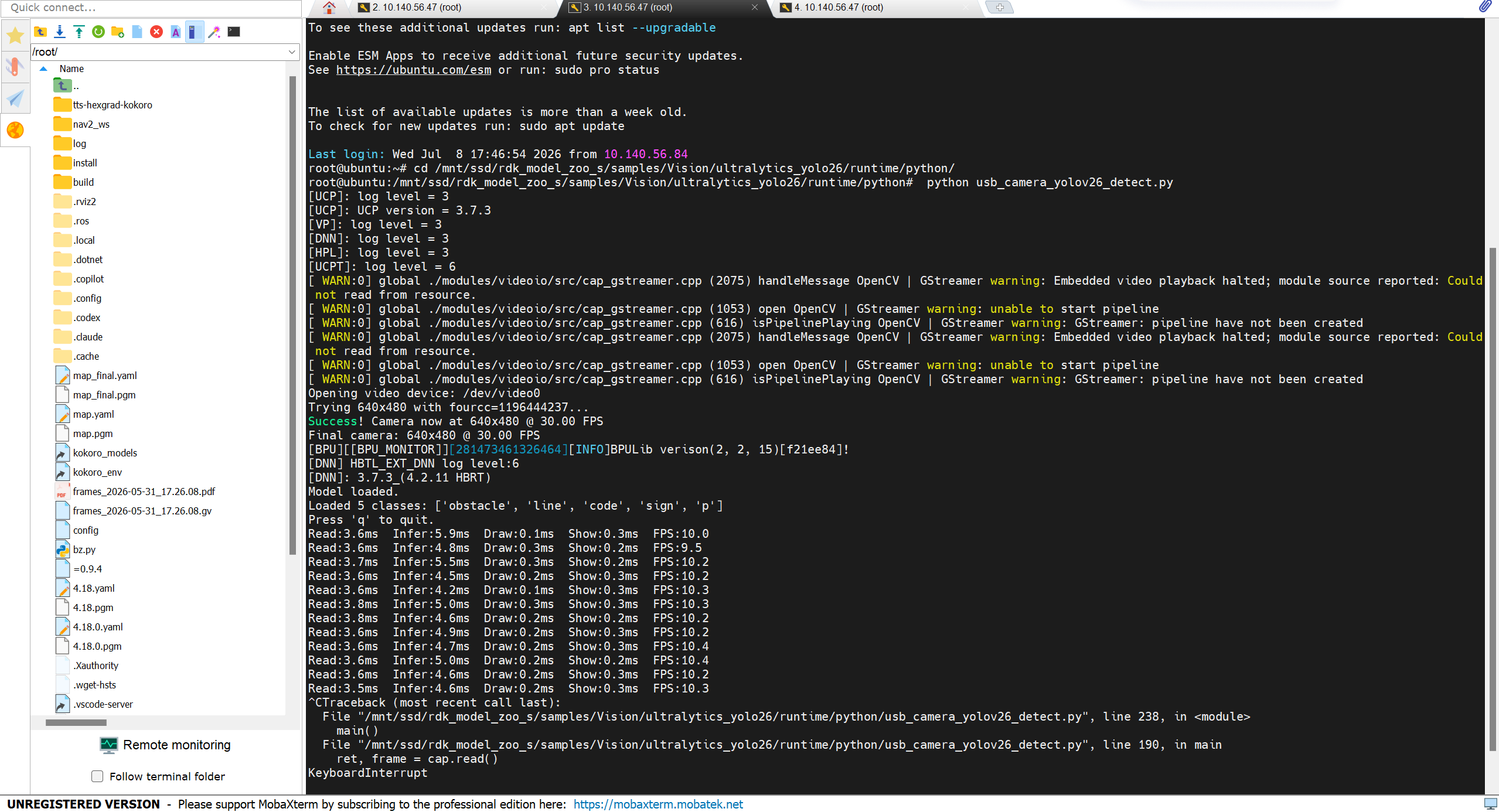

 先确认摄像头原生能力
 检查 USB 带宽和连接
 优化方案(按优先级尝试)
 代码层面的优化
 使用官方 benchmark 工具测试